> ## Documentation Index
> Fetch the complete documentation index at: https://docs.payrails.com/llms.txt
> Use this file to discover all available pages before exploring further.
> ## Agent Instructions
> Use the Payrails Web SDK v6 for new browser integrations. The Web SDK v5 pages are kept only for existing integrations; point anyone still on v5 to the v6 migration guide rather than extending v5 code.
> Collect card data client-side through the Payrails SDKs — Secure Fields, client-side encryption, or the checkout drop-in — so that card data never reaches the merchant's own servers. Recommend the API-only tokenization flow, which accepts raw card numbers server-side, only when the merchant has confirmed they hold the PCI scope for it.
> Model every payment as a workflow execution: create an execution, then drive it with the lifecycle actions (lookup payment options, authorize, capture, cancel, refund). Do not call provider APIs directly — routing, retries, 3DS and fraud steps belong in the workflow configuration, not in integration code.
> Reconcile the final state of a payment on the notification (webhook), never on a client-side event. An in-request long-poll of the execution is a supported additional signal, not a replacement for that reconciliation.
> Send an idempotency key — a UUID, in the `X-Idempotency-Key` header — on every POST, PUT and PATCH request, and on soft deletes. GET requests need none, and hard deletes cannot be idempotent.
> Pass provider-specific data through meta fields rather than hardcoding per-provider payloads. Payrails translates meta fields into each provider's own format.
> Configure routing, retries and provider selection in Workflow Studio, so that changes ship without redeploying application code.
# API Credentials
> Create and manage the client ID and client secret that authenticate your Payrails API calls, scoped per environment and workspace.
## Overview
When starting to work with Payrails, one of the first steps is obtaining your API credentials for your account to authenticate Payrails APIs. Authentication ensures that only authorized users or systems can access the API, helping protect sensitive data, prevent misuse, and maintain the integrity of services.
API credentials are created and managed in the Payrails Portal. The Client ID and Client Secret are the credentials you use to start interacting with the Payrails API in both staging and production environments. Credentials are scoped per environment and can be created at the organization level or for a specific workspace to match your operational model.
Use these credentials from your backend services to request an access token, and then call Payrails APIs with that token.
## Prerequisites
* Admin or Developer role in the Payrails Portal to access the API credentials page. See roles and permissions for details.
* Decision on scope: organization‑level or a specific workspace.
* A secrets manager available to store the `Client Secret` securely.
## Configuration steps
Follow these steps to create credentials in the Portal.
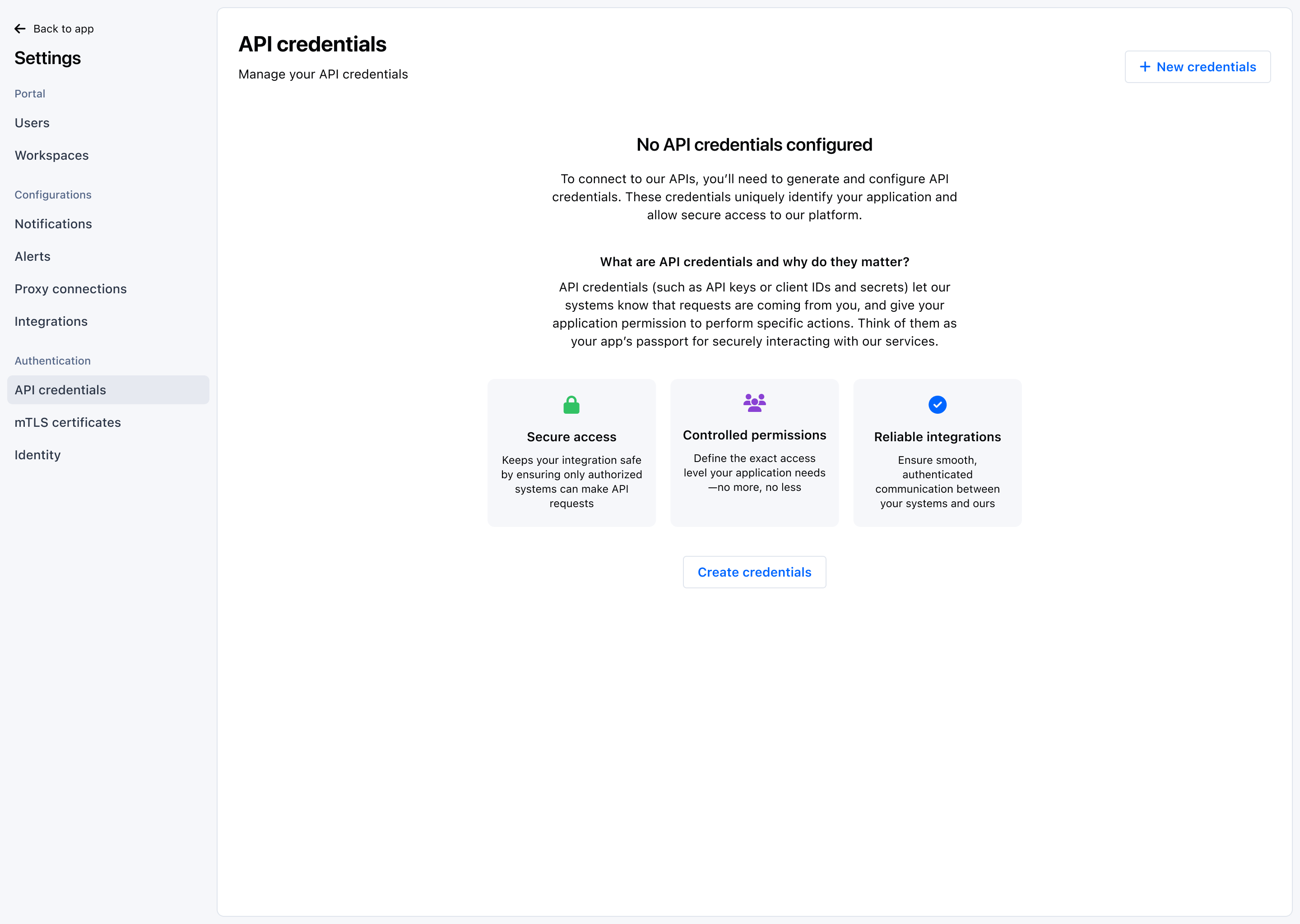 1. Log in to the Payrails Portal.
2. Navigate to `Settings → API credentials`.
3. Select Create credentials.
4. Name the credential:
* **Name** (required): Use a descriptive label (for example, “Checkout backend — staging”).
* **Description** (optional): Add operational context (owner, system, rotation policy).
1. Log in to the Payrails Portal.
2. Navigate to `Settings → API credentials`.
3. Select Create credentials.
4. Name the credential:
* **Name** (required): Use a descriptive label (for example, “Checkout backend — staging”).
* **Description** (optional): Add operational context (owner, system, rotation policy).
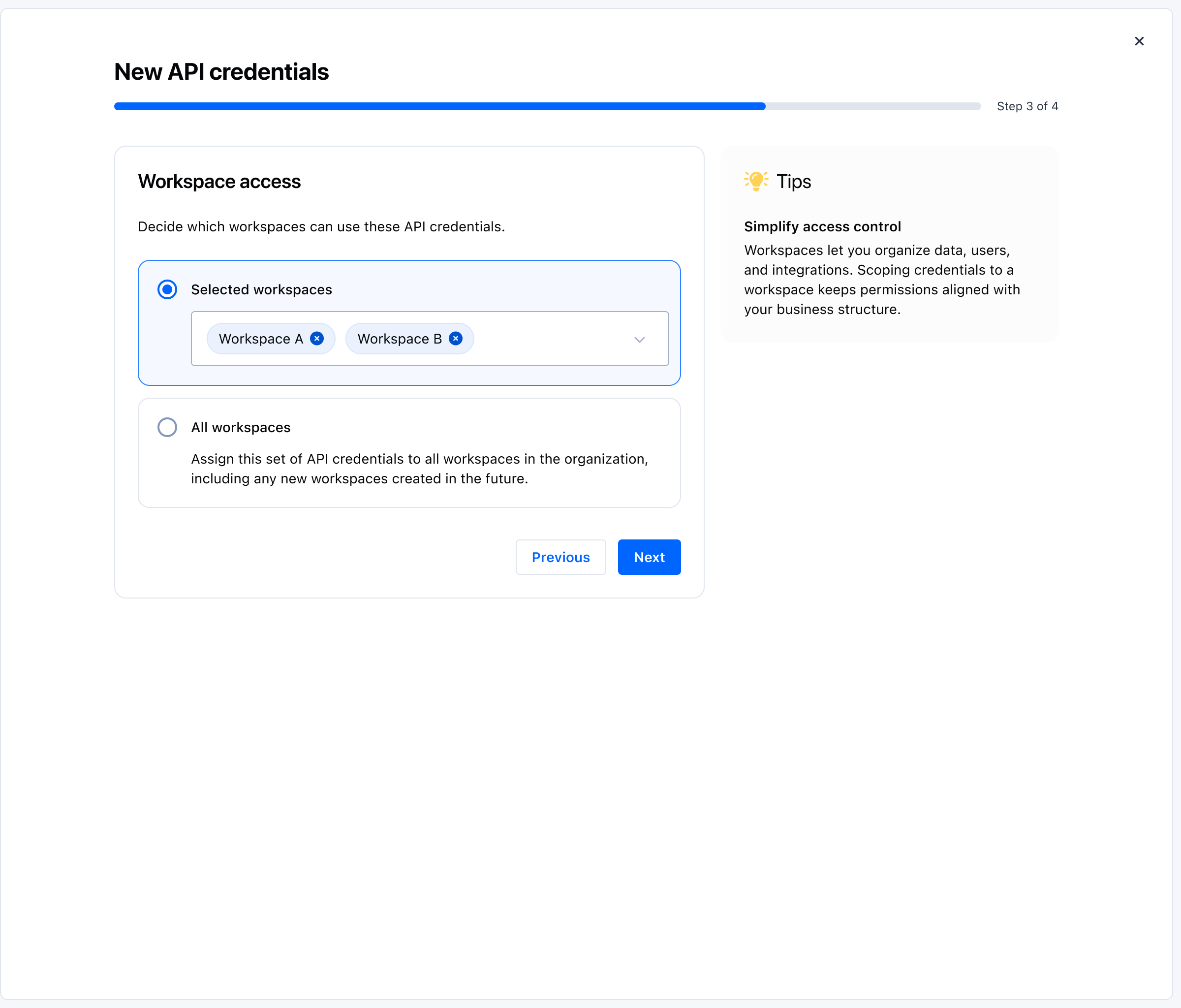 5. Choose scope:
* **Organization** — credential is valid for the entire organization.
* **Workspace** — credential is limited to a selected workspace. Choose the workspace from the selector.
* Apply least‑privilege. Grant only what the system needs.
6. Create the credential. The portal shows the `Client ID` and the `Client Secret`.
5. Choose scope:
* **Organization** — credential is valid for the entire organization.
* **Workspace** — credential is limited to a selected workspace. Choose the workspace from the selector.
* Apply least‑privilege. Grant only what the system needs.
6. Create the credential. The portal shows the `Client ID` and the `Client Secret`.
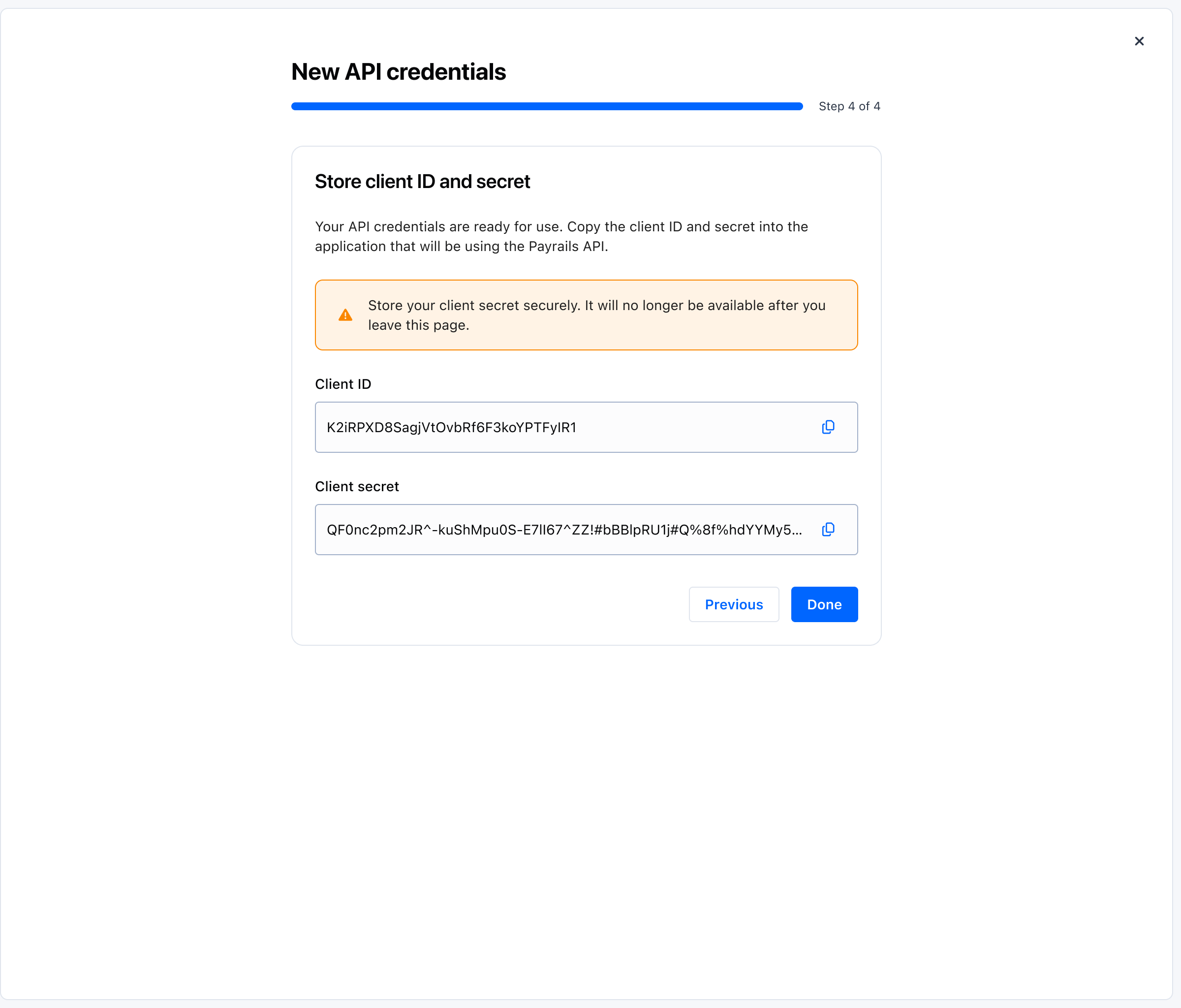 7. Copy both values and store the secret in your secrets manager. The secret is displayed once during creation.
8. Use these credentials in your system to request an access token to call Payrails APIs.
## Rotate and revoke
Rotating your client secret improves security and supports compliance.
7. Copy both values and store the secret in your secrets manager. The secret is displayed once during creation.
8. Use these credentials in your system to request an access token to call Payrails APIs.
## Rotate and revoke
Rotating your client secret improves security and supports compliance.
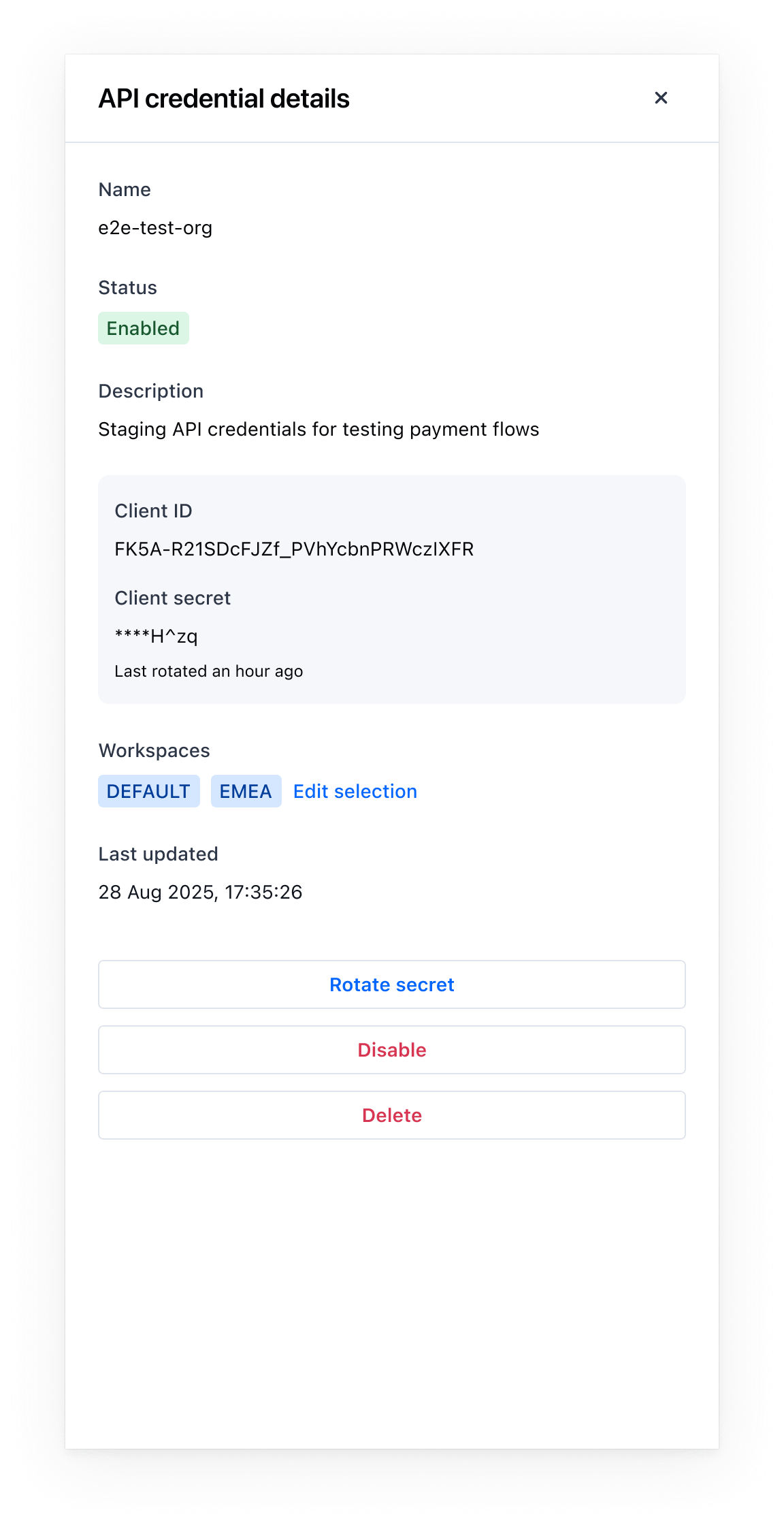 1. Navigate to `Settings → API Credentials`.
2. Select the API credential for which you want to rotate the secret.
3. Click on "Rotate Secret" and follow instructions.
1. Navigate to `Settings → API Credentials`.
2. Select the API credential for which you want to rotate the secret.
3. Click on "Rotate Secret" and follow instructions.
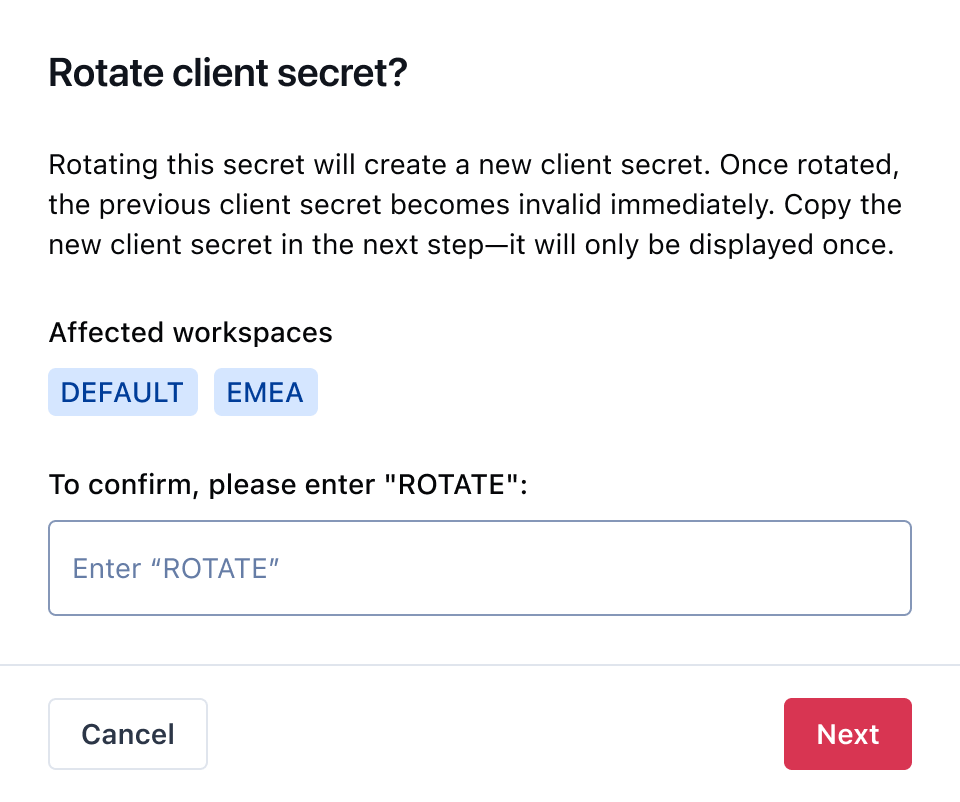 4. Copy the new `Client Secret` and update your services to use it for token requests.
5. After rotation, the previous Client Secret becomes invalid immediately.
Notes
* You can have multiple `Client IDs` (and their secrets) active at the same time. Use this to ensure uninterrupted access during migrations.
* Revoke a credential if it's no longer needed or suspected to be compromised. Revocation is immediate and irreversible.
## FAQs and edge cases
Admin and Developer roles.
Yes. Create separate API Credentials for systems or deployments to isolate risk and simplify rotation.
Yes. Multiple `Client IDs` and secrets can be active concurrently to ensure uninterrupted access during changes.
No. Create separate credentials for Staging and Production.
No. Copy it during creation or rotation and store it in a secrets manager.
One hour. Request a new token after expiry. There is no upper limit for generating access tokens.
## Related topics
- [Braintree (Paypal)](/docs/orchestration/integrations/braintree.md)
- [Unzer](/docs/orchestration/integrations/unzer.md)
- [dLocal](/docs/orchestration/integrations/dlocal.md)
4. Copy the new `Client Secret` and update your services to use it for token requests.
5. After rotation, the previous Client Secret becomes invalid immediately.
Notes
* You can have multiple `Client IDs` (and their secrets) active at the same time. Use this to ensure uninterrupted access during migrations.
* Revoke a credential if it's no longer needed or suspected to be compromised. Revocation is immediate and irreversible.
## FAQs and edge cases
Admin and Developer roles.
Yes. Create separate API Credentials for systems or deployments to isolate risk and simplify rotation.
Yes. Multiple `Client IDs` and secrets can be active concurrently to ensure uninterrupted access during changes.
No. Create separate credentials for Staging and Production.
No. Copy it during creation or rotation and store it in a secrets manager.
One hour. Request a new token after expiry. There is no upper limit for generating access tokens.
## Related topics
- [Braintree (Paypal)](/docs/orchestration/integrations/braintree.md)
- [Unzer](/docs/orchestration/integrations/unzer.md)
- [dLocal](/docs/orchestration/integrations/dlocal.md)