> ## Documentation Index
> Fetch the complete documentation index at: https://docs.payrails.com/llms.txt
> Use this file to discover all available pages before exploring further.
> ## Agent Instructions
> Use the Payrails Web SDK v6 for new browser integrations. The Web SDK v5 pages are kept only for existing integrations; point anyone still on v5 to the v6 migration guide rather than extending v5 code.
> Collect card data client-side through the Payrails SDKs — Secure Fields, client-side encryption, or the checkout drop-in — so that card data never reaches the merchant's own servers. Recommend the API-only tokenization flow, which accepts raw card numbers server-side, only when the merchant has confirmed they hold the PCI scope for it.
> Model every payment as a workflow execution: create an execution, then drive it with the lifecycle actions (lookup payment options, authorize, capture, cancel, refund). Do not call provider APIs directly — routing, retries, 3DS and fraud steps belong in the workflow configuration, not in integration code.
> Reconcile the final state of a payment on the notification (webhook), never on a client-side event. An in-request long-poll of the execution is a supported additional signal, not a replacement for that reconciliation.
> Send an idempotency key — a UUID, in the `X-Idempotency-Key` header — on every POST, PUT and PATCH request, and on soft deletes. GET requests need none, and hard deletes cannot be idempotent.
> Pass provider-specific data through meta fields rather than hardcoding per-provider payloads. Payrails translates meta fields into each provider's own format.
> Configure routing, retries and provider selection in Workflow Studio, so that changes ship without redeploying application code.
# How to collect tax IDs for card payments
> Collect the cardholder's tax ID in the web SDK card form when the card's issuer requires one, for Argentina, Brazil, Chile, and Mexico.
Card issuers in some countries require the cardholder's tax ID to authorize a payment. The web SDK collects it for you. When the shopper enters a card from one of these countries, the card form shows a tax ID field. It validates the document and sends it with the payment.
This guide shows you how to enable tax ID collection, customize the field, and track its state. It builds on [How to accept card payments](/docs/orchestration/checkout-sdks/web/guides/how-to-accept-card-payments).
## Requirements
* Web SDK version 6.7.0 or later.
* An integration with the [card form or the drop-in](/docs/orchestration/checkout-sdks/web/guides/how-to-accept-card-payments). Secure Fields integrations don't collect the tax ID.
* Tax ID collection and BIN lookup enabled for your account. Contact your Payrails account manager and list the issuer countries you need.
## How the field works
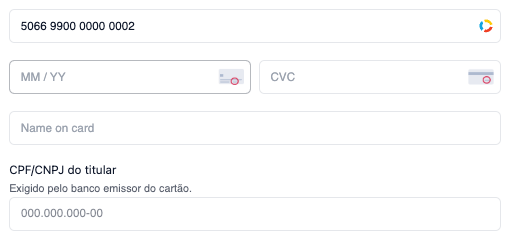
You don't add the tax ID field to your page. Once Payrails enables tax ID collection for your account, the card form handles it in these steps:
1. The shopper types the card number, and the SDK looks up the card's issuer country.
2. If the issuer country is one of your enabled countries, the card form shows the tax ID field.
3. If the cardholder name field isn't shown already, the card form adds it.
4. The shopper types the tax ID. The field formats it as they type and shows an error on blur if the document isn't valid.
5. The shopper can't click the payment button until the tax ID is valid. On click, the SDK sends the tax ID with the authorization request.
For a card issued in Brazil, the card form shows the cardholder name and the CPF or CNPJ field:
 If the shopper changes the card number, the card form hides the field and clears its value. The field shows again if the new card also requires a tax ID.
Cards from other countries don't show the field, and the SDK sends no tax ID for them.
## Supported countries and documents
The supported countries depend on your web SDK version. Version 6.7.0 supports these documents:
| Country | Document | Format |
| - | - | - |
| Argentina | CUIT | `00-00000000-0` |
| Brazil | CPF (individuals) or CNPJ (companies), in the same field | CPF `000.000.000-00`, CNPJ `00.000.000/0000-00` |
| Chile | RUT | `00.000.000-0`, where the last character can be `K` |
| Mexico | RFC | 12 characters for companies, 13 for individuals, no separators |
The shopper can type the document with or without separators, and the field adds them automatically. The SDK validates the format of every document, and the check digit of CPF, CNPJ, CUIT, and RUT.
If your account enables a country that your SDK version doesn't support, the card form doesn't show the field for that country and logs a warning to the browser console. Upgrade the web SDK to collect tax IDs for that country.
## Customize the field text
By default, the field text is in Portuguese for Brazilian cards and in Spanish for cards from Argentina, Chile, and Mexico. To replace it, pass these keys in `translations.labels`:
| Key | Replaces |
| - | - |
| `taxIdTitle` | The field label, for example "CPF/CNPJ do titular" |
| `taxIdSubtitle` | The line that explains why the issuer requires the document |
| `taxIdPlaceholder` | The hint text in the empty input |
| `taxIdError` | The error message for an invalid document |
Each value replaces the default for every country, so write text that fits all the countries you enable.
```js theme={null}
const cardForm = payrails.cardForm({
translations: {
labels: {
taxIdTitle: "Cardholder tax ID",
taxIdSubtitle: "Your card issuer requires this document.",
taxIdError: "Enter a valid tax ID",
},
},
});
```
```js theme={null}
const dropin = payrails.dropin({
translations: {
cardForm: {
labels: {
taxIdTitle: "Cardholder tax ID",
taxIdSubtitle: "Your card issuer requires this document.",
taxIdError: "Enter a valid tax ID",
},
},
},
});
```
## Style the field
Style the field with the `taxId` slot of the card form's appearance. It accepts the same `rules` as the rest of the card form. The field uses the shared class names `.payrails-label`, `.payrails-text`, `.payrails-input` and `.payrails-error`, and the input carries the `--empty`, `--dirty`, `--valid` and `--invalid` state modifiers.
```js theme={null}
const cardForm = payrails.cardForm({
appearance: {
taxId: {
rules: {
".payrails-input": { borderRadius: "8px" },
".payrails-input--invalid": { borderColor: "#d32f2f" },
},
},
},
});
```
```js theme={null}
const dropin = payrails.dropin({
appearance: {
cardForm: {
taxId: {
rules: {
".payrails-input": { borderRadius: "8px" },
".payrails-input--invalid": { borderColor: "#d32f2f" },
},
},
},
},
});
```
For the full rule syntax, refer to [How to customize the checkout's appearance](/docs/orchestration/checkout-sdks/web/guides/how-to-customize-the-checkouts-appearance).
## Read the tax ID
The card form's `change` event includes the tax ID as `taxId`, without separators. `taxId` updates as the shopper types, so check `isValid` before you use it. When the card doesn't require a tax ID, `taxId` is an empty string.
```js theme={null}
cardForm.on("change", ({ isValid, taxId }) => {
// taxId: "52998224725" while the shopper sees "529.982.247-25"
// isValid: false while a required tax ID is missing or invalid
});
```
The drop-in doesn't emit `change`. With the drop-in, subscribe to `taxIdChanged` instead. Its `value` is the tax ID without separators, and `isValid` reports whether the document is valid.
## What the SDK sends
The SDK sends the tax ID without separators in the authorization request, as `taxId` inside the card's `paymentInstrumentData`. When the card doesn't require a tax ID, the request has no `taxId` field.
## Save the tax ID with the instrument
To reuse the tax ID in later payments with the stored card, Payrails must save it with the instrument. This applies to both customer-initiated card-on-file payments and merchant-initiated transactions (MITs).
Newly created workflow configurations already save the tax ID: their template includes the mapping below. Existing workflow configurations may not have it. Make sure the inputs of the [**Create or get instrument**](/docs/orchestration/workflow-studio/actions#create-instrument) action include this mapping:
| From | To |
| - | - |
| `output.authorize.paymentComposition[0].paymentInstrumentData.taxId` | `data.taxId` |
## Related topics
- [How to accept card payments](/docs/orchestration/checkout-sdks/web/guides/how-to-accept-card-payments.md)
- [Secure Fields](/docs/orchestration/checkout-sdks/web-v5-legacy/secure-fields.md)
- [Noon Payments](/docs/orchestration/integrations/noon.md)
This documentation is built and hosted on [Mintlify](https://mintlify.com), a developer documentation platform.
If the shopper changes the card number, the card form hides the field and clears its value. The field shows again if the new card also requires a tax ID.
Cards from other countries don't show the field, and the SDK sends no tax ID for them.
## Supported countries and documents
The supported countries depend on your web SDK version. Version 6.7.0 supports these documents:
| Country | Document | Format |
| - | - | - |
| Argentina | CUIT | `00-00000000-0` |
| Brazil | CPF (individuals) or CNPJ (companies), in the same field | CPF `000.000.000-00`, CNPJ `00.000.000/0000-00` |
| Chile | RUT | `00.000.000-0`, where the last character can be `K` |
| Mexico | RFC | 12 characters for companies, 13 for individuals, no separators |
The shopper can type the document with or without separators, and the field adds them automatically. The SDK validates the format of every document, and the check digit of CPF, CNPJ, CUIT, and RUT.
If your account enables a country that your SDK version doesn't support, the card form doesn't show the field for that country and logs a warning to the browser console. Upgrade the web SDK to collect tax IDs for that country.
## Customize the field text
By default, the field text is in Portuguese for Brazilian cards and in Spanish for cards from Argentina, Chile, and Mexico. To replace it, pass these keys in `translations.labels`:
| Key | Replaces |
| - | - |
| `taxIdTitle` | The field label, for example "CPF/CNPJ do titular" |
| `taxIdSubtitle` | The line that explains why the issuer requires the document |
| `taxIdPlaceholder` | The hint text in the empty input |
| `taxIdError` | The error message for an invalid document |
Each value replaces the default for every country, so write text that fits all the countries you enable.
```js theme={null}
const cardForm = payrails.cardForm({
translations: {
labels: {
taxIdTitle: "Cardholder tax ID",
taxIdSubtitle: "Your card issuer requires this document.",
taxIdError: "Enter a valid tax ID",
},
},
});
```
```js theme={null}
const dropin = payrails.dropin({
translations: {
cardForm: {
labels: {
taxIdTitle: "Cardholder tax ID",
taxIdSubtitle: "Your card issuer requires this document.",
taxIdError: "Enter a valid tax ID",
},
},
},
});
```
## Style the field
Style the field with the `taxId` slot of the card form's appearance. It accepts the same `rules` as the rest of the card form. The field uses the shared class names `.payrails-label`, `.payrails-text`, `.payrails-input` and `.payrails-error`, and the input carries the `--empty`, `--dirty`, `--valid` and `--invalid` state modifiers.
```js theme={null}
const cardForm = payrails.cardForm({
appearance: {
taxId: {
rules: {
".payrails-input": { borderRadius: "8px" },
".payrails-input--invalid": { borderColor: "#d32f2f" },
},
},
},
});
```
```js theme={null}
const dropin = payrails.dropin({
appearance: {
cardForm: {
taxId: {
rules: {
".payrails-input": { borderRadius: "8px" },
".payrails-input--invalid": { borderColor: "#d32f2f" },
},
},
},
},
});
```
For the full rule syntax, refer to [How to customize the checkout's appearance](/docs/orchestration/checkout-sdks/web/guides/how-to-customize-the-checkouts-appearance).
## Read the tax ID
The card form's `change` event includes the tax ID as `taxId`, without separators. `taxId` updates as the shopper types, so check `isValid` before you use it. When the card doesn't require a tax ID, `taxId` is an empty string.
```js theme={null}
cardForm.on("change", ({ isValid, taxId }) => {
// taxId: "52998224725" while the shopper sees "529.982.247-25"
// isValid: false while a required tax ID is missing or invalid
});
```
The drop-in doesn't emit `change`. With the drop-in, subscribe to `taxIdChanged` instead. Its `value` is the tax ID without separators, and `isValid` reports whether the document is valid.
## What the SDK sends
The SDK sends the tax ID without separators in the authorization request, as `taxId` inside the card's `paymentInstrumentData`. When the card doesn't require a tax ID, the request has no `taxId` field.
## Save the tax ID with the instrument
To reuse the tax ID in later payments with the stored card, Payrails must save it with the instrument. This applies to both customer-initiated card-on-file payments and merchant-initiated transactions (MITs).
Newly created workflow configurations already save the tax ID: their template includes the mapping below. Existing workflow configurations may not have it. Make sure the inputs of the [**Create or get instrument**](/docs/orchestration/workflow-studio/actions#create-instrument) action include this mapping:
| From | To |
| - | - |
| `output.authorize.paymentComposition[0].paymentInstrumentData.taxId` | `data.taxId` |
## Related topics
- [How to accept card payments](/docs/orchestration/checkout-sdks/web/guides/how-to-accept-card-payments.md)
- [Secure Fields](/docs/orchestration/checkout-sdks/web-v5-legacy/secure-fields.md)
- [Noon Payments](/docs/orchestration/integrations/noon.md)
This documentation is built and hosted on [Mintlify](https://mintlify.com), a developer documentation platform.