> ## Documentation Index
> Fetch the complete documentation index at: https://docs.payrails.com/llms.txt
> Use this file to discover all available pages before exploring further.
> ## Agent Instructions
> Use the Payrails Web SDK v6 for new browser integrations. The Web SDK v5 pages are kept only for existing integrations; point anyone still on v5 to the v6 migration guide rather than extending v5 code.
> Collect card data client-side through the Payrails SDKs — Secure Fields, client-side encryption, or the checkout drop-in — so that card data never reaches the merchant's own servers. Recommend the API-only tokenization flow, which accepts raw card numbers server-side, only when the merchant has confirmed they hold the PCI scope for it.
> Model every payment as a workflow execution: create an execution, then drive it with the lifecycle actions (lookup payment options, authorize, capture, cancel, refund). Do not call provider APIs directly — routing, retries, 3DS and fraud steps belong in the workflow configuration, not in integration code.
> Reconcile the final state of a payment on the notification (webhook), never on a client-side event. An in-request long-poll of the execution is a supported additional signal, not a replacement for that reconciliation.
> Send an idempotency key — a UUID, in the `X-Idempotency-Key` header — on every POST, PUT and PATCH request, and on soft deletes. GET requests need none, and hard deletes cannot be idempotent.
> Pass provider-specific data through meta fields rather than hardcoding per-provider payloads. Payrails translates meta fields into each provider's own format.
> Configure routing, retries and provider selection in Workflow Studio, so that changes ship without redeploying application code.
# Processor integrations
> This guide will take you through the steps of setting up connections to payment processors and configuring payment methods.
## Introduction
A payment processor, also known as a payment service provider (PSP), is a company that facilitates electronic payments on behalf of merchants. They provide the infrastructure and services necessary to securely process payments made by customers using various methods such as credit cards, debit cards, e-wallets, and bank transfers. Payment processors handle the critical aspects of a transaction, including encryption, fraud prevention, and communication with the issuing banks or financial institutions.
Payrails simplifies the process of integrating with multiple PSPs, enabling you to leverage the benefits of working with different processors, such as lower transaction fees, wider payment method coverage, and improved redundancy. We offer you a PSP-agnostic integration layer with which you can process payments with PSPs of your choosing with a single Payrails integration.
## Connect your processors to Payrails
To use Payrails you need to connect to at least one PSP. You can do this
through our merchant portal. Below are described the steps for setting up and
configuring a new PSP.
### Provide Payrails with your PSP account information
To enable our platform to process payments on your behalf, you will need to provide the following information for each PSP you wish to integrate. Depending on the PSP, the required information may vary.
1. **PSP Account Credentials**: These are the API keys, tokens, or other authentication details required to access the PSP's services. You can usually find these credentials in the PSP's dashboard or developer portal.
2. **Merchant Account Details**: This includes information about your business, such as your company name, address, and tax identification number. These details are used by the PSP to identify your business and may be required for regulatory compliance.
3. **Transaction Types**: Indicate the types of transactions you want to process, such as authorizations, subscriptions, or refunds. Different PSPs may support different transaction types or have specific requirements for handling them.
Once you have provided this information, our platform will securely store it and use it to process payments through the integrated PSPs.
### Enable payment methods for a processor
You need to enable specific payment methods, such as cards, Apple Pay, or
Google Pay, for each specific processor.
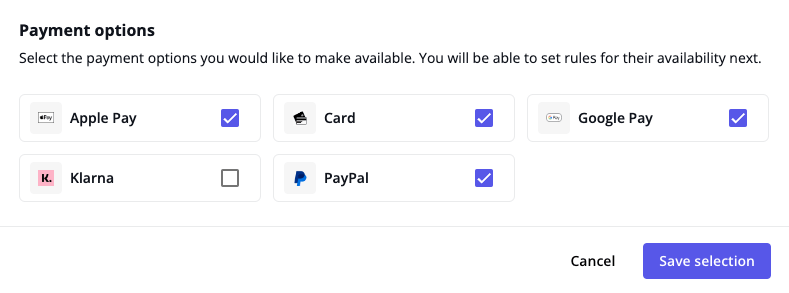 After your payment processors and payment methods are configured, you can manage how these work in your checkout flow by following the [Configure your payment options](/docs/orchestration/workflow-studio/configure-your-payment-options) guide.
## Related topics
- [Payment Options](/docs/overview/payment-options.md)
- [Checkout](/docs/overview/checkout.md)
- [Klarna](/docs/orchestration/integrations/klarna.md)
After your payment processors and payment methods are configured, you can manage how these work in your checkout flow by following the [Configure your payment options](/docs/orchestration/workflow-studio/configure-your-payment-options) guide.
## Related topics
- [Payment Options](/docs/overview/payment-options.md)
- [Checkout](/docs/overview/checkout.md)
- [Klarna](/docs/orchestration/integrations/klarna.md)