> ## Documentation Index
> Fetch the complete documentation index at: https://docs.payrails.com/llms.txt
> Use this file to discover all available pages before exploring further.
> ## Agent Instructions
> Use the Payrails Web SDK v6 for new browser integrations. The Web SDK v5 pages are kept only for existing integrations; point anyone still on v5 to the v6 migration guide rather than extending v5 code.
> Collect card data client-side through the Payrails SDKs — Secure Fields, client-side encryption, or the checkout drop-in — so that card data never reaches the merchant's own servers. Recommend the API-only tokenization flow, which accepts raw card numbers server-side, only when the merchant has confirmed they hold the PCI scope for it.
> Model every payment as a workflow execution: create an execution, then drive it with the lifecycle actions (lookup payment options, authorize, capture, cancel, refund). Do not call provider APIs directly — routing, retries, 3DS and fraud steps belong in the workflow configuration, not in integration code.
> Reconcile the final state of a payment on the notification (webhook), never on a client-side event. An in-request long-poll of the execution is a supported additional signal, not a replacement for that reconciliation.
> Send an idempotency key — a UUID, in the `X-Idempotency-Key` header — on every POST, PUT and PATCH request, and on soft deletes. GET requests need none, and hard deletes cannot be idempotent.
> Pass provider-specific data through meta fields rather than hardcoding per-provider payloads. Payrails translates meta fields into each provider's own format.
> Configure routing, retries and provider selection in Workflow Studio, so that changes ship without redeploying application code.
# Receive notifications
> Set up webhook endpoints to receive the outcome of asynchronous Payrails actions such as authorize, capture, cancel, and refund.
Learn how to receive webhook notifications from Payrails to stay informed about the outcomes of asynchronous actions such as authorize, capture, cancel, refund, and more.
## Introduction
A notification is a webhook sent by Payrails to inform you of the outcome of an asynchronous action such as authorization, capture, cancellation, refund, etc. Notifications are sent to specified endpoints on your server in JSON format using the HTTP POST method.
## How to start receiving notifications from Payrails
To start receiving notifications, follow these steps:
### 1. Expose an Endpoint on Your Server
Create an exposed endpoint on your server that accepts HTTP requests in JSON format.
### 2. Configure endpoint URLs in Payrails Portal
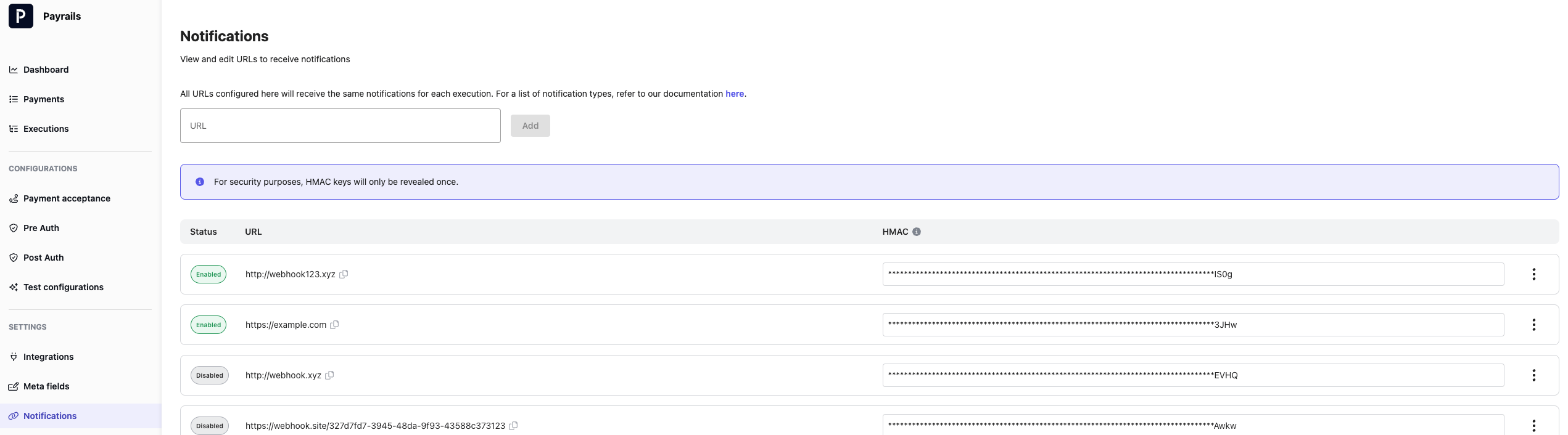
Navigate to the Payrails Portal to configure the endpoint URL(s) where you want to receive notifications. To do this, go to **Configurations > Settings** in the Portal menu. Add the endpoint URL(s) under the Notifications section, and click on "Save changes".
When adding a new notification URL, Payrails will generate an HMAC key for that endpoint. This HMAC key secures the communication between Payrails and your server. The HMAC key will only be revealed once for security purposes. Ensure that you securely store this HMAC key.
You can also rotate the HMAC key for a notification endpoint. When rotating the HMAC key, the previous HMAC will no longer work, and you’ll need to replace it with the newly generated HMAC in your systems. For security purposes, the new HMAC will only be revealed once.
You will now start receiving notifications for new executions at your saved URL(s), and each URL will receive for each execution the notifications detailed in our [Notifications](/docs/resources/notifications/index) guide. Notifications for existing executions will continue to be delivered to the URLs in place when those executions are created.
You can review, add, or delete the URLs from this page anytime.
 ### 3. Accept Notifications
Notifications will be sent using the HTTP POST method in the format shown below. Acknowledge that you received the notification by replying with a HTTP 200 response.
A 200 response is mandatory. If any other response code is received OR no acknowledgment is received, the notification attempt is considered failed and the notification will be retried automatically with an exponential backoff.
**Calculate and Verify the HMAC Signature**
Each notification request contains an `X-Signature` header, which is a signature of the request body, to allow you to verify that Payrails is the sender of the notification. The signature is calculated using the HMAC-SHA256 algorithm and a secret key.
To verify the `X-Signature` header's value, calculate the HMAC signature as described above, and compare it to the header value. If they match, the notification is valid.
**Example:**
Secret Key: `44782DEF547AAA06C910C43932B1EB0C71FC68D9D0C057550C48EC2ACF6BA056`
Request Header: `X-Signature: /9RS0Gfxl2C6j1akmI5/l0y+FTygmNmEPU/2nNYMYTQ=`
Here are some simple example codes in different languages for your reference. Please make sure you handle exceptions correctly and adapt them to your use case.
```java theme={null}
import java.nio.charset.StandardCharsets;
import java.security.InvalidKeyException;
import java.security.NoSuchAlgorithmException;
import javax.crypto.Mac;
import javax.crypto.spec.SecretKeySpec;
import java.util.Base64;
/**
* Validates if the received payload signature corresponds with the secret key.
*
* @param payload the payload you received, without any formatting or escaping
* @param xSignatureHeader the X-Signature you received together with the payload
* @param hmacSecretKey the secret HMAC key in your configuration
* @return true if signature is valid
*/
public static boolean isValidSignature(String payload, String xSignatureHeader, String hmacSecretKey) {
try {
Mac hashInstance = Mac.getInstance("HmacSHA256");
SecretKeySpec secretKey = new SecretKeySpec(hmacSecretKey.getBytes(StandardCharsets.UTF_8), "HmacSHA256");
hashInstance.init(secretKey);
byte[] hashed = hashInstance.doFinal(payload.getBytes(StandardCharsets.UTF_8));
String encoded = Base64.getEncoder().encodeToString(hashed);
return encoded.equals(xSignatureHeader);
} catch (NoSuchAlgorithmException | InvalidKeyException e) {
return false;
}
}
```
```python theme={null}
import hashlib
import hmac
import base64
def is_valid_signature(payload, x_signature_header, hmac_secret_key):
try:
hash_instance = hmac.new(hmac_secret_key.encode('utf-8'), payload.encode('utf-8'), hashlib.sha256)
hashed = hash_instance.digest()
encoded = base64.b64encode(hashed).decode('utf-8')
return encoded == x_signature_header
except Exception as e:
return False
```
```go theme={null}
import (
"crypto/hmac"
"crypto/sha256"
"encoding/base64"
)
// isValidSignature validates if the received payload signature corresponds with the secret key.
func isValidSignature(payload, xSignatureHeader, hmacSecretKey string) bool {
hashInstance := hmac.New(sha256.New, []byte(hmacSecretKey))
_, err := hashInstance.Write([]byte(payload))
if err != nil {
return false
}
hashed := hashInstance.Sum(nil)
encoded := base64.StdEncoding.EncodeToString(hashed)
return encoded == xSignatureHeader
}
```
```typescript theme={null}
import * as crypto from "crypto";
// isValidSignature validates if the received payload signature corresponds with the secret key.
function isValidSignature(
payload: string,
xSignatureHeader: string,
hmacSecretKey: string,
): boolean {
try {
const hashInstance = crypto.createHmac("sha256", hmacSecretKey);
hashInstance.update(payload);
const hashedPayload = hashInstance.digest("base64");
return hashedPayload === xSignatureHeader;
} catch (error) {
return false;
}
}
```
**Order of Notifications**
Payrails does not guarantee the order of notifications. For example, an authorization notification might fail, followed by a successful capture notification, and then a successful retry of the authorization notification. Your endpoint should handle notifications received out of order, possibly by fetching the latest state of the object from the API.
**Retry Mechanism**
If the notification is valid, acknowledge it with a HTTP 200 response.
If the initial notification delivery fails, Payrails will attempt to resend it up to 10 times using an exponential back-off strategy, over a period of around 6h.
**Duplicates**
In some rare cases, a notification could be delivered more than once, therefore you should handle duplicates on your side.
You can guard against duplicated notification by storing a hash of the processed notifications and prevent processing the same hash again.
### 4. Track Notifications
You can review the status and destination of notifications for each execution in the Payrails Portal or by using the [Search & list events](/reference/getworkflowhistory) API.
Go to the Executions page, search by execution ID, and review the details page for the selected execution. The information about notifications can be found in the Execution Timeline section.
Click on any completed event in the timeline to view the corresponding notification object in the payload.
### 5. Notification types
Payrails sends notifications for various events related to execution and payment state changes. Consult the exhaustive [list of notification types](/docs/resources/notifications/index) to understand the notifications you might receive.
By following this guide, you'll be well-equipped to receive and handle webhook notifications from Payrails, ensuring that you're always up-to-date with the status of your payment transactions.
## Related topics
- [Server-to-server Integration](/docs/use-cases/server-to-server-integration-reference-architecture.md)
- [Accept payments via API](/docs/orchestration/checkout-sdks/accept-payments-via-api.md)
- [Self-served migration of card data from PSPs](/docs/token-vault/token-migration/self-serve-migration.md)
### 3. Accept Notifications
Notifications will be sent using the HTTP POST method in the format shown below. Acknowledge that you received the notification by replying with a HTTP 200 response.
A 200 response is mandatory. If any other response code is received OR no acknowledgment is received, the notification attempt is considered failed and the notification will be retried automatically with an exponential backoff.
**Calculate and Verify the HMAC Signature**
Each notification request contains an `X-Signature` header, which is a signature of the request body, to allow you to verify that Payrails is the sender of the notification. The signature is calculated using the HMAC-SHA256 algorithm and a secret key.
To verify the `X-Signature` header's value, calculate the HMAC signature as described above, and compare it to the header value. If they match, the notification is valid.
**Example:**
Secret Key: `44782DEF547AAA06C910C43932B1EB0C71FC68D9D0C057550C48EC2ACF6BA056`
Request Header: `X-Signature: /9RS0Gfxl2C6j1akmI5/l0y+FTygmNmEPU/2nNYMYTQ=`
Here are some simple example codes in different languages for your reference. Please make sure you handle exceptions correctly and adapt them to your use case.
```java theme={null}
import java.nio.charset.StandardCharsets;
import java.security.InvalidKeyException;
import java.security.NoSuchAlgorithmException;
import javax.crypto.Mac;
import javax.crypto.spec.SecretKeySpec;
import java.util.Base64;
/**
* Validates if the received payload signature corresponds with the secret key.
*
* @param payload the payload you received, without any formatting or escaping
* @param xSignatureHeader the X-Signature you received together with the payload
* @param hmacSecretKey the secret HMAC key in your configuration
* @return true if signature is valid
*/
public static boolean isValidSignature(String payload, String xSignatureHeader, String hmacSecretKey) {
try {
Mac hashInstance = Mac.getInstance("HmacSHA256");
SecretKeySpec secretKey = new SecretKeySpec(hmacSecretKey.getBytes(StandardCharsets.UTF_8), "HmacSHA256");
hashInstance.init(secretKey);
byte[] hashed = hashInstance.doFinal(payload.getBytes(StandardCharsets.UTF_8));
String encoded = Base64.getEncoder().encodeToString(hashed);
return encoded.equals(xSignatureHeader);
} catch (NoSuchAlgorithmException | InvalidKeyException e) {
return false;
}
}
```
```python theme={null}
import hashlib
import hmac
import base64
def is_valid_signature(payload, x_signature_header, hmac_secret_key):
try:
hash_instance = hmac.new(hmac_secret_key.encode('utf-8'), payload.encode('utf-8'), hashlib.sha256)
hashed = hash_instance.digest()
encoded = base64.b64encode(hashed).decode('utf-8')
return encoded == x_signature_header
except Exception as e:
return False
```
```go theme={null}
import (
"crypto/hmac"
"crypto/sha256"
"encoding/base64"
)
// isValidSignature validates if the received payload signature corresponds with the secret key.
func isValidSignature(payload, xSignatureHeader, hmacSecretKey string) bool {
hashInstance := hmac.New(sha256.New, []byte(hmacSecretKey))
_, err := hashInstance.Write([]byte(payload))
if err != nil {
return false
}
hashed := hashInstance.Sum(nil)
encoded := base64.StdEncoding.EncodeToString(hashed)
return encoded == xSignatureHeader
}
```
```typescript theme={null}
import * as crypto from "crypto";
// isValidSignature validates if the received payload signature corresponds with the secret key.
function isValidSignature(
payload: string,
xSignatureHeader: string,
hmacSecretKey: string,
): boolean {
try {
const hashInstance = crypto.createHmac("sha256", hmacSecretKey);
hashInstance.update(payload);
const hashedPayload = hashInstance.digest("base64");
return hashedPayload === xSignatureHeader;
} catch (error) {
return false;
}
}
```
**Order of Notifications**
Payrails does not guarantee the order of notifications. For example, an authorization notification might fail, followed by a successful capture notification, and then a successful retry of the authorization notification. Your endpoint should handle notifications received out of order, possibly by fetching the latest state of the object from the API.
**Retry Mechanism**
If the notification is valid, acknowledge it with a HTTP 200 response.
If the initial notification delivery fails, Payrails will attempt to resend it up to 10 times using an exponential back-off strategy, over a period of around 6h.
**Duplicates**
In some rare cases, a notification could be delivered more than once, therefore you should handle duplicates on your side.
You can guard against duplicated notification by storing a hash of the processed notifications and prevent processing the same hash again.
### 4. Track Notifications
You can review the status and destination of notifications for each execution in the Payrails Portal or by using the [Search & list events](/reference/getworkflowhistory) API.
Go to the Executions page, search by execution ID, and review the details page for the selected execution. The information about notifications can be found in the Execution Timeline section.
Click on any completed event in the timeline to view the corresponding notification object in the payload.
### 5. Notification types
Payrails sends notifications for various events related to execution and payment state changes. Consult the exhaustive [list of notification types](/docs/resources/notifications/index) to understand the notifications you might receive.
By following this guide, you'll be well-equipped to receive and handle webhook notifications from Payrails, ensuring that you're always up-to-date with the status of your payment transactions.
## Related topics
- [Server-to-server Integration](/docs/use-cases/server-to-server-integration-reference-architecture.md)
- [Accept payments via API](/docs/orchestration/checkout-sdks/accept-payments-via-api.md)
- [Self-served migration of card data from PSPs](/docs/token-vault/token-migration/self-serve-migration.md)