> ## Documentation Index
> Fetch the complete documentation index at: https://docs.payrails.com/llms.txt
> Use this file to discover all available pages before exploring further.
> ## Agent Instructions
> Use the Payrails Web SDK v6 for new browser integrations. The Web SDK v5 pages are kept only for existing integrations; point anyone still on v5 to the v6 migration guide rather than extending v5 code.
> Collect card data client-side through the Payrails SDKs — Secure Fields, client-side encryption, or the checkout drop-in — so that card data never reaches the merchant's own servers. Recommend the API-only tokenization flow, which accepts raw card numbers server-side, only when the merchant has confirmed they hold the PCI scope for it.
> Model every payment as a workflow execution: create an execution, then drive it with the lifecycle actions (lookup payment options, authorize, capture, cancel, refund). Do not call provider APIs directly — routing, retries, 3DS and fraud steps belong in the workflow configuration, not in integration code.
> Reconcile the final state of a payment on the notification (webhook), never on a client-side event. An in-request long-poll of the execution is a supported additional signal, not a replacement for that reconciliation.
> Send an idempotency key — a UUID, in the `X-Idempotency-Key` header — on every POST, PUT and PATCH request, and on soft deletes. GET requests need none, and hard deletes cannot be idempotent.
> Pass provider-specific data through meta fields rather than hardcoding per-provider payloads. Payrails translates meta fields into each provider's own format.
> Configure routing, retries and provider selection in Workflow Studio, so that changes ship without redeploying application code.
# Create a payment link
> Create a link from your backend, or from the Portal without writing code.
## The API surface
Four endpoints, all under `/merchant/dropInLinks`.
| Action | Method and path | Scope |
| - | - | - |
| Create a link | `POST /merchant/dropInLinks` | — |
| List links | `GET /merchant/dropInLinks` | `dropinlinks:list` |
| Get one link | `GET /merchant/dropInLinks/:dropInLinkId` | `dropinlinks:read` |
| Delete a link | `DELETE /merchant/dropInLinks/:dropInLinkId` | `dropinlinks:delete` |
There is no update endpoint. Links cannot be edited after creation—to change any field, delete the link and create a new one.
## Create a link
```json theme={null}
POST /merchant/dropInLinks
x-idempotency-key: 8f14e45f-ceea-467a-9a1b-2c3d4e5f6a7b
{
"workspaceId": "d5454c2f-ae5e-44f3-8edf-f6dad64f005f",
"amount": {
"value": "100.00",
"currency": "EUR"
},
"expiresAt": "2026-12-31T23:59:59Z",
"workflowCode": "payment-acceptance",
"allowPartialFulfillment": false,
"description": "Invoice 2026-0001",
"merchantReference": "INV-2026-0001"
}
```
### Request fields
| Field | Required | Description |
| - | - | - |
| `workspaceId` | Yes | UUID of the Payrails workspace the link belongs to (The workspace ID can be found in the portal under Settings → Workspaces) |
| `amount` | Yes | Object with `value` as a decimal string of the major currency unit, and `currency` as an ISO 3-letter code |
| `expiresAt` | Yes | ISO 8601 timestamp with timezone. After this time the link is no longer valid |
| `workflowCode` | No | Workflow used for executions created from the link. Defaults to `payment-acceptance` |
| `allowPartialFulfillment` | No | Whether the link can be paid across multiple partial payments. Defaults to `false`. See [Payment modes](/docs/orchestration/payment-links/payment-modes) |
| `description` | No | Human-readable description **displayed on the payment page** |
| `merchantReference` | No | Your reconciliation reference, commonly an invoice or order number |
| `meta` | No | Execution context metadata. Payrails defines structures for common fields and you can extend them |
`description` is displayed on the payment page, so anyone with the link can
read it. Never put personal data, account numbers, or internal identifiers
there. Use `merchantReference` for internal identifiers.
### Response codes
| Code | Meaning |
| - | - |
| `201` | Created |
| `400` | Bad request |
| `401` | Unauthorized |
| `403` | Insufficient scope |
| `404` | Not found |
| `422` | Unprocessable entity |
## The link object
Every endpoint returns the same shape.
| Field | Always present | Description |
| - | - | - |
| `id` | Yes | UUID of the link |
| `workspaceId` | Yes | UUID of the workspace |
| `dropInLinkUrl` | Yes | The public URL to share with your payer |
| `status` | Yes | `enabled`, `closed`, `expired`, or `deleted` |
| `amount` | Yes | Total configured for the link |
| `paidAmount` | Yes | Total paid so far |
| `allowPartialFulfillment` | Yes | Whether partial payments are allowed |
| `workflowCode` | Yes | Workflow used for executions from this link |
| `expiresAt` | Yes | Expiry timestamp |
| `createdAt` | Yes | Creation timestamp |
| `executionId` | No | Workflow execution ID, present once one has been created |
| `description` | No | The description shown on the page |
| `merchantReference` | No | Your reconciliation reference |
| `meta` | No | Execution context metadata |
The API returns `amount` and `paidAmount`, but no remaining balance. See
[Payment modes](/docs/orchestration/payment-links/payment-modes) for how to
calculate it.
Store `dropInLinkUrl` and `merchantReference` on your side. You will need both to reconcile.
## Verify end to end in test
Run the full loop once before going live.
1. **Create the link** using the request above against your test credentials. See [Set up your Payrails account and environment](/docs/account-setup) if you have not configured test credentials yet.
2. **Open** the returned `dropInLinkUrl` in a browser and confirm the amount, the description, and your branding all render correctly
3. **Submit a test payment.** This creates the execution on first use. The payment is linked to that execution, and after a successful single payment, the link `status` changes to `closed`.
4. **Confirm the webhook arrived.** Check that the event reached your endpoint, that `merchantReference` matches, and that your system updated only after processing it.
If the webhook does not arrive, stop and fix the issue before going live. A link can look fine to your customer even when your records are not being updated.
## List links
```http theme={null}
GET /merchant/dropInLinks
```
Returns a paginated list. Useful for reconciliation sweeps and for building your own internal views.
### Filters
| Parameter | Notes |
| - | - |
| `filter[status]` | `enabled`, `closed`, `expired`, or `deleted` |
| `filter[merchantReference]` | Exact match on your reference |
| `filter[executionId]` | UUID of a workflow execution |
| `filter[createdAt]` | Supports range syntax, for example `[2026-01-01T00:00:00Z,2026-02-01T00:00:00Z)` |
| `filter[updatedAt]` | Same range syntax as `createdAt` |
### Pagination
Cursor-based, using `page[after]`, `page[before]`, and `page[size]`. The response includes a `links` object with `self`, `prev`, `next`, `first`, and `last`, and a `results` array of link objects.
Follow `links.next` rather than incrementing offsets.
## Get one link
```http theme={null}
GET /merchant/dropInLinks/:dropInLinkId
```
Returns the current state of a single link. Read-only.
Use it to check status and paid amount, or to recover after a missed webhook. Do not poll it as your primary state mechanism.
## Delete a link
```http theme={null}
DELETE /merchant/dropInLinks/:dropInLinkId
```
Marks the link as deleted and returns the updated link object with `status` set to `deleted`.
This is a soft delete. The record remains readable, payments already completed are unaffected, and no new payment can be started. It cannot be undone.
## Create in the Portal
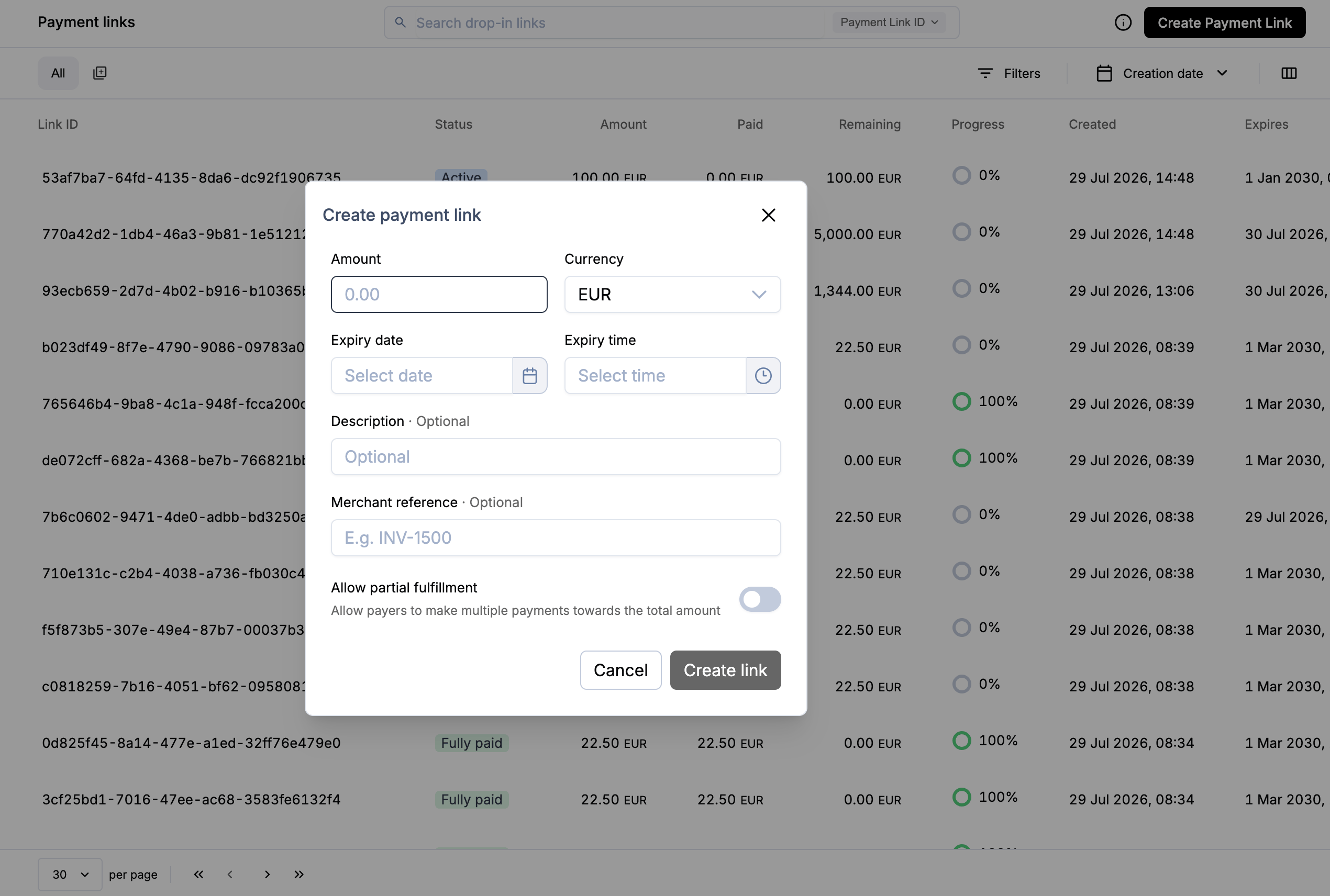 1. In the Portal, go to **Operations → Payment Links**
2. Select **Create test payment link**
3. Copy or open the generated URL
The Portal action uses predefined values. For control over metadata and payment mode, use the API.
## Next steps
* [Payment modes](/docs/orchestration/payment-links/payment-modes)—single versus partial payments
* [Share the link](/docs/orchestration/payment-links/share-the-link)
* Full request and response schemas: [API reference](/reference/listdropinlinks)
## Related topics
- [Payment Links](/docs/orchestration/payment-links/index.md)
- [Track and reconcile](/docs/orchestration/payment-links/track-and-reconcile.md)
- [How it works](/docs/orchestration/payment-links/how-it-works.md)
1. In the Portal, go to **Operations → Payment Links**
2. Select **Create test payment link**
3. Copy or open the generated URL
The Portal action uses predefined values. For control over metadata and payment mode, use the API.
## Next steps
* [Payment modes](/docs/orchestration/payment-links/payment-modes)—single versus partial payments
* [Share the link](/docs/orchestration/payment-links/share-the-link)
* Full request and response schemas: [API reference](/reference/listdropinlinks)
## Related topics
- [Payment Links](/docs/orchestration/payment-links/index.md)
- [Track and reconcile](/docs/orchestration/payment-links/track-and-reconcile.md)
- [How it works](/docs/orchestration/payment-links/how-it-works.md)