> ## Documentation Index
> Fetch the complete documentation index at: https://docs.payrails.com/llms.txt
> Use this file to discover all available pages before exploring further.
> ## Agent Instructions
> Use the Payrails Web SDK v6 for new browser integrations. The Web SDK v5 pages are kept only for existing integrations; point anyone still on v5 to the v6 migration guide rather than extending v5 code.
> Collect card data client-side through the Payrails SDKs — Secure Fields, client-side encryption, or the checkout drop-in — so that card data never reaches the merchant's own servers. Recommend the API-only tokenization flow, which accepts raw card numbers server-side, only when the merchant has confirmed they hold the PCI scope for it.
> Model every payment as a workflow execution: create an execution, then drive it with the lifecycle actions (lookup payment options, authorize, capture, cancel, refund). Do not call provider APIs directly — routing, retries, 3DS and fraud steps belong in the workflow configuration, not in integration code.
> Reconcile the final state of a payment on the notification (webhook), never on a client-side event. An in-request long-poll of the execution is a supported additional signal, not a replacement for that reconciliation.
> Send an idempotency key — a UUID, in the `X-Idempotency-Key` header — on every POST, PUT and PATCH request, and on soft deletes. GET requests need none, and hard deletes cannot be idempotent.
> Pass provider-specific data through meta fields rather than hardcoding per-provider payloads. Payrails translates meta fields into each provider's own format.
> Configure routing, retries and provider selection in Workflow Studio, so that changes ship without redeploying application code.
# Apple Pay
> Allow customers to securely make payments using Apple Pay
export const SupportedWorkflowsTable = ({workflows, workflowKeys}) => {
const hideUnsupportedWorkflows = ["interoperability"];
if (!workflows) {
return
No workflow data configured for this method yet — add an
entry to snippets/payment-methods/data.mdx.
;
}
return
| Workflow |
Supported |
{workflowKeys.filter(w => workflows[w.key] !== false || !hideUnsupportedWorkflows.includes(w.key.toLowerCase())).map(w => {
const value = workflows[w.key];
const display = value === true ? "✔" : value === false ? "✖" : value === "pending" ? "⏳" : value === null ? "N/A" : value;
return
|
{w.href ? {w.label} : w.label}
|
{display} |
;
})}
;
};
export const SupportedCountriesTable = ({countries, continents, method, merchant = false}) => {
const flagFor = code => code.toUpperCase().replace(/./g, ch => String.fromCodePoint(ch.charCodeAt(0) + 127397));
if (!countries || countries.length === 0) {
return
No countries configured for this method yet — add an entry
to snippets/payment-methods/data.mdx.
;
}
const byContinent = {};
for (const continent of continents) {
byContinent[continent] = [];
}
for (const country of countries) {
if (!byContinent[country.continent]) {
byContinent[country.continent] = [];
}
byContinent[country.continent].push(country);
}
const rows = continents.map(continent => ({
continent,
list: (byContinent[continent] || []).slice().sort((a, b) => a.name.localeCompare(b.name))
})).filter(row => row.list.length > 0);
const description = merchant ? `Merchants based in the following regions can accept ${method} payments:` : `${method} is available to customers based in:`;
return
{method &&
{description}
}
| Region(s) |
Countries |
{rows.map(row =>
|
{row.continent}
|
{row.list.map(c =>
{flagFor(c.code)} {c.name}
)}
|
)}

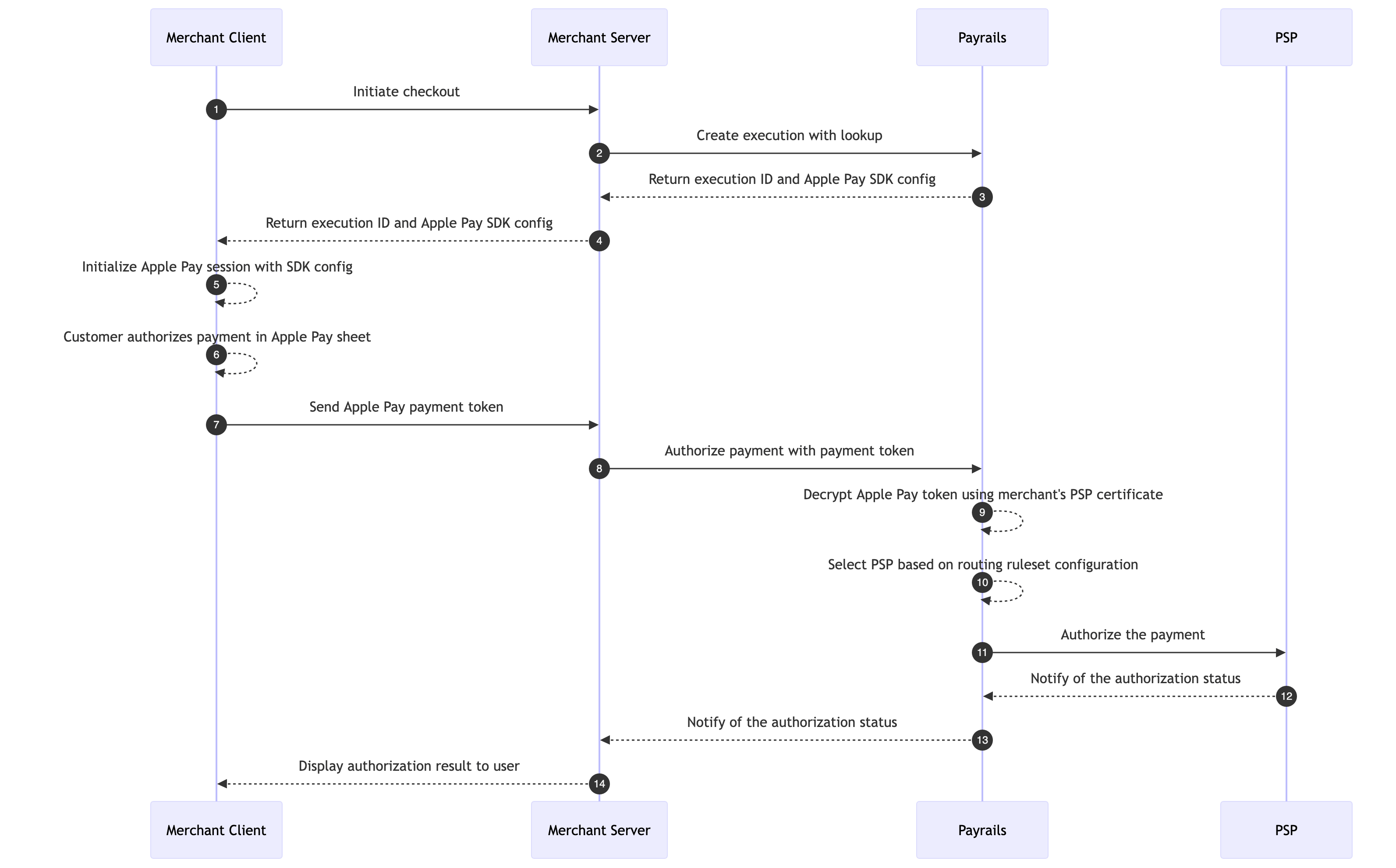
 ## Choose your Integration
Payrails offers multiple integration approaches for Apple Pay, each with different tradeoffs between customization and ease of implementation.
| Approach | Description |
| - | - |
| **Drop-in** | The fastest way to get started. Payrails renders the Apple Pay button and handles the entire payment flow. No additional frontend code required. |
| **Elements** | Use the Payrails Apple Pay Element for more control over button placement and styling while keeping payment processing handled by Payrails. |
| **Server-to-server** | Full control over your client-side Apple Pay implementation. You build the Apple Pay flow using Apple's native SDKs and pass the payment token to Payrails via API. |
For a full comparison of integration approaches and help choosing the right one for your use case, refer to our [integration approach guide](/docs/token-vault/getting-started).
## Setup Apple Pay
You wish to accept payments on both iOS devices and Web
1. [Register for an Apple Pay Merchant ID](#register-for-an-apple-pay-merchant-id)
2. [Request Certificate Signing Request (CSRs)](#request-certificate-signing-requests-csrs)
3. [Upload CSR to your Apple Developer Account](#upload-csr-to-your-apple-developer-account)
4. [Provide your certificates](#provide-your-certificates)
5. [Register your domain](#register-your-domain)
### Register for an Apple Pay Merchant ID
Register a new Merchant ID via Apple's [Setting up Apple Pay](https://developer.apple.com/documentation/passkit/setting-up-apple-pay#Create-a-merchant-identifier) guide.
We recommend creating distinct Apple Merchant IDs for Payrails production and staging environments.
***
### Request Certificate Signing Requests (CSRs)
Contact your Payrails representative to initiate the certificate generation process. Payrails will generate two Certificate Signing Requests (CSRs) for you:
* `apple_pay.csr` — Payment Processing Certificate Signing Request
* `merchant_id.csr` — Merchant Identity Certificate Signing Request
You will use these in the next step to generate your certificates in the Apple Developer Center.
***
### Upload CSR to your Apple Developer Account
1. Go to the [Merchant ID list](https://developer.apple.com/account/resources/identifiers/list/merchant) in Apple's Developer Center and select the Merchant ID you registered earlier.
2. Under the **Apple Pay Payment Processing Certificate** section, click **Create Certificate** and upload the `apple_pay.csr` file provided by Payrails. Download the generated Payment Processing Certificate.
## Choose your Integration
Payrails offers multiple integration approaches for Apple Pay, each with different tradeoffs between customization and ease of implementation.
| Approach | Description |
| - | - |
| **Drop-in** | The fastest way to get started. Payrails renders the Apple Pay button and handles the entire payment flow. No additional frontend code required. |
| **Elements** | Use the Payrails Apple Pay Element for more control over button placement and styling while keeping payment processing handled by Payrails. |
| **Server-to-server** | Full control over your client-side Apple Pay implementation. You build the Apple Pay flow using Apple's native SDKs and pass the payment token to Payrails via API. |
For a full comparison of integration approaches and help choosing the right one for your use case, refer to our [integration approach guide](/docs/token-vault/getting-started).
## Setup Apple Pay
You wish to accept payments on both iOS devices and Web
1. [Register for an Apple Pay Merchant ID](#register-for-an-apple-pay-merchant-id)
2. [Request Certificate Signing Request (CSRs)](#request-certificate-signing-requests-csrs)
3. [Upload CSR to your Apple Developer Account](#upload-csr-to-your-apple-developer-account)
4. [Provide your certificates](#provide-your-certificates)
5. [Register your domain](#register-your-domain)
### Register for an Apple Pay Merchant ID
Register a new Merchant ID via Apple's [Setting up Apple Pay](https://developer.apple.com/documentation/passkit/setting-up-apple-pay#Create-a-merchant-identifier) guide.
We recommend creating distinct Apple Merchant IDs for Payrails production and staging environments.
***
### Request Certificate Signing Requests (CSRs)
Contact your Payrails representative to initiate the certificate generation process. Payrails will generate two Certificate Signing Requests (CSRs) for you:
* `apple_pay.csr` — Payment Processing Certificate Signing Request
* `merchant_id.csr` — Merchant Identity Certificate Signing Request
You will use these in the next step to generate your certificates in the Apple Developer Center.
***
### Upload CSR to your Apple Developer Account
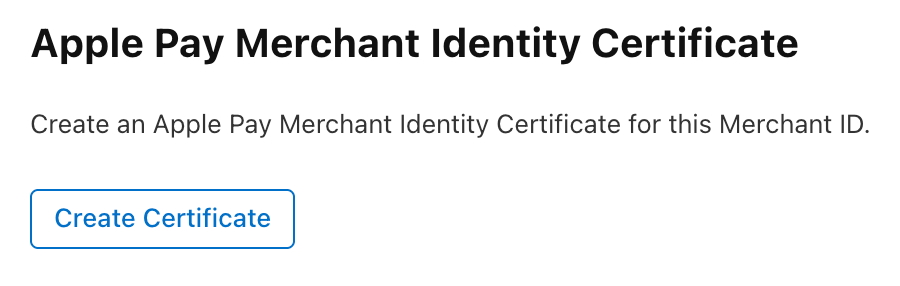
1. Go to the [Merchant ID list](https://developer.apple.com/account/resources/identifiers/list/merchant) in Apple's Developer Center and select the Merchant ID you registered earlier.
2. Under the **Apple Pay Payment Processing Certificate** section, click **Create Certificate** and upload the `apple_pay.csr` file provided by Payrails. Download the generated Payment Processing Certificate.
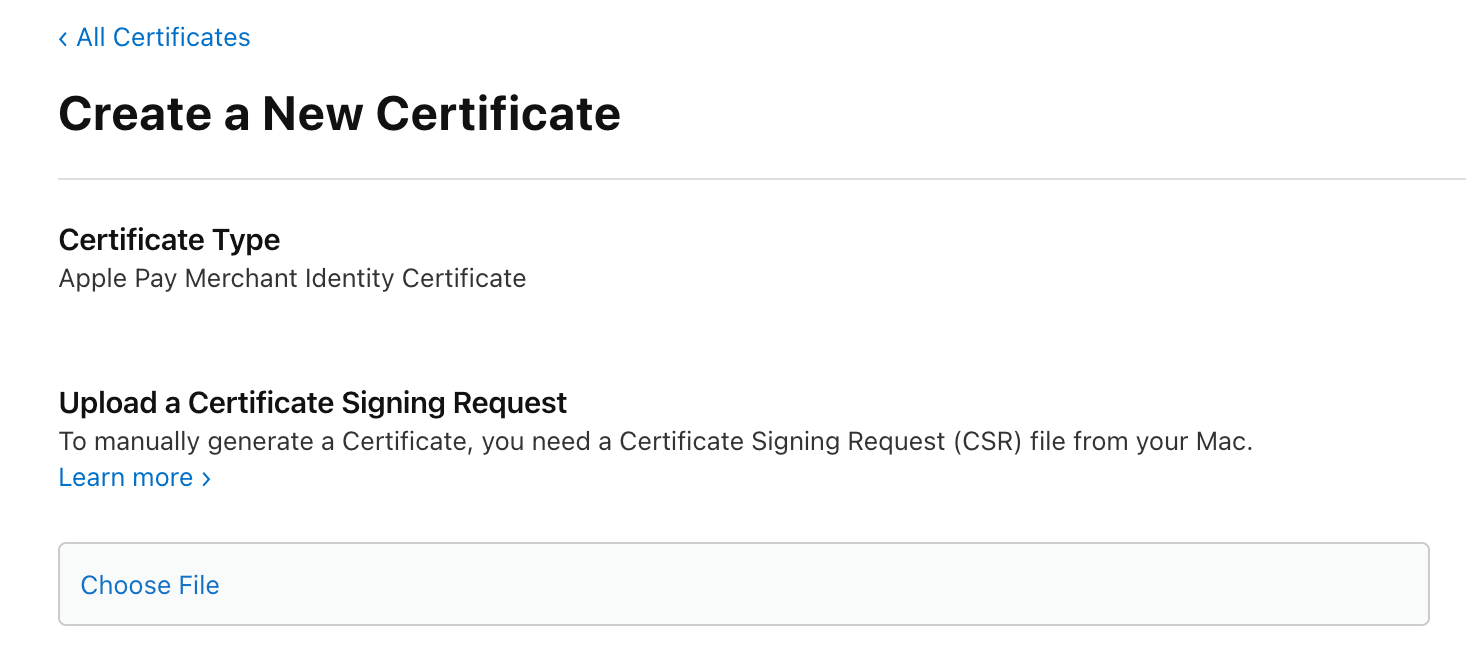
 3. Go back to the same Merchant ID and under the **Apple Pay Merchant Identity Certificate** section, click **Create Certificate** and upload the `merchant_id.csr` file provided by Payrails. Download the generated Merchant Identity Certificate.
 ***
### Decide on a Config ID
Payrails allows you to set up multiple Apple Pay key configurations, each identified by a unique Config ID. This is useful for splitting traffic across different regions or environments — for example, routing European payments through one set of keys and US payments through another.
Your Config ID can be a UUID or a descriptive string such as `region-eu-west` or `region-us-east`. Share your chosen Config ID with your Payrails representative when providing your certificates — it will be used to associate your Apple Pay keys and can be referenced in payment requests to select which configuration should be used for processing.
***
### Provide your Certificates
Send both the Payment Processing Certificate and the Merchant Identity Certificate to your Payrails representative.
Once Payrails confirms receipt, go back to the [Merchant ID list](https://developer.apple.com/account/resources/identifiers/list/merchant), select your Merchant ID, and activate the Payment Processing Certificate you just created.
***
### Register your Domain
To process Apple Pay payments on the web, Apple requires you to verify ownership of your domain.
1. Go to the [Merchant ID list](https://developer.apple.com/account/resources/identifiers/list/merchant) and select the Merchant ID for which you configured certificates.
2. Under the **Merchant Domains** section, click **Add Domain** and download the domain association file.
***
### Decide on a Config ID
Payrails allows you to set up multiple Apple Pay key configurations, each identified by a unique Config ID. This is useful for splitting traffic across different regions or environments — for example, routing European payments through one set of keys and US payments through another.
Your Config ID can be a UUID or a descriptive string such as `region-eu-west` or `region-us-east`. Share your chosen Config ID with your Payrails representative when providing your certificates — it will be used to associate your Apple Pay keys and can be referenced in payment requests to select which configuration should be used for processing.
***
### Provide your Certificates
Send both the Payment Processing Certificate and the Merchant Identity Certificate to your Payrails representative.
Once Payrails confirms receipt, go back to the [Merchant ID list](https://developer.apple.com/account/resources/identifiers/list/merchant), select your Merchant ID, and activate the Payment Processing Certificate you just created.
***
### Register your Domain
To process Apple Pay payments on the web, Apple requires you to verify ownership of your domain.
1. Go to the [Merchant ID list](https://developer.apple.com/account/resources/identifiers/list/merchant) and select the Merchant ID for which you configured certificates.
2. Under the **Merchant Domains** section, click **Add Domain** and download the domain association file.
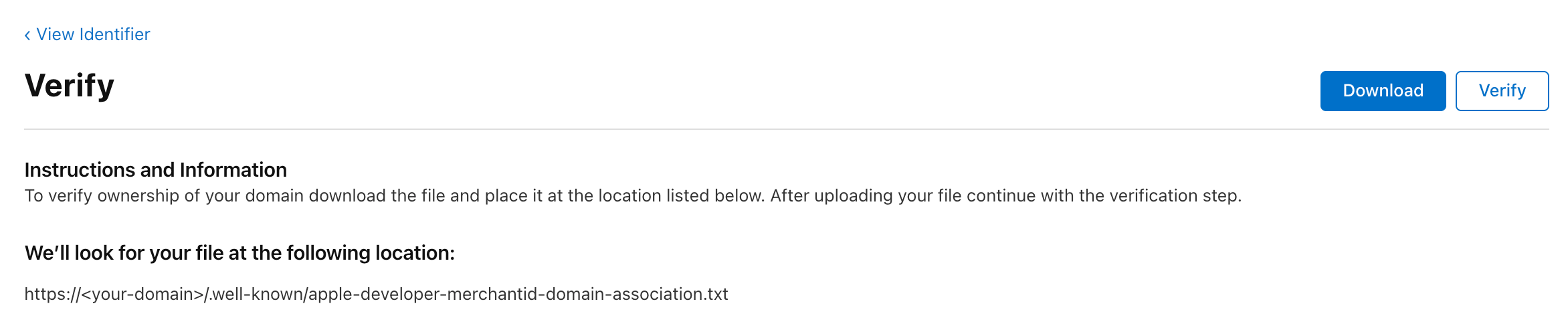 3. Host the file on your domain at the following path: `https:///.well-known/apple-developer-merchantid-domain-association`
4. Click **Verify** in the Apple Developer Center to complete domain registration.
**We render the Apple Pay button inside an iframe — which domain should we register?**
Apple requires domain registration to be done on the domain visible in the browser address bar, not the iframe's domain. Registering the iframe domain will cause Apple Pay payments to automatically fail.
The domain association file must remain publicly accessible without redirects — Apple regularly re-verifies domains after the initial registration. This step is not required for staging environments.
You only wish to accept payments on the Web without a Native iOS integration
This setup cannot later be extended for native integrations, If you plan on accepting Apple Pay payments using the native SDK later please perform the Native + Web setup
A web-only integration doesn't require your own Apple Pay Merchant ID. You will, however, need an Apple Developer account to [create a sandbox tester account](https://developer.apple.com/apple-pay/sandbox-testing/) — this is required to test Apple Pay payments on staging before completing the steps below.
1. [Download Payrails' domain association file](#download-payrails-domain-association-file)
2. [Host the domain association file](#host-the-domain-association-file)
3. [Register your domain with Payrails](#register-your-domain-with-payrails)
### Download Payrails' Domain Association File
Download Payrails' domain association file from the following URL:
[https://api-pub.payrails.io/.well-known/apple-developer-merchantid-domain-association](https://api-pub.payrails.io/.well-known/apple-developer-merchantid-domain-association)
***
### Host the Domain Association File
Host the file on your domain at the following path:
`https:///.well-known/apple-developer-merchantid-domain-association`
This step is not required for staging environments as Apple doesn't verify domains for payments made with test Apple accounts.
The file must remain publicly accessible without redirects — Apple regularly re-verifies domains after the initial
registration.
***
### Register your Domain with Payrails
Once the file is hosted, contact your Payrails representative with the list of domains you wish to register. Payrails will handle the domain registration process with Apple on your behalf.
**We render the Apple Pay button inside an iframe — which domain should we register?**
Apple requires domain registration to be done on the domain visible in the browser address bar, not the iframe's domain. Registering the iframe domain will cause Apple Pay payments to automatically fail.
## Accept Apple Pay
### Accept Apple Pay with the Payrails Drop-in
The Payrails Drop-in is the fastest way to accept Apple Pay. It handles the entire payment UI and flow — no additional client-side development is required beyond mounting the component.
1. [Create a session](#step-1-create-a-session-server-side)
2. [Initialize the SDK](#step-2-initialize-the-sdk-client-side)
3. [Mount the Drop-in](#step-3-mount-the-drop-in-client-side)
4. [Handle payment events](#step-4-handle-payment-events)
For the full list of Drop-in configuration options, styling, and event handling, refer to the [Drop-in integration guide](/docs/orchestration/checkout-sdks/web-v5-legacy/drop-in).
***
#### Step 1: Create a session (Server-side)
From your server, call the Payrails `/client/init` endpoint. To enable Apple Pay, pass the `applePayConfigId` that was agreed upon during your Payrails onboarding.
```bash theme={null}
POST /merchant/client/init
Authorization: Bearer
x-idempotency-key:
```
```json theme={null}
{
"type": "dropIn",
"holderReference": "customer-123",
"workflowCode": "payment-acceptance",
"merchantReference": "order_3573894940903",
"applePayConfigId": "default",
"amount": {
"value": "12.50",
"currency": "EUR"
},
"meta": {
"order": {
"reference": "order_3573894940903"
},
"customer": {
"reference": "customer-123",
"country": {
"code": "DE"
}
},
"clientContext": {
"ipAddress": "217.110.239.132",
"origin": "https://your-domain.com"
}
}
}
```
The response contains a `data` field — a base64-encoded string — and a `version` field. Pass both to your client.
```json theme={null}
{
"version": "1.2.3",
"data": "TG9yZW0gaXBzdW0..."
}
```
The `applePayConfigId` determines which Apple Pay keys are used for this session. If you have multiple configurations (e.g. per region), pass the appropriate ID here. If omitted, the default config will be used as fallback.
***
#### Step 2: Initialize the SDK (Client-side)
Pass the `data` and `version` from your server response to `Payrails.init()`:
```javascript theme={null}
import Payrails from '@payrails/web-sdk';
const payrailsClient = await Payrails.init(
{ data: '', version: '' }
);
```
***
#### Step 3: Mount the Drop-in (Client-side)
Create and mount the Drop-in component into your checkout page. Apple Pay will appear automatically if the customer's device and browser support it.
```html theme={null}
```
```javascript theme={null}
const dropin = payrailsClient.dropin({
paymentMethodsConfiguration: {
applePay: {
showStoreInstrumentCheckbox: false
}
},
events: {
onSuccess: (event) => {
console.log('Payment successful', event);
// redirect to order confirmation page
},
onFailed: (event) => {
console.log('Payment failed', event);
// show error to customer
}
}
});
dropin.mount('#dropin-container');
```
The Apple Pay button is only shown when the customer is on a supported device (Safari on iOS/macOS) with a card in their Apple Wallet. No additional checks are needed on your end.
***
#### Step 4: Handle payment events
The Drop-in emits the following events relevant to Apple Pay:
| Event | Description |
| - | - |
| `onApplePayAvailable` | Fires when Apple Pay is available on the customer's device |
| `onRequestStart` | Fires after the customer approves payment in the Apple Pay sheet, before the authorize request is sent |
| `onSuccess` | Payment was authorized successfully |
| `onFailed` | Payment authorization failed |
| `onPending` | Payment is pending with no further action required |
```javascript theme={null}
const dropin = payrailsClient.dropin({
events: {
onApplePayAvailable: () => {
console.log('Apple Pay is available');
},
onRequestStart: () => {
// customer approved in Apple Pay sheet
// good place to show a loading state
},
onSuccess: (action, event) => {
// action will be 'AUTHORIZE'
// redirect to confirmation
},
onFailed: (action, event) => {
// action will be 'AUTHORIZE'
// show error message to customer
},
onPending: (action, event) => {
// action will be 'AUTHORIZE'
}
}
});
```
If you are on `@payrails/web-sdk` version 5.36.0 or later, use the generic events (`onSuccess`, `onFailed`, `onPending`, `onRequestStart`). The older events `onAuthorizeSuccess`, `onAuthorizeFailed`, `onAuthorizePending`, and `onAuthorizeRequestStart` are deprecated.
### Accept Apple Pay with the Payrails Apple Pay Element
The Apple Pay Element gives you more control over the placement and styling of the Apple Pay button compared to the Drop-in. Use this approach if you want to embed the Apple Pay button independently in your checkout UI.
1. [Create a session](#step-1-create-a-session-server-side)
2. [Initialize the SDK](#step-2-initialize-the-sdk-client-side)
3. [Check Apple Pay availability](#step-3-check-apple-pay-availability-optional)
4. [Mount the Apple Pay Element](#step-4-mount-the-apple-pay-element-client-side)
5. [Handle payment events](#step-5-handle-payment-events)
For the full list of Elements configuration options, styling, and event handling, refer to the [Elements integration guide](/docs/orchestration/checkout-sdks/web-v5-legacy/elements).
***
#### Step 1: Create a session (Server-side)
From your server, call the Payrails `/client/init` endpoint. To enable Apple Pay, pass the `applePayConfigId` that was agreed upon during your Payrails onboarding.
```bash theme={null}
POST /merchant/client/init
Authorization: Bearer
x-idempotency-key:
```
```json theme={null}
{
"type": "dropIn",
"holderReference": "customer-123",
"workflowCode": "payment-acceptance",
"merchantReference": "order_3573894940903",
"applePayConfigId": "default",
"amount": {
"value": "12.50",
"currency": "EUR"
},
"meta": {
"order": {
"reference": "order_3573894940903"
},
"customer": {
"reference": "customer-123",
"country": {
"code": "DE"
}
},
"clientContext": {
"ipAddress": "217.110.239.132",
"origin": "https://your-domain.com"
}
}
}
```
The response contains a `data` field and a `version` field. Pass both to your client.
```json theme={null}
{
"version": "1.2.3",
"data": "TG9yZW0gaXBzdW0..."
}
```
The `applePayConfigId` determines which Apple Pay keys are used for this session. If you have multiple configurations (e.g. per region), pass the appropriate ID here. If omitted, the default config will be used as fallback.
***
#### Step 2: Initialize the SDK (Client-side)
Pass the `data` and `version` from your server response to `Payrails.init()`:
```javascript theme={null}
import Payrails from '@payrails/web-sdk';
const payrailsClient = await Payrails.init(
{ data: '', version: '' }
);
```
***
#### Step 3: Check Apple Pay availability (Optional)
The Apple Pay button will not render if the customer's browser or device does not support Apple Pay — no additional checks are needed. However, if you need to know availability in advance (for example, to conditionally render surrounding UI), you can use:
```javascript theme={null}
const isAvailable = await payrailsClient.isApplePayAvailable(); // returns boolean
```
***
#### Step 4: Mount the Apple Pay Element (Client-side)
Add a container to your HTML and mount the Apple Pay button element into it:
```html theme={null}
```
```javascript theme={null}
const applePayElement = payrailsClient.applePayButton({
showStoreInstrumentCheckbox: false,
abortAfterAuthorizeFailed: true,
clientDomain: 'your-domain.com', // optional, see configuration table below
styles: {
type: 'buy',
style: 'black',
locale: 'en-US'
},
events: {
onApplePayAvailable: () => {
// Apple Pay button is initialized and visible
},
onRequestStart: () => {
// customer approved in Apple Pay sheet
// good place to show a loading state
},
onSuccess: (action, event) => {
// action will be 'AUTHORIZE'
// redirect to confirmation
},
onFailed: (action, event) => {
// action will be 'AUTHORIZE'
// show error message to customer
},
onPending: (action, event) => {
// action will be 'AUTHORIZE'
},
onPaymentSessionExpired: () => {
// session expired, re-initialize the client from your server
}
}
});
applePayElement.mount('#apple-pay-button-container');
```
##### Configuration options
| Property | Type | Required | Description |
| - | - | - | - |
| `showStoreInstrumentCheckbox` | boolean | No | Show a checkbox to let the customer save their Apple Pay method for later |
| `abortAfterAuthorizeFailed` | boolean | No | Hide the Apple Pay sheet if authorization fails |
| `clientDomain` | string | No | The domain visible in the browser address bar. Use this when the Apple Pay button is rendered inside an iframe whose domain differs from the top-level domain |
| `styles.type` | string | No | Button label type — e.g. `plain`, `buy`, `checkout`, `subscribe`, `donate`, `order` |
| `styles.style` | string | No | Button color — `black`, `white`, `white-outline`, `automatic` |
| `styles.locale` | string | No | Button locale — e.g. `en-US`, `de-DE` |
If you are rendering the Apple Pay button inside an iframe, pass the browser's top-level domain in `clientDomain`. Apple Pay domain verification is performed against the domain the customer sees in the address bar, not the iframe's domain.
***
#### Step 5: Handle payment events
The Apple Pay Element emits the following events:
| Event | Description |
| - | - |
| `onApplePayAvailable` | Fires when the Apple Pay button is initialized and visible |
| `onRequestStart` | Fires after the customer approves payment in the Apple Pay sheet, before the authorize request is sent |
| `onSuccess` | Payment was authorized successfully |
| `onFailed` | Payment authorization failed |
| `onPending` | Payment is pending with no further action required |
| `onPaymentSessionExpired` | Session has expired — re-initialize from your server |
If you are on `@payrails/web-sdk` version 5.36.0 or later, use the generic events (`onSuccess`, `onFailed`, `onPending`, `onRequestStart`). The older events `onAuthorizeSuccess`, `onAuthorizeFailed`, `onAuthorizePending`, and `onAuthorizeRequestStart` are deprecated.
For the full list of Elements configuration options and styling, refer to the [Elements guide](/docs/orchestration/checkout-sdks/web-v5-legacy/elements).
### Accept Apple Pay with the Server-to-Server Integration
With the server-to-server integration, you have full control over your client-side Apple Pay implementation and use the Payrails API directly to process payments. This approach requires building the Apple Pay flow yourself using Apple's native SDKs, then passing the resulting payment token to Payrails for processing.
1. [Create a workflow execution with lookup](#step-1-create-a-workflow-execution-with-lookup)
2. [Perform merchant validation (web only)](#step-2-perform-merchant-validation-web-only)
3. [Authorize the payment](#step-3-authorize-the-payment)
***
#### Step 1: Create a workflow execution with lookup
Create an execution and include a `lookup` initial action to retrieve the available payment options and Apple Pay SDK configuration in a single request. Pass `applePayConfigId` to specify which Apple Pay key configuration to use.
```bash theme={null}
POST /merchant/workflows/{workflowCode}/executions
Authorization: Bearer
x-idempotency-key:
```
```json theme={null}
{
"merchantReference": "order_3573894940903",
"holderReference": "customer-123",
"applePayConfigId": "default",
"meta": {
"order": {
"reference": "order_3573894940903"
},
"customer": {
"reference": "customer-123",
"country": {
"code": "DE"
}
},
"clientContext": {
"ipAddress": "217.110.239.132",
"origin": "https://your-domain.com"
}
},
"initialActions": [
{
"action": "lookup",
"method": "POST",
"body": {
"amount": {
"value": "12.50",
"currency": "EUR"
},
"meta": {
"customer": {
"reference": "customer-123",
"country": {
"code": "DE"
}
}
}
}
}
]
}
```
The response includes the execution `id` and an `initialResults` array containing the lookup result. Inside `initialResults`, find the `applePay` entry in `paymentCompositionOptions` — this contains the SDK configuration needed to initialize the Apple Pay session on your client.
```json theme={null}
{
"id": "5d0e7a85-c982-499f-bb7f-296b75bcbe10",
"status": [{ "code": "created", "time": "2022-02-03T14:38:41.557Z" }],
"merchantReference": "order_3573894940903",
"holderReference": "customer-123",
"initialResults": [
{
"httpCode": 200,
"body": {
"name": "lookup",
"actionId": "1aa0ef20-36cb-4485-b60e-0526c3699014",
"executedAt": "2022-02-03T14:38:40.557Z",
"data": {
"paymentCompositionOptions": [
{
"paymentMethodCode": "applePay",
"integrationType": "api",
"description": "ApplePay",
"config": {
"parameters": {
"countryCode": "DE",
"merchantCapabilities": ["supports3DS", "supportsCredit", "supportsDebit"],
"merchantIdentifier": "merchant.payrails.testing",
"supportedNetworks": ["AMEX", "DISCOVER", "INTERAC", "JCB", "VISA", "MASTERCARD"]
},
"type": "CARD"
}
}
]
},
"links": {
"authorize": {
"method": "POST",
"href": "https://api.staging.payrails.io/merchant/workflows/payment-acceptance/executions/5d0e7a85-c982-499f-bb7f-296b75bcbe10/authorize"
},
"startPaymentSession": {
"method": "POST",
"href": "https://api.staging.payrails.io/merchant/workflows/payment-acceptance/executions/5d0e7a85-c982-499f-bb7f-296b75bcbe10/startPaymentSession"
}
}
}
}
],
"links": {
"self": "https://api.staging.payrails.io/merchant/workflows/payment-acceptance/executions/5d0e7a85-c982-499f-bb7f-296b75bcbe10"
}
}
```
Use the `config.parameters` from the Apple Pay composition option to initialize your Apple Pay session on the client — passing `merchantIdentifier`, `supportedNetworks`, and `merchantCapabilities` to the Apple Pay SDK. Use the execution `id` in all subsequent requests.
***
#### Step 2: Perform merchant validation (web only)
This step is only required for web (Safari) payments. For native iOS or Android app integrations, skip to Step 3.
When the customer initiates Apple Pay in a browser, Apple calls your `onvalidatemerchant` handler with a `validationURL`. Forward this URL to Payrails via the `startPaymentSession` endpoint to complete merchant validation.
```bash theme={null}
POST /merchant/workflows/{workflowCode}/executions/{executionId}/startPaymentSession
Authorization: Bearer
x-idempotency-key:
```
```json theme={null}
{
"integrationType": "api",
"paymentMethodCode": "applePay",
"amount": {
"value": "12.50",
"currency": "EUR"
},
"returnInfo": {
"success": "https://your-domain.com/success"
},
"meta": {
"sessionURL": "https://apple-pay-gateway-cert.apple.com/paymentservices/startSession",
"clientContext": {
"host": "your-domain.com"
}
}
}
```
The response contains an opaque Apple Pay session object in the `data` field. Pass this directly to the Apple Pay JS SDK's `completeMerchantValidation` method.
```json theme={null}
{
"name": "startPaymentSession",
"actionId": "1aa0ef20-36cb-4485-b60e-0526c3699014",
"executedAt": "2022-02-03T14:38:40.557Z",
"data": {
"id": "SSH268E...",
"data": {
"displayName": "Test Merchant",
"domainName": "https://your-domain.com",
"epochTimestamp": 1717486879562,
"expiresAt": 1717490479562,
"merchantIdentifier": "E92FBE...",
"merchantSessionIdentifier": "SSH268E...",
"nonce": "fd3...",
"signature": "30800..."
}
},
"links": {
"execution": "https://api.staging.payrails.io/merchant/workflows/payment-acceptance/executions/5d0e7a85-c982-499f-bb7f-296b75bcbe10"
}
}
```
***
#### Step 3: Authorize the payment
Once the customer authorizes the payment in the Apple Pay sheet, Apple provides a `PKPaymentToken` containing a `paymentData` object. Pass the entire token as a JSON string in `paymentInstrumentData.paymentToken`.
```bash theme={null}
POST /merchant/workflows/{workflowCode}/executions/{executionId}/authorize
Authorization: Bearer
x-idempotency-key:
```
```json theme={null}
{
"amount": {
"value": "12.50",
"currency": "EUR"
},
"returnInfo": {
"success": "https://your-domain.com/success",
"error": "https://your-domain.com/error"
},
"paymentComposition": [
{
"paymentMethodCode": "applePay",
"integrationType": "api",
"amount": {
"value": "12.50",
"currency": "EUR"
},
"paymentInstrumentData": {
"paymentToken": "{\"paymentData\":{\"data\":\"V0D4ZZq5XBJoORaiwCxQKq4P1WtrRdiRY3PmF9BX0l3BRplz1XMKNJcbqstekoqDaNFtAFyxUkvwXLsxU81KcQ9P8AQoYjj5KMXPgO\\/jeIqgnKGwaF3+cPEmoYUnmfLVpnrGGDiH8An6E9DjdX48nUMyC4rzAwBhXcjqFW3s93D5lUgbjKdgKK0vs8M\\/UGWJ+dGNrVshiG48fWCcO8iiUgTvaJqnERnkmVs\\/Fu6\\/CBIZqB1ytQh+osuvSrEb8YurrRHHc\\/Y1JbeTBSpSi\\/fWrMljXAjthF3JiO00g9EgYb0p+e3+dVvb+P0bvvmo5l4GRsRVaysgW0nX8MbzR\\/nUfIoGc6NlaUhTP6vkOi8ccBX63urdoa\\/LD7bXCnkEJ9tag+uTCgKWlAOS34ls\",\"signature\":\"MIAGCSqGSIb3DQEH...\",\"header\":{\"publicKeyHash\":\"ZJSKMBJDW9HqdVlxZeNWBooGagS9Ef2+yyPZwV17HmY=\",\"ephemeralPublicKey\":\"MFkwEwYHKoZIzj0CAQYIKoZIzj0DAQcDQgAE9\\/m6C48ZHg25pmAQRadr4W1jPMYSQbO9b1nW\\/D3+rC\\/WSEcw7NygSMkQkAU\\/0En5AZ0\\/c8hgDWPknFVNlN8pcQ==\",\"transactionId\":\"642e2f06b74fc4cfc301553a37905ff16cf163173a46a25d022ffdd1cc0ad6a5\"},\"version\":\"EC_v1\"},\"paymentMethod\":{\"displayName\":\"MasterCard 0049\",\"network\":\"MasterCard\",\"type\":\"credit\"},\"transactionIdentifier\":\"642e2f06b74fc4cfc301553a37905ff16cf163173a46a25d022ffdd1cc0ad6a5\"}"
}
}
]
}
```
A successful response returns `202 Accepted` with an `actionId` and links to track the payment outcome.
```json theme={null}
{
"name": "authorize",
"actionId": "1aa0ef20-36cb-4485-b60e-0526c3699014",
"executedAt": "2022-04-22T17:53:36.814Z",
"links": {
"execution": "https://api.staging.payrails.io/merchant/workflows/payment-acceptance/executions/5d0e7a85-c982-499f-bb7f-296b75bcbe10",
"consumerWait": "https://api.staging.payrails.io/public/redirect/...",
"cancel": {
"method": "POST",
"href": "https://api.staging.payrails.io/merchant/workflows/payment-acceptance/executions/5d0e7a85-c982-499f-bb7f-296b75bcbe10/cancel"
}
}
}
```
Authorization is processed asynchronously. The final payment outcome is delivered via webhook notification containing the `actionId` from this response.
This integration requires PCI DSS compliance as you will be handling decrypted Apple Pay token data on your servers. If you prefer Payrails to handle decryption, use the Server-to-Server integration instead.
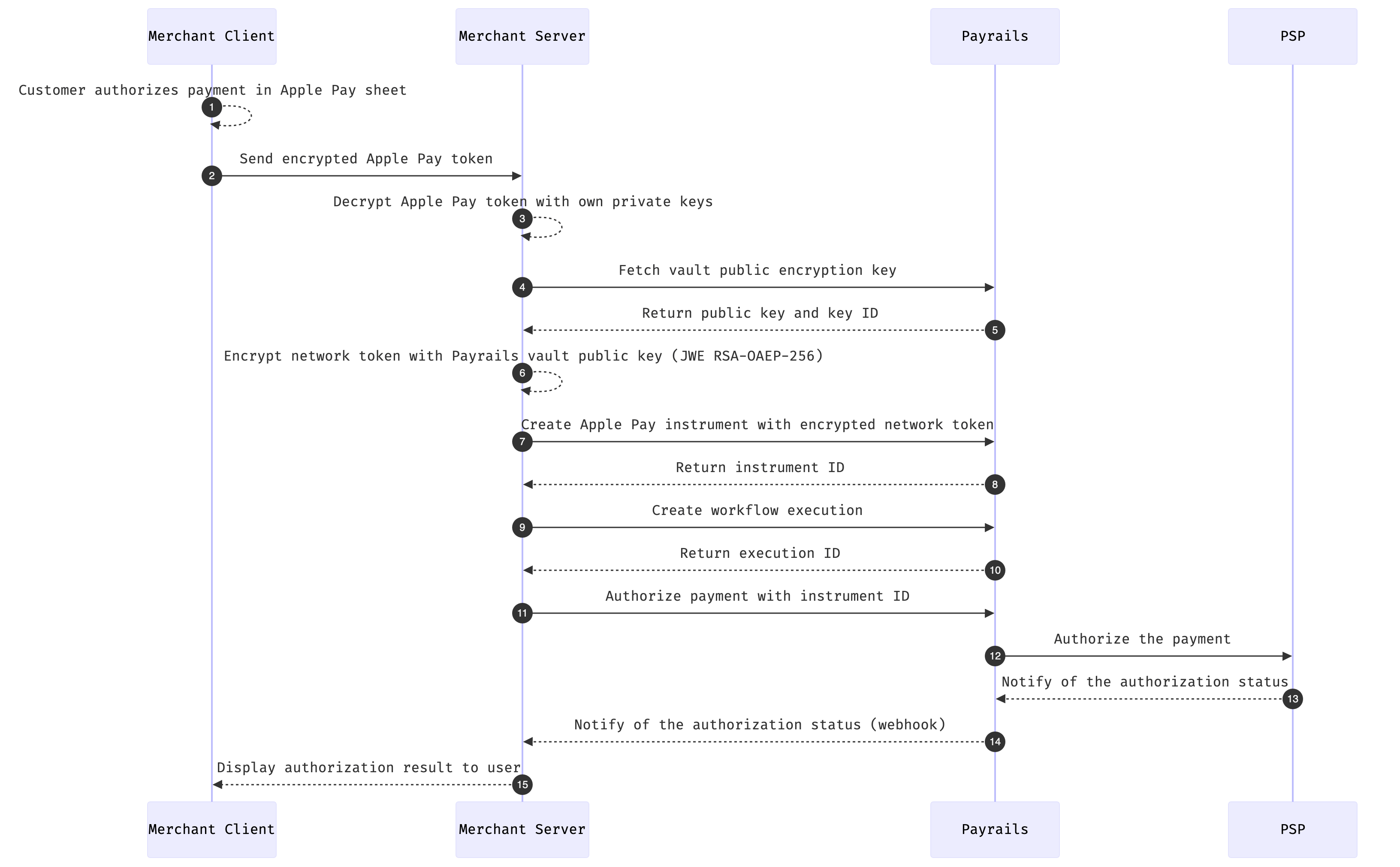
With this approach, you decrypt the Apple Pay token on your own servers, re-encrypt the decrypted network token using the Payrails vault public key, and send it to Payrails for processing. This gives you full control over the decryption flow but requires managing your own Apple Pay private keys and certificates.
1. [Decrypt the Apple Pay token](#step-1-decrypt-the-apple-pay-token)
2. [Fetch the Payrails vault public key](#step-2-fetch-the-payrails-vault-public-key)
3. [Encrypt the network token](#step-3-encrypt-the-network-token)
4. [Create an Apple Pay instrument](#step-4-create-an-apple-pay-instrument)
5. [Create a workflow execution](#step-5-create-a-workflow-execution)
6. [Authorize the payment](#step-6-authorize-the-payment)
#### Step 1: Decrypt the Apple Pay token
Once the customer authorizes the payment in the Apple Pay sheet, Apple provides an encrypted `PKPaymentToken`. Decrypt it on your server using your Apple Pay private keys. The decrypted token contains the card network token data in the following format:
```json theme={null}
{
"cardNumber": "4111111111111111",
"expiryMonth": "03",
"expiryYear": "30",
"securityCode": "ApplePayCryptogram==",
"holderName": "John Doe",
"holderReference": "customer-123"
}
```
The decrypted Apple Pay token contains PCI-sensitive data. Ensure this data is handled exclusively on your server and never exposed to the client.
***
#### Step 2: Fetch the Payrails vault public key
Before sending the decrypted token to Payrails, fetch the current vault public encryption key.
```bash theme={null}
GET /payment/vault/info
Authorization: Bearer
```
```json theme={null}
{
"encryptionPublicKey": "MIIBIjANBgkqhkiG9w0BAQEFAAOCAQ8AMIIBCgKCAQEA0MqUlEo2bC9iJi4LEHQ6...",
"encryptionKeyId": "b24ff007-728c-455d-b51c-556108ccdf59",
"expiresIn": 3300
}
```
Cache the public key and refresh it before `expiresIn` seconds to avoid unnecessary API calls.
***
#### Step 3: Encrypt the network token
Encrypt the decrypted Apple Pay network token JSON using JWE with the following parameters:
* Encryption algorithm: `RSA-OAEP-256`
* Content encryption: `A256CBC-HS512`
* Include the `encryptionKeyId` as the `kid` JWE header
```python theme={null}
from jose import jwe
import json
data = {
"cardNumber": "4111111111111111",
"expiryMonth": "03",
"expiryYear": "30",
"securityCode": "ApplePayCryptogram==",
"holderName": "John Doe",
"holderReference": "customer-123"
}
json_data = json.dumps(data).encode('utf-8')
encrypted_token = jwe.encrypt(
plaintext=json_data,
algorithm='RSA-OAEP-256',
encryption='A256CBC-HS512',
key=vault_key_info['encryptionPublicKey'],
keyID=vault_key_info['encryptionKeyId']
)
# eyJhbGciOiJSU0EtT0FFUC0yNTYiLCJlbmMiOiJBMjU2Q0JDLUhTNTEyIn0...
```
```go theme={null}
recipient := jose.Recipient{
Algorithm: jose.RSA_OAEP_256,
Key: publicKey,
KeyID: vaultKeyInfo.EncryptionKeyID,
}
e, err := jose.NewEncrypter(jose.A256CBC_HS512, recipient, nil)
encrypted, err := e.Encrypt(jsonData)
encryptedToken, err := encrypted.CompactSerialize()
// eyJhbGciOiJSU0EtT0FFUC0yNTYiLCJlbmMiOiJBMjU2Q0JDLUhTNTEyIn0...
```
***
#### Step 4: Create an Apple Pay instrument
Send the encrypted network token to Payrails to create a stored Apple Pay instrument.
```bash theme={null}
POST /merchant/instruments
Authorization: Bearer
```
```json theme={null}
{
"paymentMethod": "applePay",
"displayName": "Visa 4443",
"data": {
"encryptedData": ".......encryptedApplePayNetworkToken.......",
"encryptedDataType": "networkToken",
"network": "visa",
"eci": "07",
"billingAddress": {
"street": "Berlin street",
"doornumber": "345",
"postalCode": "30103",
"city": "Berlin",
"country": "DE"
}
}
}
```
The response contains the `id` of the newly created Apple Pay instrument.
```json theme={null}
{
"id": "32749353-263f-4510-9572-c782ab64e599",
"paymentMethod": "applePay",
"displayName": "Visa 4443",
"status": "created"
}
```
To achieve full interoperability across providers, always include `eci`, `billingAddress`, `network`, and `displayName` when creating the instrument.
***
#### Step 5: Create a workflow execution
Create an execution to initiate the payment flow.
```bash theme={null}
POST /merchant/workflows/{workflowCode}/executions
Authorization: Bearer
x-idempotency-key:
```
```json theme={null}
{
"merchantReference": "order_3573894940903",
"holderReference": "customer-123",
"meta": {
"order": {
"reference": "order_3573894940903"
},
"customer": {
"reference": "customer-123",
"country": {
"code": "DE"
}
},
"clientContext": {
"ipAddress": "217.110.239.132"
}
}
}
```
```json theme={null}
{
"id": "5d0e7a85-c982-499f-bb7f-296b75bcbe10",
"status": [{ "code": "created", "time": "2022-02-03T14:38:41.557Z" }],
"links": {
"authorize": {
"method": "POST",
"href": "https://api.staging.payrails.io/merchant/workflows/payment-acceptance/executions/5d0e7a85-c982-499f-bb7f-296b75bcbe10/authorize"
}
}
}
```
***
#### Step 6: Authorize the payment
Use the instrument ID from Step 4 and execution ID from Step 5 to authorize the payment.
```bash theme={null}
POST /merchant/workflows/{workflowCode}/executions/{executionId}/authorize
Authorization: Bearer
x-idempotency-key:
```
```json theme={null}
{
"amount": {
"value": "12.50",
"currency": "EUR"
},
"returnInfo": {
"success": "https://your-domain.com/success",
"error": "https://your-domain.com/error"
},
"paymentComposition": [
{
"paymentMethodCode": "applePay",
"integrationType": "api",
"paymentInstrumentId": "32749353-263f-4510-9572-c782ab64e599",
"amount": {
"value": "12.50",
"currency": "EUR"
}
}
]
}
```
A successful response returns `202 Accepted`. Authorization is processed asynchronously and the final outcome is delivered via webhook.
```json theme={null}
{
"name": "authorize",
"actionId": "1aa0ef20-36cb-4485-b60e-0526c3699014",
"executedAt": "2022-04-22T17:53:36.814Z",
"links": {
"execution": "https://api.staging.payrails.io/merchant/workflows/payment-acceptance/executions/5d0e7a85-c982-499f-bb7f-296b75bcbe10",
"cancel": {
"method": "POST",
"href": "https://api.staging.payrails.io/merchant/workflows/payment-acceptance/executions/5d0e7a85-c982-499f-bb7f-296b75bcbe10/cancel"
}
}
}
```
## Recurring payments
As with other payment methods, you can choose to tokenize the payment instrument such that it can be used for future authorizations by setting the `storeInstrument` parameter to `true`. In this case, you can expect to receive a Payrails `paymentInstrumentId` in the authorize notification as in the below example.
```json theme={null}
{
"event":"executionActionCompleted",
"time":"2023-10-26T08:48:50.057448Z",
"details":{
"action":"authorize",
"actionId":"d1d7eec1-6c4d-561b-b924-e05abd1c564c",
"amount":{...},
"execution":{...},
"paymentComposition":[
{
"amount":{...},
"integrationType":"api",
"operationProviderReference":"pi_3O5PFEG5MqUZQUfk1exfNecz",
"operationResult":"Success",
"operationType":"Authorize",
"paymentId":"f5b277c8-db9b-4521-8625-f9bb8dd07de1",
"paymentInstrument":{...},
"paymentInstrumentId":"32749353-263f-4510-9572-c782ab64e599",
"paymentMethodCode":"applePay",
"providerConfigId":"d83d0617-784d-4181-8d28-290c948e590a",
"providerId":"5559a584-0995-4ed4-a4bb-32f9cc2a8c39",
"storeInstrument":true,
"success":true
}
],
"success":true
}
}
```
In order to make a subsequent authorization request using the tokenized Apple Pay payment instrument, pass the saved `paymentInstrumentId` in the `paymentComposition` as in the below example.
Please note that for Apple Pay payments made with a tokenized payment
instrument, you must appropriately set authorization flags with us to indicate
that the payment is a merchant-initiated transaction (MIT). If you indicate
that the payment is a customer-initiated transaction (CIT), then the payment
will be rejected. See our guide
[here](/docs/resources/payments/authorization-flags) on how to set
authorization flags.
```json theme={null}
"paymentComposition":[
{
"amount":{
"currency":"USD",
"value":"1.00"
},
"integrationType":"api",
"paymentInstrumentId":"32749353-263f-4510-9572-c782ab64e599",
"paymentMethodCode":"applePay"
}
]
```
## Supported regions / countries
Apple Pay payments may be available in additional countries based on the status of their integrations and each provider's technology rollout.
## Supported workflows and services
## Troubleshoot
### Payment session fails due to `merchant url validation failed for the requested session url`
When the payment session fails due to `merchant url validation failed for the requested session url`, it usually means that the payment was attempted using a real apple pay account in staging and vice versa.
* In staging, to test apple pay, you must [create sandbox tester account](https://developer.apple.com/apple-pay/sandbox-testing/) and use one of the test cards. If you use a real apple pay account, you'll get this error.
* In production, you must use a real apple pay account, otherwise you'll get this error.
One way to verify if you used a tester account or real account is to check the session URL:
* If the session URL is `https://apple-pay-gateway.apple.com/paymentservices/startSession`(or `https://cn-apple-pay-gateway.apple.com/paymentservices/startSession` in China), then a real apple pay account was used.
* If the session URL is `https://apple-pay-gateway-cert.apple.com/paymentservices/startSession` (`https://cn-apple-pay-gateway-cert.apple.com/paymentservices/startSession` in China), then a sandbox tester apple pay account was used.
### `400: Payment Services Exception merchantId= not registered for domain=`
This error means that the domain has not been verified for this certificate.
In order to verify this domain, you must expose the Apple domain verification file on `https:///.well-known/apple-developer-merchantid-domain-association`
* If you are using your own certificates, this file can be found in your own Apple developer center.
* If you are using Apple Pay for Web using Payrails' certificates, then you must expose [Payrails' domain verification file](https://api-pub.payrails.io/.well-known/apple-developer-merchantid-domain-association) and then request Payrails to register this domain for you.
If your domain is already verified and you still see this error, it can be that the domain verification file exposed in your domain doesn't match the certificate. In that case, you must ensure to expose the right domain association file.
Note that one domain can only be verified with one certificate. Domain verification propagation can take up to a few hours on Apple side due to caching.
## Related topics
- [Server-to-server Integration](/docs/use-cases/server-to-server-integration-reference-architecture.md)
- [Apple Pay Express](/docs/orchestration/payment-methods/apple-pay-express.md)
- [Apple Pay via Proxy](/docs/token-vault/vault-proxy/proxy-payment-instruments/apple-pay-via-proxy.md)
3. Host the file on your domain at the following path: `https:///.well-known/apple-developer-merchantid-domain-association`
4. Click **Verify** in the Apple Developer Center to complete domain registration.
**We render the Apple Pay button inside an iframe — which domain should we register?**
Apple requires domain registration to be done on the domain visible in the browser address bar, not the iframe's domain. Registering the iframe domain will cause Apple Pay payments to automatically fail.
The domain association file must remain publicly accessible without redirects — Apple regularly re-verifies domains after the initial registration. This step is not required for staging environments.
You only wish to accept payments on the Web without a Native iOS integration
This setup cannot later be extended for native integrations, If you plan on accepting Apple Pay payments using the native SDK later please perform the Native + Web setup
A web-only integration doesn't require your own Apple Pay Merchant ID. You will, however, need an Apple Developer account to [create a sandbox tester account](https://developer.apple.com/apple-pay/sandbox-testing/) — this is required to test Apple Pay payments on staging before completing the steps below.
1. [Download Payrails' domain association file](#download-payrails-domain-association-file)
2. [Host the domain association file](#host-the-domain-association-file)
3. [Register your domain with Payrails](#register-your-domain-with-payrails)
### Download Payrails' Domain Association File
Download Payrails' domain association file from the following URL:
[https://api-pub.payrails.io/.well-known/apple-developer-merchantid-domain-association](https://api-pub.payrails.io/.well-known/apple-developer-merchantid-domain-association)
***
### Host the Domain Association File
Host the file on your domain at the following path:
`https:///.well-known/apple-developer-merchantid-domain-association`
This step is not required for staging environments as Apple doesn't verify domains for payments made with test Apple accounts.
The file must remain publicly accessible without redirects — Apple regularly re-verifies domains after the initial
registration.
***
### Register your Domain with Payrails
Once the file is hosted, contact your Payrails representative with the list of domains you wish to register. Payrails will handle the domain registration process with Apple on your behalf.
**We render the Apple Pay button inside an iframe — which domain should we register?**
Apple requires domain registration to be done on the domain visible in the browser address bar, not the iframe's domain. Registering the iframe domain will cause Apple Pay payments to automatically fail.
## Accept Apple Pay
### Accept Apple Pay with the Payrails Drop-in
The Payrails Drop-in is the fastest way to accept Apple Pay. It handles the entire payment UI and flow — no additional client-side development is required beyond mounting the component.
1. [Create a session](#step-1-create-a-session-server-side)
2. [Initialize the SDK](#step-2-initialize-the-sdk-client-side)
3. [Mount the Drop-in](#step-3-mount-the-drop-in-client-side)
4. [Handle payment events](#step-4-handle-payment-events)
For the full list of Drop-in configuration options, styling, and event handling, refer to the [Drop-in integration guide](/docs/orchestration/checkout-sdks/web-v5-legacy/drop-in).
***
#### Step 1: Create a session (Server-side)
From your server, call the Payrails `/client/init` endpoint. To enable Apple Pay, pass the `applePayConfigId` that was agreed upon during your Payrails onboarding.
```bash theme={null}
POST /merchant/client/init
Authorization: Bearer
x-idempotency-key:
```
```json theme={null}
{
"type": "dropIn",
"holderReference": "customer-123",
"workflowCode": "payment-acceptance",
"merchantReference": "order_3573894940903",
"applePayConfigId": "default",
"amount": {
"value": "12.50",
"currency": "EUR"
},
"meta": {
"order": {
"reference": "order_3573894940903"
},
"customer": {
"reference": "customer-123",
"country": {
"code": "DE"
}
},
"clientContext": {
"ipAddress": "217.110.239.132",
"origin": "https://your-domain.com"
}
}
}
```
The response contains a `data` field — a base64-encoded string — and a `version` field. Pass both to your client.
```json theme={null}
{
"version": "1.2.3",
"data": "TG9yZW0gaXBzdW0..."
}
```
The `applePayConfigId` determines which Apple Pay keys are used for this session. If you have multiple configurations (e.g. per region), pass the appropriate ID here. If omitted, the default config will be used as fallback.
***
#### Step 2: Initialize the SDK (Client-side)
Pass the `data` and `version` from your server response to `Payrails.init()`:
```javascript theme={null}
import Payrails from '@payrails/web-sdk';
const payrailsClient = await Payrails.init(
{ data: '', version: '' }
);
```
***
#### Step 3: Mount the Drop-in (Client-side)
Create and mount the Drop-in component into your checkout page. Apple Pay will appear automatically if the customer's device and browser support it.
```html theme={null}
```
```javascript theme={null}
const dropin = payrailsClient.dropin({
paymentMethodsConfiguration: {
applePay: {
showStoreInstrumentCheckbox: false
}
},
events: {
onSuccess: (event) => {
console.log('Payment successful', event);
// redirect to order confirmation page
},
onFailed: (event) => {
console.log('Payment failed', event);
// show error to customer
}
}
});
dropin.mount('#dropin-container');
```
The Apple Pay button is only shown when the customer is on a supported device (Safari on iOS/macOS) with a card in their Apple Wallet. No additional checks are needed on your end.
***
#### Step 4: Handle payment events
The Drop-in emits the following events relevant to Apple Pay:
| Event | Description |
| - | - |
| `onApplePayAvailable` | Fires when Apple Pay is available on the customer's device |
| `onRequestStart` | Fires after the customer approves payment in the Apple Pay sheet, before the authorize request is sent |
| `onSuccess` | Payment was authorized successfully |
| `onFailed` | Payment authorization failed |
| `onPending` | Payment is pending with no further action required |
```javascript theme={null}
const dropin = payrailsClient.dropin({
events: {
onApplePayAvailable: () => {
console.log('Apple Pay is available');
},
onRequestStart: () => {
// customer approved in Apple Pay sheet
// good place to show a loading state
},
onSuccess: (action, event) => {
// action will be 'AUTHORIZE'
// redirect to confirmation
},
onFailed: (action, event) => {
// action will be 'AUTHORIZE'
// show error message to customer
},
onPending: (action, event) => {
// action will be 'AUTHORIZE'
}
}
});
```
If you are on `@payrails/web-sdk` version 5.36.0 or later, use the generic events (`onSuccess`, `onFailed`, `onPending`, `onRequestStart`). The older events `onAuthorizeSuccess`, `onAuthorizeFailed`, `onAuthorizePending`, and `onAuthorizeRequestStart` are deprecated.
### Accept Apple Pay with the Payrails Apple Pay Element
The Apple Pay Element gives you more control over the placement and styling of the Apple Pay button compared to the Drop-in. Use this approach if you want to embed the Apple Pay button independently in your checkout UI.
1. [Create a session](#step-1-create-a-session-server-side)
2. [Initialize the SDK](#step-2-initialize-the-sdk-client-side)
3. [Check Apple Pay availability](#step-3-check-apple-pay-availability-optional)
4. [Mount the Apple Pay Element](#step-4-mount-the-apple-pay-element-client-side)
5. [Handle payment events](#step-5-handle-payment-events)
For the full list of Elements configuration options, styling, and event handling, refer to the [Elements integration guide](/docs/orchestration/checkout-sdks/web-v5-legacy/elements).
***
#### Step 1: Create a session (Server-side)
From your server, call the Payrails `/client/init` endpoint. To enable Apple Pay, pass the `applePayConfigId` that was agreed upon during your Payrails onboarding.
```bash theme={null}
POST /merchant/client/init
Authorization: Bearer
x-idempotency-key:
```
```json theme={null}
{
"type": "dropIn",
"holderReference": "customer-123",
"workflowCode": "payment-acceptance",
"merchantReference": "order_3573894940903",
"applePayConfigId": "default",
"amount": {
"value": "12.50",
"currency": "EUR"
},
"meta": {
"order": {
"reference": "order_3573894940903"
},
"customer": {
"reference": "customer-123",
"country": {
"code": "DE"
}
},
"clientContext": {
"ipAddress": "217.110.239.132",
"origin": "https://your-domain.com"
}
}
}
```
The response contains a `data` field and a `version` field. Pass both to your client.
```json theme={null}
{
"version": "1.2.3",
"data": "TG9yZW0gaXBzdW0..."
}
```
The `applePayConfigId` determines which Apple Pay keys are used for this session. If you have multiple configurations (e.g. per region), pass the appropriate ID here. If omitted, the default config will be used as fallback.
***
#### Step 2: Initialize the SDK (Client-side)
Pass the `data` and `version` from your server response to `Payrails.init()`:
```javascript theme={null}
import Payrails from '@payrails/web-sdk';
const payrailsClient = await Payrails.init(
{ data: '', version: '' }
);
```
***
#### Step 3: Check Apple Pay availability (Optional)
The Apple Pay button will not render if the customer's browser or device does not support Apple Pay — no additional checks are needed. However, if you need to know availability in advance (for example, to conditionally render surrounding UI), you can use:
```javascript theme={null}
const isAvailable = await payrailsClient.isApplePayAvailable(); // returns boolean
```
***
#### Step 4: Mount the Apple Pay Element (Client-side)
Add a container to your HTML and mount the Apple Pay button element into it:
```html theme={null}
```
```javascript theme={null}
const applePayElement = payrailsClient.applePayButton({
showStoreInstrumentCheckbox: false,
abortAfterAuthorizeFailed: true,
clientDomain: 'your-domain.com', // optional, see configuration table below
styles: {
type: 'buy',
style: 'black',
locale: 'en-US'
},
events: {
onApplePayAvailable: () => {
// Apple Pay button is initialized and visible
},
onRequestStart: () => {
// customer approved in Apple Pay sheet
// good place to show a loading state
},
onSuccess: (action, event) => {
// action will be 'AUTHORIZE'
// redirect to confirmation
},
onFailed: (action, event) => {
// action will be 'AUTHORIZE'
// show error message to customer
},
onPending: (action, event) => {
// action will be 'AUTHORIZE'
},
onPaymentSessionExpired: () => {
// session expired, re-initialize the client from your server
}
}
});
applePayElement.mount('#apple-pay-button-container');
```
##### Configuration options
| Property | Type | Required | Description |
| - | - | - | - |
| `showStoreInstrumentCheckbox` | boolean | No | Show a checkbox to let the customer save their Apple Pay method for later |
| `abortAfterAuthorizeFailed` | boolean | No | Hide the Apple Pay sheet if authorization fails |
| `clientDomain` | string | No | The domain visible in the browser address bar. Use this when the Apple Pay button is rendered inside an iframe whose domain differs from the top-level domain |
| `styles.type` | string | No | Button label type — e.g. `plain`, `buy`, `checkout`, `subscribe`, `donate`, `order` |
| `styles.style` | string | No | Button color — `black`, `white`, `white-outline`, `automatic` |
| `styles.locale` | string | No | Button locale — e.g. `en-US`, `de-DE` |
If you are rendering the Apple Pay button inside an iframe, pass the browser's top-level domain in `clientDomain`. Apple Pay domain verification is performed against the domain the customer sees in the address bar, not the iframe's domain.
***
#### Step 5: Handle payment events
The Apple Pay Element emits the following events:
| Event | Description |
| - | - |
| `onApplePayAvailable` | Fires when the Apple Pay button is initialized and visible |
| `onRequestStart` | Fires after the customer approves payment in the Apple Pay sheet, before the authorize request is sent |
| `onSuccess` | Payment was authorized successfully |
| `onFailed` | Payment authorization failed |
| `onPending` | Payment is pending with no further action required |
| `onPaymentSessionExpired` | Session has expired — re-initialize from your server |
If you are on `@payrails/web-sdk` version 5.36.0 or later, use the generic events (`onSuccess`, `onFailed`, `onPending`, `onRequestStart`). The older events `onAuthorizeSuccess`, `onAuthorizeFailed`, `onAuthorizePending`, and `onAuthorizeRequestStart` are deprecated.
For the full list of Elements configuration options and styling, refer to the [Elements guide](/docs/orchestration/checkout-sdks/web-v5-legacy/elements).
### Accept Apple Pay with the Server-to-Server Integration
With the server-to-server integration, you have full control over your client-side Apple Pay implementation and use the Payrails API directly to process payments. This approach requires building the Apple Pay flow yourself using Apple's native SDKs, then passing the resulting payment token to Payrails for processing.
1. [Create a workflow execution with lookup](#step-1-create-a-workflow-execution-with-lookup)
2. [Perform merchant validation (web only)](#step-2-perform-merchant-validation-web-only)
3. [Authorize the payment](#step-3-authorize-the-payment)
***
#### Step 1: Create a workflow execution with lookup
Create an execution and include a `lookup` initial action to retrieve the available payment options and Apple Pay SDK configuration in a single request. Pass `applePayConfigId` to specify which Apple Pay key configuration to use.
```bash theme={null}
POST /merchant/workflows/{workflowCode}/executions
Authorization: Bearer
x-idempotency-key:
```
```json theme={null}
{
"merchantReference": "order_3573894940903",
"holderReference": "customer-123",
"applePayConfigId": "default",
"meta": {
"order": {
"reference": "order_3573894940903"
},
"customer": {
"reference": "customer-123",
"country": {
"code": "DE"
}
},
"clientContext": {
"ipAddress": "217.110.239.132",
"origin": "https://your-domain.com"
}
},
"initialActions": [
{
"action": "lookup",
"method": "POST",
"body": {
"amount": {
"value": "12.50",
"currency": "EUR"
},
"meta": {
"customer": {
"reference": "customer-123",
"country": {
"code": "DE"
}
}
}
}
}
]
}
```
The response includes the execution `id` and an `initialResults` array containing the lookup result. Inside `initialResults`, find the `applePay` entry in `paymentCompositionOptions` — this contains the SDK configuration needed to initialize the Apple Pay session on your client.
```json theme={null}
{
"id": "5d0e7a85-c982-499f-bb7f-296b75bcbe10",
"status": [{ "code": "created", "time": "2022-02-03T14:38:41.557Z" }],
"merchantReference": "order_3573894940903",
"holderReference": "customer-123",
"initialResults": [
{
"httpCode": 200,
"body": {
"name": "lookup",
"actionId": "1aa0ef20-36cb-4485-b60e-0526c3699014",
"executedAt": "2022-02-03T14:38:40.557Z",
"data": {
"paymentCompositionOptions": [
{
"paymentMethodCode": "applePay",
"integrationType": "api",
"description": "ApplePay",
"config": {
"parameters": {
"countryCode": "DE",
"merchantCapabilities": ["supports3DS", "supportsCredit", "supportsDebit"],
"merchantIdentifier": "merchant.payrails.testing",
"supportedNetworks": ["AMEX", "DISCOVER", "INTERAC", "JCB", "VISA", "MASTERCARD"]
},
"type": "CARD"
}
}
]
},
"links": {
"authorize": {
"method": "POST",
"href": "https://api.staging.payrails.io/merchant/workflows/payment-acceptance/executions/5d0e7a85-c982-499f-bb7f-296b75bcbe10/authorize"
},
"startPaymentSession": {
"method": "POST",
"href": "https://api.staging.payrails.io/merchant/workflows/payment-acceptance/executions/5d0e7a85-c982-499f-bb7f-296b75bcbe10/startPaymentSession"
}
}
}
}
],
"links": {
"self": "https://api.staging.payrails.io/merchant/workflows/payment-acceptance/executions/5d0e7a85-c982-499f-bb7f-296b75bcbe10"
}
}
```
Use the `config.parameters` from the Apple Pay composition option to initialize your Apple Pay session on the client — passing `merchantIdentifier`, `supportedNetworks`, and `merchantCapabilities` to the Apple Pay SDK. Use the execution `id` in all subsequent requests.
***
#### Step 2: Perform merchant validation (web only)
This step is only required for web (Safari) payments. For native iOS or Android app integrations, skip to Step 3.
When the customer initiates Apple Pay in a browser, Apple calls your `onvalidatemerchant` handler with a `validationURL`. Forward this URL to Payrails via the `startPaymentSession` endpoint to complete merchant validation.
```bash theme={null}
POST /merchant/workflows/{workflowCode}/executions/{executionId}/startPaymentSession
Authorization: Bearer
x-idempotency-key:
```
```json theme={null}
{
"integrationType": "api",
"paymentMethodCode": "applePay",
"amount": {
"value": "12.50",
"currency": "EUR"
},
"returnInfo": {
"success": "https://your-domain.com/success"
},
"meta": {
"sessionURL": "https://apple-pay-gateway-cert.apple.com/paymentservices/startSession",
"clientContext": {
"host": "your-domain.com"
}
}
}
```
The response contains an opaque Apple Pay session object in the `data` field. Pass this directly to the Apple Pay JS SDK's `completeMerchantValidation` method.
```json theme={null}
{
"name": "startPaymentSession",
"actionId": "1aa0ef20-36cb-4485-b60e-0526c3699014",
"executedAt": "2022-02-03T14:38:40.557Z",
"data": {
"id": "SSH268E...",
"data": {
"displayName": "Test Merchant",
"domainName": "https://your-domain.com",
"epochTimestamp": 1717486879562,
"expiresAt": 1717490479562,
"merchantIdentifier": "E92FBE...",
"merchantSessionIdentifier": "SSH268E...",
"nonce": "fd3...",
"signature": "30800..."
}
},
"links": {
"execution": "https://api.staging.payrails.io/merchant/workflows/payment-acceptance/executions/5d0e7a85-c982-499f-bb7f-296b75bcbe10"
}
}
```
***
#### Step 3: Authorize the payment
Once the customer authorizes the payment in the Apple Pay sheet, Apple provides a `PKPaymentToken` containing a `paymentData` object. Pass the entire token as a JSON string in `paymentInstrumentData.paymentToken`.
```bash theme={null}
POST /merchant/workflows/{workflowCode}/executions/{executionId}/authorize
Authorization: Bearer
x-idempotency-key:
```
```json theme={null}
{
"amount": {
"value": "12.50",
"currency": "EUR"
},
"returnInfo": {
"success": "https://your-domain.com/success",
"error": "https://your-domain.com/error"
},
"paymentComposition": [
{
"paymentMethodCode": "applePay",
"integrationType": "api",
"amount": {
"value": "12.50",
"currency": "EUR"
},
"paymentInstrumentData": {
"paymentToken": "{\"paymentData\":{\"data\":\"V0D4ZZq5XBJoORaiwCxQKq4P1WtrRdiRY3PmF9BX0l3BRplz1XMKNJcbqstekoqDaNFtAFyxUkvwXLsxU81KcQ9P8AQoYjj5KMXPgO\\/jeIqgnKGwaF3+cPEmoYUnmfLVpnrGGDiH8An6E9DjdX48nUMyC4rzAwBhXcjqFW3s93D5lUgbjKdgKK0vs8M\\/UGWJ+dGNrVshiG48fWCcO8iiUgTvaJqnERnkmVs\\/Fu6\\/CBIZqB1ytQh+osuvSrEb8YurrRHHc\\/Y1JbeTBSpSi\\/fWrMljXAjthF3JiO00g9EgYb0p+e3+dVvb+P0bvvmo5l4GRsRVaysgW0nX8MbzR\\/nUfIoGc6NlaUhTP6vkOi8ccBX63urdoa\\/LD7bXCnkEJ9tag+uTCgKWlAOS34ls\",\"signature\":\"MIAGCSqGSIb3DQEH...\",\"header\":{\"publicKeyHash\":\"ZJSKMBJDW9HqdVlxZeNWBooGagS9Ef2+yyPZwV17HmY=\",\"ephemeralPublicKey\":\"MFkwEwYHKoZIzj0CAQYIKoZIzj0DAQcDQgAE9\\/m6C48ZHg25pmAQRadr4W1jPMYSQbO9b1nW\\/D3+rC\\/WSEcw7NygSMkQkAU\\/0En5AZ0\\/c8hgDWPknFVNlN8pcQ==\",\"transactionId\":\"642e2f06b74fc4cfc301553a37905ff16cf163173a46a25d022ffdd1cc0ad6a5\"},\"version\":\"EC_v1\"},\"paymentMethod\":{\"displayName\":\"MasterCard 0049\",\"network\":\"MasterCard\",\"type\":\"credit\"},\"transactionIdentifier\":\"642e2f06b74fc4cfc301553a37905ff16cf163173a46a25d022ffdd1cc0ad6a5\"}"
}
}
]
}
```
A successful response returns `202 Accepted` with an `actionId` and links to track the payment outcome.
```json theme={null}
{
"name": "authorize",
"actionId": "1aa0ef20-36cb-4485-b60e-0526c3699014",
"executedAt": "2022-04-22T17:53:36.814Z",
"links": {
"execution": "https://api.staging.payrails.io/merchant/workflows/payment-acceptance/executions/5d0e7a85-c982-499f-bb7f-296b75bcbe10",
"consumerWait": "https://api.staging.payrails.io/public/redirect/...",
"cancel": {
"method": "POST",
"href": "https://api.staging.payrails.io/merchant/workflows/payment-acceptance/executions/5d0e7a85-c982-499f-bb7f-296b75bcbe10/cancel"
}
}
}
```
Authorization is processed asynchronously. The final payment outcome is delivered via webhook notification containing the `actionId` from this response.
This integration requires PCI DSS compliance as you will be handling decrypted Apple Pay token data on your servers. If you prefer Payrails to handle decryption, use the Server-to-Server integration instead.
With this approach, you decrypt the Apple Pay token on your own servers, re-encrypt the decrypted network token using the Payrails vault public key, and send it to Payrails for processing. This gives you full control over the decryption flow but requires managing your own Apple Pay private keys and certificates.
1. [Decrypt the Apple Pay token](#step-1-decrypt-the-apple-pay-token)
2. [Fetch the Payrails vault public key](#step-2-fetch-the-payrails-vault-public-key)
3. [Encrypt the network token](#step-3-encrypt-the-network-token)
4. [Create an Apple Pay instrument](#step-4-create-an-apple-pay-instrument)
5. [Create a workflow execution](#step-5-create-a-workflow-execution)
6. [Authorize the payment](#step-6-authorize-the-payment)
#### Step 1: Decrypt the Apple Pay token
Once the customer authorizes the payment in the Apple Pay sheet, Apple provides an encrypted `PKPaymentToken`. Decrypt it on your server using your Apple Pay private keys. The decrypted token contains the card network token data in the following format:
```json theme={null}
{
"cardNumber": "4111111111111111",
"expiryMonth": "03",
"expiryYear": "30",
"securityCode": "ApplePayCryptogram==",
"holderName": "John Doe",
"holderReference": "customer-123"
}
```
The decrypted Apple Pay token contains PCI-sensitive data. Ensure this data is handled exclusively on your server and never exposed to the client.
***
#### Step 2: Fetch the Payrails vault public key
Before sending the decrypted token to Payrails, fetch the current vault public encryption key.
```bash theme={null}
GET /payment/vault/info
Authorization: Bearer
```
```json theme={null}
{
"encryptionPublicKey": "MIIBIjANBgkqhkiG9w0BAQEFAAOCAQ8AMIIBCgKCAQEA0MqUlEo2bC9iJi4LEHQ6...",
"encryptionKeyId": "b24ff007-728c-455d-b51c-556108ccdf59",
"expiresIn": 3300
}
```
Cache the public key and refresh it before `expiresIn` seconds to avoid unnecessary API calls.
***
#### Step 3: Encrypt the network token
Encrypt the decrypted Apple Pay network token JSON using JWE with the following parameters:
* Encryption algorithm: `RSA-OAEP-256`
* Content encryption: `A256CBC-HS512`
* Include the `encryptionKeyId` as the `kid` JWE header
```python theme={null}
from jose import jwe
import json
data = {
"cardNumber": "4111111111111111",
"expiryMonth": "03",
"expiryYear": "30",
"securityCode": "ApplePayCryptogram==",
"holderName": "John Doe",
"holderReference": "customer-123"
}
json_data = json.dumps(data).encode('utf-8')
encrypted_token = jwe.encrypt(
plaintext=json_data,
algorithm='RSA-OAEP-256',
encryption='A256CBC-HS512',
key=vault_key_info['encryptionPublicKey'],
keyID=vault_key_info['encryptionKeyId']
)
# eyJhbGciOiJSU0EtT0FFUC0yNTYiLCJlbmMiOiJBMjU2Q0JDLUhTNTEyIn0...
```
```go theme={null}
recipient := jose.Recipient{
Algorithm: jose.RSA_OAEP_256,
Key: publicKey,
KeyID: vaultKeyInfo.EncryptionKeyID,
}
e, err := jose.NewEncrypter(jose.A256CBC_HS512, recipient, nil)
encrypted, err := e.Encrypt(jsonData)
encryptedToken, err := encrypted.CompactSerialize()
// eyJhbGciOiJSU0EtT0FFUC0yNTYiLCJlbmMiOiJBMjU2Q0JDLUhTNTEyIn0...
```
***
#### Step 4: Create an Apple Pay instrument
Send the encrypted network token to Payrails to create a stored Apple Pay instrument.
```bash theme={null}
POST /merchant/instruments
Authorization: Bearer
```
```json theme={null}
{
"paymentMethod": "applePay",
"displayName": "Visa 4443",
"data": {
"encryptedData": ".......encryptedApplePayNetworkToken.......",
"encryptedDataType": "networkToken",
"network": "visa",
"eci": "07",
"billingAddress": {
"street": "Berlin street",
"doornumber": "345",
"postalCode": "30103",
"city": "Berlin",
"country": "DE"
}
}
}
```
The response contains the `id` of the newly created Apple Pay instrument.
```json theme={null}
{
"id": "32749353-263f-4510-9572-c782ab64e599",
"paymentMethod": "applePay",
"displayName": "Visa 4443",
"status": "created"
}
```
To achieve full interoperability across providers, always include `eci`, `billingAddress`, `network`, and `displayName` when creating the instrument.
***
#### Step 5: Create a workflow execution
Create an execution to initiate the payment flow.
```bash theme={null}
POST /merchant/workflows/{workflowCode}/executions
Authorization: Bearer
x-idempotency-key:
```
```json theme={null}
{
"merchantReference": "order_3573894940903",
"holderReference": "customer-123",
"meta": {
"order": {
"reference": "order_3573894940903"
},
"customer": {
"reference": "customer-123",
"country": {
"code": "DE"
}
},
"clientContext": {
"ipAddress": "217.110.239.132"
}
}
}
```
```json theme={null}
{
"id": "5d0e7a85-c982-499f-bb7f-296b75bcbe10",
"status": [{ "code": "created", "time": "2022-02-03T14:38:41.557Z" }],
"links": {
"authorize": {
"method": "POST",
"href": "https://api.staging.payrails.io/merchant/workflows/payment-acceptance/executions/5d0e7a85-c982-499f-bb7f-296b75bcbe10/authorize"
}
}
}
```
***
#### Step 6: Authorize the payment
Use the instrument ID from Step 4 and execution ID from Step 5 to authorize the payment.
```bash theme={null}
POST /merchant/workflows/{workflowCode}/executions/{executionId}/authorize
Authorization: Bearer
x-idempotency-key:
```
```json theme={null}
{
"amount": {
"value": "12.50",
"currency": "EUR"
},
"returnInfo": {
"success": "https://your-domain.com/success",
"error": "https://your-domain.com/error"
},
"paymentComposition": [
{
"paymentMethodCode": "applePay",
"integrationType": "api",
"paymentInstrumentId": "32749353-263f-4510-9572-c782ab64e599",
"amount": {
"value": "12.50",
"currency": "EUR"
}
}
]
}
```
A successful response returns `202 Accepted`. Authorization is processed asynchronously and the final outcome is delivered via webhook.
```json theme={null}
{
"name": "authorize",
"actionId": "1aa0ef20-36cb-4485-b60e-0526c3699014",
"executedAt": "2022-04-22T17:53:36.814Z",
"links": {
"execution": "https://api.staging.payrails.io/merchant/workflows/payment-acceptance/executions/5d0e7a85-c982-499f-bb7f-296b75bcbe10",
"cancel": {
"method": "POST",
"href": "https://api.staging.payrails.io/merchant/workflows/payment-acceptance/executions/5d0e7a85-c982-499f-bb7f-296b75bcbe10/cancel"
}
}
}
```
## Recurring payments
As with other payment methods, you can choose to tokenize the payment instrument such that it can be used for future authorizations by setting the `storeInstrument` parameter to `true`. In this case, you can expect to receive a Payrails `paymentInstrumentId` in the authorize notification as in the below example.
```json theme={null}
{
"event":"executionActionCompleted",
"time":"2023-10-26T08:48:50.057448Z",
"details":{
"action":"authorize",
"actionId":"d1d7eec1-6c4d-561b-b924-e05abd1c564c",
"amount":{...},
"execution":{...},
"paymentComposition":[
{
"amount":{...},
"integrationType":"api",
"operationProviderReference":"pi_3O5PFEG5MqUZQUfk1exfNecz",
"operationResult":"Success",
"operationType":"Authorize",
"paymentId":"f5b277c8-db9b-4521-8625-f9bb8dd07de1",
"paymentInstrument":{...},
"paymentInstrumentId":"32749353-263f-4510-9572-c782ab64e599",
"paymentMethodCode":"applePay",
"providerConfigId":"d83d0617-784d-4181-8d28-290c948e590a",
"providerId":"5559a584-0995-4ed4-a4bb-32f9cc2a8c39",
"storeInstrument":true,
"success":true
}
],
"success":true
}
}
```
In order to make a subsequent authorization request using the tokenized Apple Pay payment instrument, pass the saved `paymentInstrumentId` in the `paymentComposition` as in the below example.
Please note that for Apple Pay payments made with a tokenized payment
instrument, you must appropriately set authorization flags with us to indicate
that the payment is a merchant-initiated transaction (MIT). If you indicate
that the payment is a customer-initiated transaction (CIT), then the payment
will be rejected. See our guide
[here](/docs/resources/payments/authorization-flags) on how to set
authorization flags.
```json theme={null}
"paymentComposition":[
{
"amount":{
"currency":"USD",
"value":"1.00"
},
"integrationType":"api",
"paymentInstrumentId":"32749353-263f-4510-9572-c782ab64e599",
"paymentMethodCode":"applePay"
}
]
```
## Supported regions / countries
Apple Pay payments may be available in additional countries based on the status of their integrations and each provider's technology rollout.
## Supported workflows and services
## Troubleshoot
### Payment session fails due to `merchant url validation failed for the requested session url`
When the payment session fails due to `merchant url validation failed for the requested session url`, it usually means that the payment was attempted using a real apple pay account in staging and vice versa.
* In staging, to test apple pay, you must [create sandbox tester account](https://developer.apple.com/apple-pay/sandbox-testing/) and use one of the test cards. If you use a real apple pay account, you'll get this error.
* In production, you must use a real apple pay account, otherwise you'll get this error.
One way to verify if you used a tester account or real account is to check the session URL:
* If the session URL is `https://apple-pay-gateway.apple.com/paymentservices/startSession`(or `https://cn-apple-pay-gateway.apple.com/paymentservices/startSession` in China), then a real apple pay account was used.
* If the session URL is `https://apple-pay-gateway-cert.apple.com/paymentservices/startSession` (`https://cn-apple-pay-gateway-cert.apple.com/paymentservices/startSession` in China), then a sandbox tester apple pay account was used.
### `400: Payment Services Exception merchantId= not registered for domain=`
This error means that the domain has not been verified for this certificate.
In order to verify this domain, you must expose the Apple domain verification file on `https:///.well-known/apple-developer-merchantid-domain-association`
* If you are using your own certificates, this file can be found in your own Apple developer center.
* If you are using Apple Pay for Web using Payrails' certificates, then you must expose [Payrails' domain verification file](https://api-pub.payrails.io/.well-known/apple-developer-merchantid-domain-association) and then request Payrails to register this domain for you.
If your domain is already verified and you still see this error, it can be that the domain verification file exposed in your domain doesn't match the certificate. In that case, you must ensure to expose the right domain association file.
Note that one domain can only be verified with one certificate. Domain verification propagation can take up to a few hours on Apple side due to caching.
## Related topics
- [Server-to-server Integration](/docs/use-cases/server-to-server-integration-reference-architecture.md)
- [Apple Pay Express](/docs/orchestration/payment-methods/apple-pay-express.md)
- [Apple Pay via Proxy](/docs/token-vault/vault-proxy/proxy-payment-instruments/apple-pay-via-proxy.md)