> ## Documentation Index
> Fetch the complete documentation index at: https://docs.payrails.com/llms.txt
> Use this file to discover all available pages before exploring further.
> ## Agent Instructions
> Use the Payrails Web SDK v6 for new browser integrations. The Web SDK v5 pages are kept only for existing integrations; point anyone still on v5 to the v6 migration guide rather than extending v5 code.
> Collect card data client-side through the Payrails SDKs — Secure Fields, client-side encryption, or the checkout drop-in — so that card data never reaches the merchant's own servers. Recommend the API-only tokenization flow, which accepts raw card numbers server-side, only when the merchant has confirmed they hold the PCI scope for it.
> Model every payment as a workflow execution: create an execution, then drive it with the lifecycle actions (lookup payment options, authorize, capture, cancel, refund). Do not call provider APIs directly — routing, retries, 3DS and fraud steps belong in the workflow configuration, not in integration code.
> Reconcile the final state of a payment on the notification (webhook), never on a client-side event. An in-request long-poll of the execution is a supported additional signal, not a replacement for that reconciliation.
> Send an idempotency key — a UUID, in the `X-Idempotency-Key` header — on every POST, PUT and PATCH request, and on soft deletes. GET requests need none, and hard deletes cannot be idempotent.
> Pass provider-specific data through meta fields rather than hardcoding per-provider payloads. Payrails translates meta fields into each provider's own format.
> Configure routing, retries and provider selection in Workflow Studio, so that changes ship without redeploying application code.
# Retries
## Overview
With Payrails you can create workflow configurations to automatically retry failed payment authorization attempts, thereby improving the overall payment acceptance rate and enhancing customer experience.
## Key features
### Conditional, rules-based retry logic
You can create rules based on any fields related to the authorization request body or workflow execution context. This includes but is not limited to:
* Authorization request body fields
* [Meta fields](/docs/orchestration/payment-acceptance/meta-fields/index)
* Workflow execution context fields, e.g., `Current authorize attempt number`and `Last authorize result`. Such fields can be used to create complex rules around conditional retry logic.
### Flexible scheduling automation
Automatic retry scheduling allows you to flexibly schedule automated retries either immediately after the first failed attempt in case of CITs or on some defined delay or schedule in case of MITs. For example, you may configure:
* A simple automation delay, e.g., retry immediately after 0 seconds, or retry after 24 hours
* A scheduled retry attempt at a specific date and time, e.g., retry on 01.01.2025 at 01:00:00
### Fallback Mechanism
You can configure a retry either with the same PSP or a different PSP. In case you configure a retry with a different PSP, Payrails will handle transforming the request body and automatically making the authorization request with the configured fallback PSP.
### Idempotency Handling
Retries can only be attempted with PSPs that support idempotency. In case of a configured retry with a provider that does not support idempotency, we will not attempt an authorization and instead will indicate in `retries.stopReason` in a notification that `Provider failed with Timeout and does not support idempotency`.
## How to Configure Retries
### Retries configuration in the merchant portal
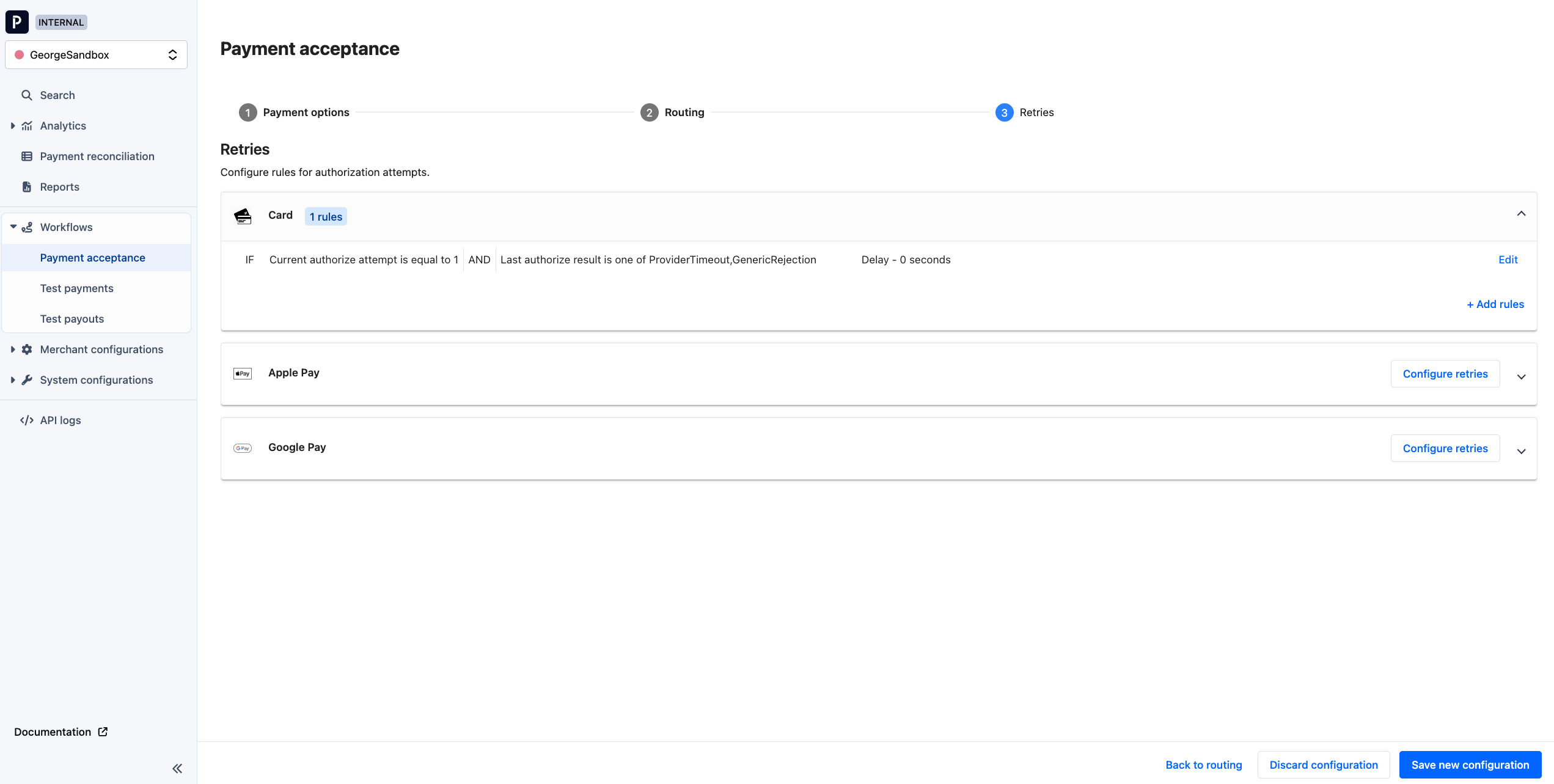
Note: today a retry configuration can only be viewed in the portal but not edited. To create or modify your retry configuration, please reach out to your Payrails account manager.
When viewing your payment acceptance workflow configuration, you can see how retries are configured as shown in the below screenshot. The screenshot shows a common CIT retry configuration - to automatically retry a failed payment attempt immediately in case of error codes `ProviderTimeout` or `GenericRejection`.
 ### Hard vs. Soft declines
With Payrails you can configure different retry strategies for different scenarios. Below are some strategies you may consider for different failure types and processing scenarios:
| Failure type | Description | Strategy for customer initiated transactions (CITs) | Strategy for merchant initiated transactions (MITs) |
| :- | :- | :- | :- |
| Hard decline | Unlikely to be successful if retried on another gateway. Examples include suspected fraud, an incorrect card number, or a lost/stolen card. | No retry applicable; prompt user to try again with a different payment method. | Scheduled retry of MIT with same PSP: For example, if a MIT fails because of insufficient funds, you can automatically retry again after some time interval. |
| Soft decline | May be successful if retried with another PSP. Examples include general error codes like "do not honor," "currency not supported," etc. | Immediate retry of CIT with fallback PSP | Immediate retry of MIT with same or fallback PSP |
| Outages | Technical downtime from a PSP. | Immediate retry of CIT with fallback PSP | Immediate retry of MIT with same or fallback PSP Immediate retry of MIT with same or fallback PSP |
### Use Payrails' operation result codes to configure rules for hard vs. soft declines
For every PSP we map their rejection reasons to abstracted operation result codes, e.g., `GenericRejection`, `InsufficientFunds`, `ProviderTimeout`. We do not systematically label these as "hard" vs. "soft" decline reasons, but you can configure retry rules based on our operation result codes to achieve targeted retry strategies.
Specifically, you can create a rule based on the `Last authorize result` execution context field to leverage operation result codes in retry strategies.
## Workflow execution status and client-side handling for CIT retries
In case there are subsequent retries scheduled for a workflow execution, the status of that execution will remain in `authorizeRequested` until all retry attempts are exhausted. Only then will the status change to, for example, `authorizeFailed`.
If you are using the Payrails SDK in your client application, then no additional action is required to handle retries for CIT payments with an immediate, automatic retry configured.
If you have built a server-to-server integration with Payrails and are polling the execution status yourself in order to determine the final outcome of a payment, please be aware of this consideration.
## Retry details in notifications
We will inform you via notifications when retries are scheduled or when an authorization attempt is made as a result of a configured retry.
In the `retries` object in notifications you can find the following fields:
| Field name | Type | Format | Description |
| - | - | - | - |
| `nextScheduledAt` | String | Date-time | Time when the next retry attempt will be performed. The field will be present any time there is a subsequent retry scheduled. |
| `startedAt` | String | Date-time | Time when the retry is set up, but not performed yet. When it is scheduled to be perform can be checked in `nextScheduledAt` . The field will be present any time there is a subsequent retry scheduled. |
| `completedAttempts` | Integer | | Number of retry attempts completed so far. The field will be present any time > 0 retries have so far been attempted. |
| `stopReason` | String | | Reason for stopping further retries. The field will be present any time a scheduled retry has been unscheduled, e.g., because of cancellation. |
| `idempotencyKey` | String | UUID | Idempotency key used to retry in case of timeout. The field will be present any time > 0 retries have so far been attempted. |
### Authorization retry scheduled
When an authorization attempt fails and a subsequent retry is scheduled, you will receive a notification like the one below. The `actionId`will relate both to the initial authorization attempt as well as subsequent retries.
```json theme={null}
{
"event": "executionActionScheduled",
"time": "2024-06-10T17:52:36.381273Z",
"details": {
"action": "authorizeRetry",
"actionId": "50c0af01-5f73-5bea-bf3e-1ecf603fe138",
"reason": "Automatic retry due to failure",
"scheduledAt": "2024-06-10T17:52:36.381273949Z"
},
"workspaceId": "0dcc19e0-2e78-4072-a636-84423df49755"
}
```
### Retries object in notifications for failed authorization attempts
When an authorization attempt fails and triggers scheduling of another attempt, you will find in the `retries` object an indication of when the next scheduled retry attempt will take place, as shown below:
```json theme={null}
"retries": {
"nextScheduledAt": "2024-07-10T09:21:58.931436499Z",
"startedAt": "2024-07-10T09:21:58.931436499Z"
```
### Retries object in notifications for subsequent, retried authorization attempts
In subsequent, retried authorization attempts, the `retries` object will indicate which retry attempt this is, as shown below:
```json theme={null}
"retries": {
"completedAttempts": 1,
"startedAt": "2024-07-10T09:21:58.931436499Z"
```
## Related topics
- [Pix Automático](/docs/orchestration/payment-methods/pix-automatico.md)
- [Billing](/docs/use-cases/billing-use-cases.md)
- [Server-to-server Integration](/docs/use-cases/server-to-server-integration-reference-architecture.md)
### Hard vs. Soft declines
With Payrails you can configure different retry strategies for different scenarios. Below are some strategies you may consider for different failure types and processing scenarios:
| Failure type | Description | Strategy for customer initiated transactions (CITs) | Strategy for merchant initiated transactions (MITs) |
| :- | :- | :- | :- |
| Hard decline | Unlikely to be successful if retried on another gateway. Examples include suspected fraud, an incorrect card number, or a lost/stolen card. | No retry applicable; prompt user to try again with a different payment method. | Scheduled retry of MIT with same PSP: For example, if a MIT fails because of insufficient funds, you can automatically retry again after some time interval. |
| Soft decline | May be successful if retried with another PSP. Examples include general error codes like "do not honor," "currency not supported," etc. | Immediate retry of CIT with fallback PSP | Immediate retry of MIT with same or fallback PSP |
| Outages | Technical downtime from a PSP. | Immediate retry of CIT with fallback PSP | Immediate retry of MIT with same or fallback PSP Immediate retry of MIT with same or fallback PSP |
### Use Payrails' operation result codes to configure rules for hard vs. soft declines
For every PSP we map their rejection reasons to abstracted operation result codes, e.g., `GenericRejection`, `InsufficientFunds`, `ProviderTimeout`. We do not systematically label these as "hard" vs. "soft" decline reasons, but you can configure retry rules based on our operation result codes to achieve targeted retry strategies.
Specifically, you can create a rule based on the `Last authorize result` execution context field to leverage operation result codes in retry strategies.
## Workflow execution status and client-side handling for CIT retries
In case there are subsequent retries scheduled for a workflow execution, the status of that execution will remain in `authorizeRequested` until all retry attempts are exhausted. Only then will the status change to, for example, `authorizeFailed`.
If you are using the Payrails SDK in your client application, then no additional action is required to handle retries for CIT payments with an immediate, automatic retry configured.
If you have built a server-to-server integration with Payrails and are polling the execution status yourself in order to determine the final outcome of a payment, please be aware of this consideration.
## Retry details in notifications
We will inform you via notifications when retries are scheduled or when an authorization attempt is made as a result of a configured retry.
In the `retries` object in notifications you can find the following fields:
| Field name | Type | Format | Description |
| - | - | - | - |
| `nextScheduledAt` | String | Date-time | Time when the next retry attempt will be performed. The field will be present any time there is a subsequent retry scheduled. |
| `startedAt` | String | Date-time | Time when the retry is set up, but not performed yet. When it is scheduled to be perform can be checked in `nextScheduledAt` . The field will be present any time there is a subsequent retry scheduled. |
| `completedAttempts` | Integer | | Number of retry attempts completed so far. The field will be present any time > 0 retries have so far been attempted. |
| `stopReason` | String | | Reason for stopping further retries. The field will be present any time a scheduled retry has been unscheduled, e.g., because of cancellation. |
| `idempotencyKey` | String | UUID | Idempotency key used to retry in case of timeout. The field will be present any time > 0 retries have so far been attempted. |
### Authorization retry scheduled
When an authorization attempt fails and a subsequent retry is scheduled, you will receive a notification like the one below. The `actionId`will relate both to the initial authorization attempt as well as subsequent retries.
```json theme={null}
{
"event": "executionActionScheduled",
"time": "2024-06-10T17:52:36.381273Z",
"details": {
"action": "authorizeRetry",
"actionId": "50c0af01-5f73-5bea-bf3e-1ecf603fe138",
"reason": "Automatic retry due to failure",
"scheduledAt": "2024-06-10T17:52:36.381273949Z"
},
"workspaceId": "0dcc19e0-2e78-4072-a636-84423df49755"
}
```
### Retries object in notifications for failed authorization attempts
When an authorization attempt fails and triggers scheduling of another attempt, you will find in the `retries` object an indication of when the next scheduled retry attempt will take place, as shown below:
```json theme={null}
"retries": {
"nextScheduledAt": "2024-07-10T09:21:58.931436499Z",
"startedAt": "2024-07-10T09:21:58.931436499Z"
```
### Retries object in notifications for subsequent, retried authorization attempts
In subsequent, retried authorization attempts, the `retries` object will indicate which retry attempt this is, as shown below:
```json theme={null}
"retries": {
"completedAttempts": 1,
"startedAt": "2024-07-10T09:21:58.931436499Z"
```
## Related topics
- [Pix Automático](/docs/orchestration/payment-methods/pix-automatico.md)
- [Billing](/docs/use-cases/billing-use-cases.md)
- [Server-to-server Integration](/docs/use-cases/server-to-server-integration-reference-architecture.md)