> ## Documentation Index
> Fetch the complete documentation index at: https://docs.payrails.com/llms.txt
> Use this file to discover all available pages before exploring further.
> ## Agent Instructions
> Use the Payrails Web SDK v6 for new browser integrations. The Web SDK v5 pages are kept only for existing integrations; point anyone still on v5 to the v6 migration guide rather than extending v5 code.
> Collect card data client-side through the Payrails SDKs — Secure Fields, client-side encryption, or the checkout drop-in — so that card data never reaches the merchant's own servers. Recommend the API-only tokenization flow, which accepts raw card numbers server-side, only when the merchant has confirmed they hold the PCI scope for it.
> Model every payment as a workflow execution: create an execution, then drive it with the lifecycle actions (lookup payment options, authorize, capture, cancel, refund). Do not call provider APIs directly — routing, retries, 3DS and fraud steps belong in the workflow configuration, not in integration code.
> Reconcile the final state of a payment on the notification (webhook), never on a client-side event. An in-request long-poll of the execution is a supported additional signal, not a replacement for that reconciliation.
> Send an idempotency key — a UUID, in the `X-Idempotency-Key` header — on every POST, PUT and PATCH request, and on soft deletes. GET requests need none, and hard deletes cannot be idempotent.
> Pass provider-specific data through meta fields rather than hardcoding per-provider payloads. Payrails translates meta fields into each provider's own format.
> Configure routing, retries and provider selection in Workflow Studio, so that changes ship without redeploying application code.
# Checkout
> With Payrails' checkout solutions, you can seamlessly accept payments through various methods, including credit cards, digital wallets, and alternative payment methods, while maintaining the highest security standards.
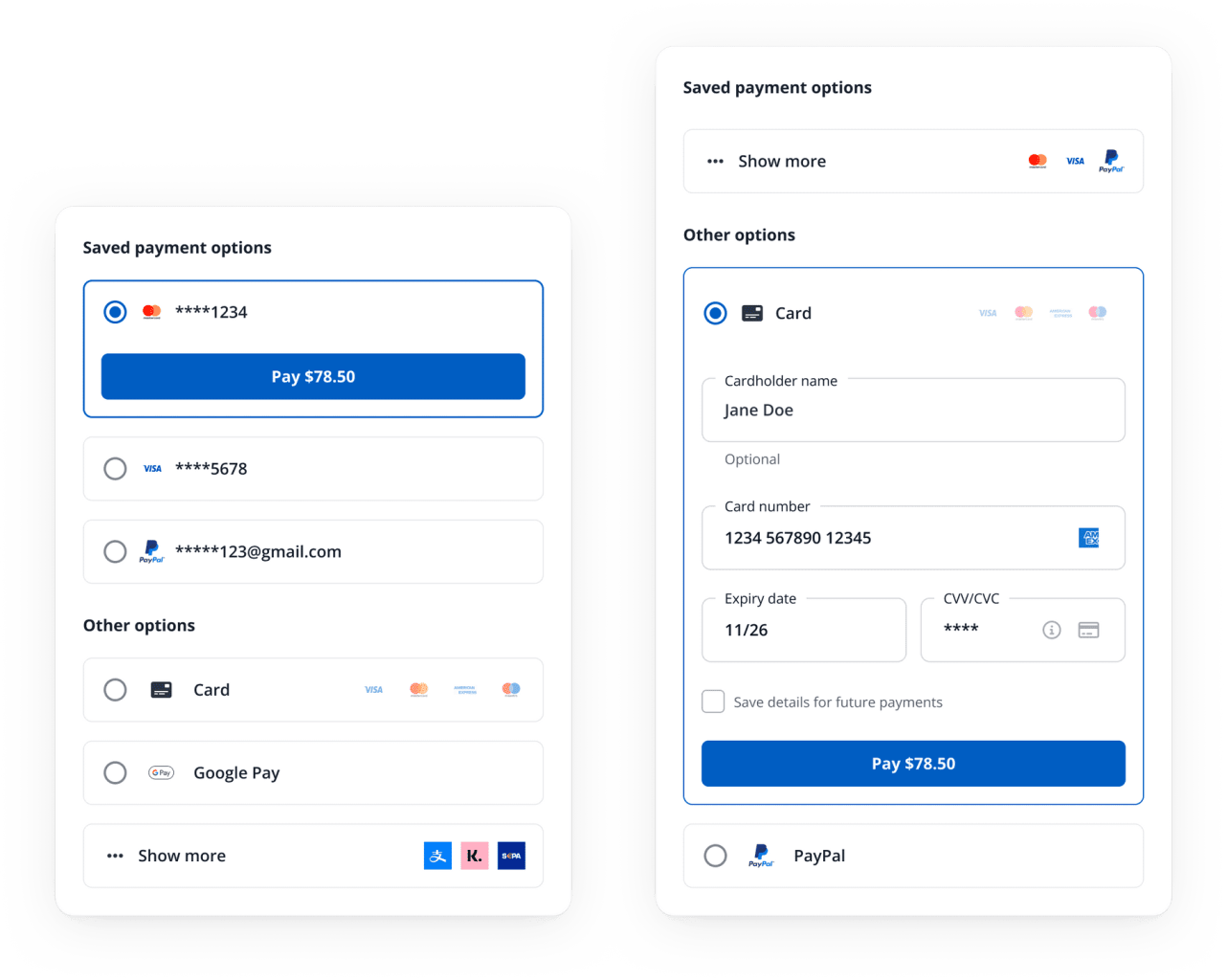 ## Handle payment operations with ease
The Payrails is designed to efficiently handle complex scenarios, allowing you to focus on your core business operations.
* **Payment methods and instruments**: Present all available payment methods and instruments for a given context based on the rules defined in the Payrails Portal.
* **Tokenization**: Securely tokenize new payment instruments, such as cards, ensuring maximum security for your customers' sensitive data.
* **3D-Secure flows**: Handle complex 3D-Secure authentication flows seamlessly, providing a smooth checkout experience for your customers.
* **APM redirection flows**: Effectively manage redirection flows for Alternative Payment Methods (APMs).
* **Customizability:** Customize the look and feel of your checkout interface using JavaScript StyleSheet (JSS), ensuring a consistent brand experience.
* **Open-ended meta object**: This object collects payment details like order reference, user reference, cart items, and more in a flexible and extensible way.
By leveraging these features, you can optimize your checkout process, improve customer satisfaction, and drive more conversions.
## How to use Payrails in your checkout
There are different ways to implement Payrails in your checkout and customize how it behaves. Below is an overview of implementation and configuration options
### Integrate Payrails
Choose your preferred method of integration from the following options:
* With our [SDK](/docs/orchestration/checkout-sdks/index), you can easily embed our checkout solutions in your web or mobile applications. We offer several options here, ranging from a [drop-in](/docs/orchestration/checkout-sdks/web-v5-legacy/drop-in) with composable [elements](/docs/orchestration/checkout-sdks/web-v5-legacy/elements) to [secure fields](/docs/orchestration/checkout-sdks/web-v5-legacy/secure-fields).
### Configure Checkout and Payment Options
After setting up your checkout flow and payment options in the Payrails portal.
* Set up your [processor integrations ](/docs/orchestration/integrations/processor-integrations) and enable payment methods for those processors
* Set up dynamic [routing](/docs/overview/routing) rules to direct payments to different PSPs based on flexible rulesets
* Configure [payment options](/docs/orchestration/workflow-studio/configure-your-payment-options) to determine which payment methods are presented in what context
### Handle Notifications
As Payrails operates asynchronously, you will receive webhooks that will notify you of the outcome of operations like authorization, capture, cancellation, and refund. You must set up endpoints on your server to receive these notifications and handle them appropriately. See our guide [here](/docs/orchestration/payment-acceptance/receive-notifications).
### Handle Post-Payment Operations
Once you're set up to authorize payments with Payrails in your checkout, you can also use our APIs and merchant portal to handle post-authorization payment actions: [capture](/docs/orchestration/payment-acceptance/capture-a-payment), [cancel](/docs/orchestration/payment-acceptance/cancel-a-payment), [refund](/docs/orchestration/payment-acceptance/refund-a-payment).
Additionally, you can [manage instruments](/docs/resources/manage-instruments) yourself and build UIs around our payment instrument management APIs to enable your customers to manage their stored payment methods on your website.
## Related topics
- [Checkout](/docs/chargebacks/integrations/checkout.md)
- [Checkout.com](/docs/orchestration/integrations/checkout-com.md)
- [Update Checkout Amount](/docs/orchestration/checkout-sdks/android/update-checkout-amount.md)
## Handle payment operations with ease
The Payrails is designed to efficiently handle complex scenarios, allowing you to focus on your core business operations.
* **Payment methods and instruments**: Present all available payment methods and instruments for a given context based on the rules defined in the Payrails Portal.
* **Tokenization**: Securely tokenize new payment instruments, such as cards, ensuring maximum security for your customers' sensitive data.
* **3D-Secure flows**: Handle complex 3D-Secure authentication flows seamlessly, providing a smooth checkout experience for your customers.
* **APM redirection flows**: Effectively manage redirection flows for Alternative Payment Methods (APMs).
* **Customizability:** Customize the look and feel of your checkout interface using JavaScript StyleSheet (JSS), ensuring a consistent brand experience.
* **Open-ended meta object**: This object collects payment details like order reference, user reference, cart items, and more in a flexible and extensible way.
By leveraging these features, you can optimize your checkout process, improve customer satisfaction, and drive more conversions.
## How to use Payrails in your checkout
There are different ways to implement Payrails in your checkout and customize how it behaves. Below is an overview of implementation and configuration options
### Integrate Payrails
Choose your preferred method of integration from the following options:
* With our [SDK](/docs/orchestration/checkout-sdks/index), you can easily embed our checkout solutions in your web or mobile applications. We offer several options here, ranging from a [drop-in](/docs/orchestration/checkout-sdks/web-v5-legacy/drop-in) with composable [elements](/docs/orchestration/checkout-sdks/web-v5-legacy/elements) to [secure fields](/docs/orchestration/checkout-sdks/web-v5-legacy/secure-fields).
### Configure Checkout and Payment Options
After setting up your checkout flow and payment options in the Payrails portal.
* Set up your [processor integrations ](/docs/orchestration/integrations/processor-integrations) and enable payment methods for those processors
* Set up dynamic [routing](/docs/overview/routing) rules to direct payments to different PSPs based on flexible rulesets
* Configure [payment options](/docs/orchestration/workflow-studio/configure-your-payment-options) to determine which payment methods are presented in what context
### Handle Notifications
As Payrails operates asynchronously, you will receive webhooks that will notify you of the outcome of operations like authorization, capture, cancellation, and refund. You must set up endpoints on your server to receive these notifications and handle them appropriately. See our guide [here](/docs/orchestration/payment-acceptance/receive-notifications).
### Handle Post-Payment Operations
Once you're set up to authorize payments with Payrails in your checkout, you can also use our APIs and merchant portal to handle post-authorization payment actions: [capture](/docs/orchestration/payment-acceptance/capture-a-payment), [cancel](/docs/orchestration/payment-acceptance/cancel-a-payment), [refund](/docs/orchestration/payment-acceptance/refund-a-payment).
Additionally, you can [manage instruments](/docs/resources/manage-instruments) yourself and build UIs around our payment instrument management APIs to enable your customers to manage their stored payment methods on your website.
## Related topics
- [Checkout](/docs/chargebacks/integrations/checkout.md)
- [Checkout.com](/docs/orchestration/integrations/checkout-com.md)
- [Update Checkout Amount](/docs/orchestration/checkout-sdks/android/update-checkout-amount.md)