

Overview
With Payrails you can create workflow configurations to automatically retry failed payment authorization attempts, thereby improving the overall payment acceptance rate and enhancing customer experience.Key features
Conditional, rules-based retry logic
You can create rules based on any fields related to the authorization request body or workflow execution context. This includes but is not limited to:- Authorization request body fields
- Meta fields
- Workflow execution context fields, e.g.,
Current authorize attempt numberandLast authorize result. Such fields can be used to create complex rules around conditional retry logic.
Flexible scheduling automation
Automatic retry scheduling allows you to flexibly schedule automated retries either immediately after the first failed attempt in case of CITs or on some defined delay or schedule in case of MITs. For example, you may configure:- A simple automation delay, e.g., retry immediately after 0 seconds, or retry after 24 hours
- A scheduled retry attempt at a specific date and time, e.g., retry on 01.01.2025 at 01:00:00
Fallback Mechanism
You can configure a retry either with the same PSP or a different PSP. In case you configure a retry with a different PSP, Payrails will handle transforming the request body and automatically making the authorization request with the configured fallback PSP.Idempotency Handling
Retries can only be attempted with PSPs that support idempotency. In case of a configured retry with a provider that does not support idempotency, we will not attempt an authorization and instead will indicate inretries.stopReason in a notification that Provider failed with Timeout and does not support idempotency.
How to Configure Retries
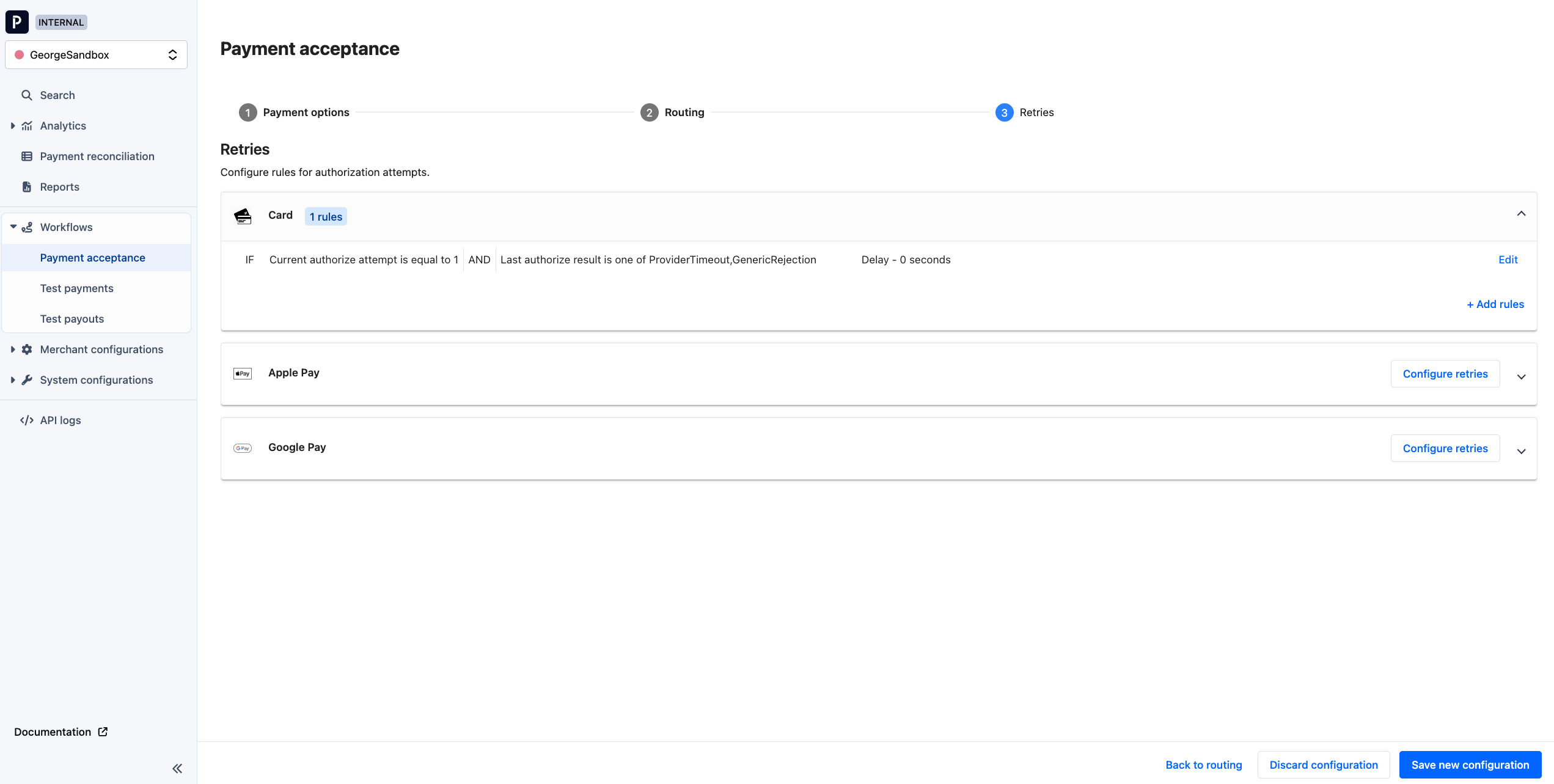
Retries configuration in the merchant portal
Note: today a retry configuration can only be viewed in the portal but not edited. To create or modify your retry configuration, please reach out to your Payrails account manager.
ProviderTimeout or GenericRejection.
Hard vs. Soft declines
With Payrails you can configure different retry strategies for different scenarios. Below are some strategies you may consider for different failure types and processing scenarios:Use Payrails’ operation result codes to configure rules for hard vs. soft declines
For every PSP we map their rejection reasons to abstracted operation result codes, e.g.,GenericRejection, InsufficientFunds, ProviderTimeout. We do not systematically label these as “hard” vs. “soft” decline reasons, but you can configure retry rules based on our operation result codes to achieve targeted retry strategies.
Specifically, you can create a rule based on the Last authorize result execution context field to leverage operation result codes in retry strategies.
Workflow execution status and client-side handling for CIT retries
In case there are subsequent retries scheduled for a workflow execution, the status of that execution will remain inauthorizeRequested until all retry attempts are exhausted. Only then will the status change to, for example, authorizeFailed.
If you are using the Payrails SDK in your client application, then no additional action is required to handle retries for CIT payments with an immediate, automatic retry configured.
If you have built a server-to-server integration with Payrails and are polling the execution status yourself in order to determine the final outcome of a payment, please be aware of this consideration.
Retry details in notifications
We will inform you via notifications when retries are scheduled or when an authorization attempt is made as a result of a configured retry. In theretries object in notifications you can find the following fields:
Authorization retry scheduled
When an authorization attempt fails and a subsequent retry is scheduled, you will receive a notification like the one below. TheactionIdwill relate both to the initial authorization attempt as well as subsequent retries.
Retries object in notifications for failed authorization attempts
When an authorization attempt fails and triggers scheduling of another attempt, you will find in theretries object an indication of when the next scheduled retry attempt will take place, as shown below:
Retries object in notifications for subsequent, retried authorization attempts
In subsequent, retried authorization attempts, theretries object will indicate which retry attempt this is, as shown below: