

Before start
Across this guide we will often use words Instrument, vault token, alias, record. We recommend to get familiar with these concepts by reading Payment Instruments and Tokens and Records, Aliases and Instrument pages. In short, details of single card is stored in our vault as Record. Record consists of several fields like card number, cardholder name, expiry month - each of these fields has alias that can be used in configurable proxy requests. Vault records can be “attached” to instruments as Token.High level overview
Process of migrating card data consists of following steps which should be executed for each card that you want to migrate to Payrails.- Merchant send request to PSP’s special “forwarding” API endpoint.
- Merchant’s PSP forwards that request to Payrails with raw card details inside of the body.
- Payrails tokenize card in our Token Vault and returns alias/token information.
- This response is returned to merchant.
- Merchant updates or creates instrument in Payrails using data returned on previous step.
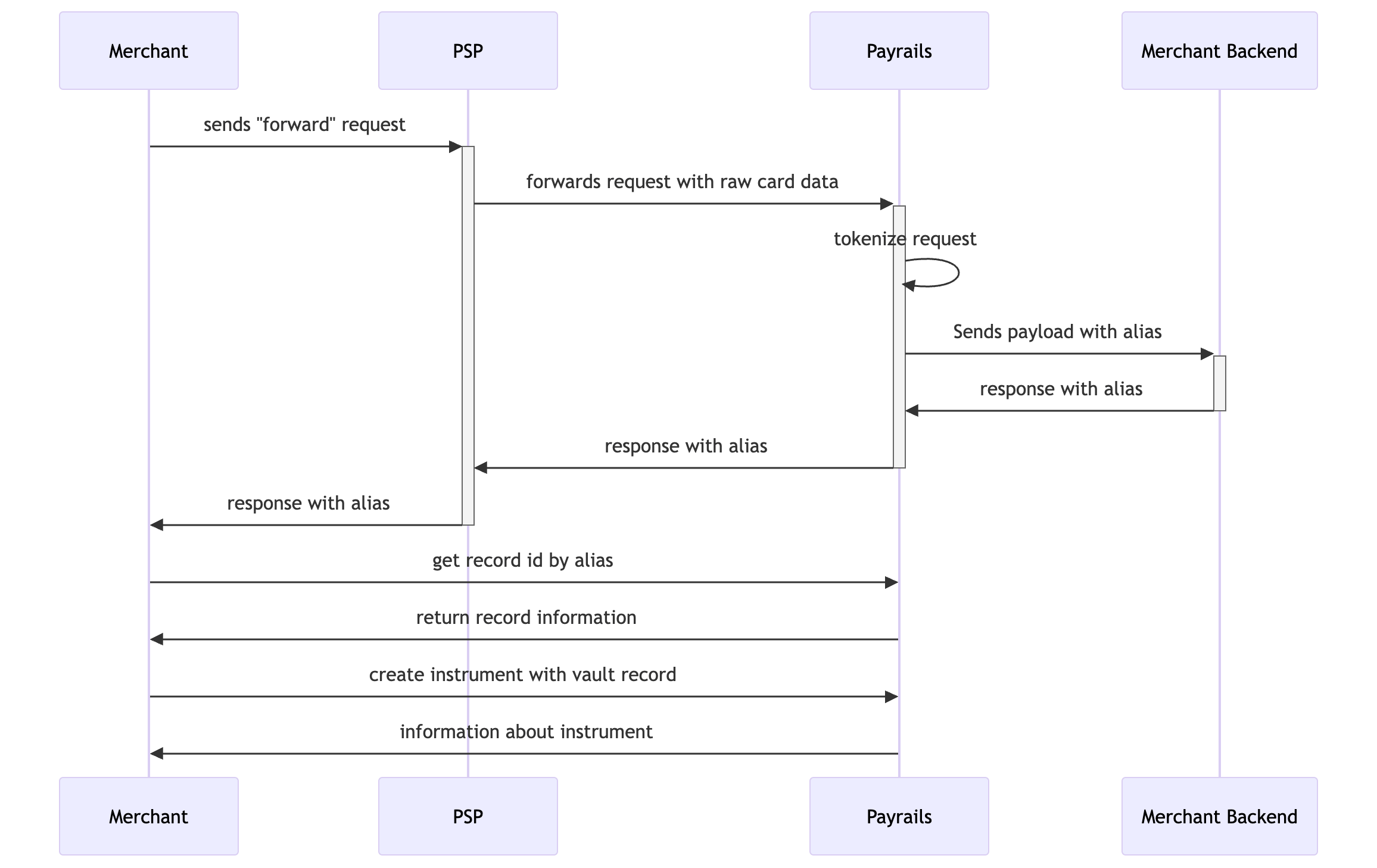
What is a forwarding request?
This is a request you execute to Stripe/Adyen API and which securely forwards (hence the name of it) detokenized card data to Payrails. By calling this “forwarding” endpoints you can send card data to Payrails without need to execute For each PSP implementation details and how exactly these calls are executed is different, but concept is the same.Use same approach for “account updater” use case
Approach described in this guide can be used as well for other cases when you want to transfer new or updated card details to Payrails, for example when certain card is part of Account Updater in your PSP. In this case when you receive notification or webhook that certain card details were updated you can “forward” updated card details to Payrails.One-time setup steps
Step 1 - Enable capability on PSP side. Endpoints “Forward stored credentials” in Checkout, or “Forward payment details” in Adyen, or “Forwarding Requests” in Stripe, or “Forward API” in Braintree are not active by default and in order to use it merchant needs to provide proof that destination (Payrails) is PCI compliant party. Please reach out to our customer support team to get necessary documents that proves it. Step 2 - Enable and configure inbound connections in Payrails. In order to receive requests from 3rd parties (which in this case are Adyen or Checkout) merchant needs to configure inbound proxy connection. Step 3 - Get vault provider ID and config ID. Payrails is a modular platform and there is a support of multiple vaults, therefore in order to “attach” new token to an instrument, you will need to provide information about which vault this token belongs to. You can call API endpointGET /payment/instruments/:instrumentId?includeTokens=true for any instrument you have and get this data from response:
Response of call
Execute migration
Step 1 - send API request to PSP. Now merchant can send request to API endpoint of Stripe or API endpoint of Checkout which will be forwarded to inbound connection you configured before. On example of Adyen here is request merchant will send to Adyen’s API:Request to Adyen
{{number}} with real data and forwards request to URL you provided. It means there will be call executed to URL https://yourcompany.proxy.vault.payrails.io/tokenize-from-adyen with following body:
Request from Adyen to Payrails
Tokenized payload (from Payrails to merchant's backend)
5062d8a5-46cc-42fd-954b-5c469c4664d8 is alias of card number.
This tokenized payload is forwarded to your backend (to “echo” endpoint) and it returned all the way back.
To summarize, you execute request with body as in code block “Request to Adyen” and as result of this call you get response as per code block “Tokenized payload”.
Step 2 - get Payrails Vault Record ID. As result of operation on previous step you got alias of card number. Using call to Payrails API endpoint “Get field details by alias” you can get information about record this alias belongs to. Let’s say c2e1632d-ac6b-4f83-a89e-253d33a356b6is record ID you got as result.
Step 3 - using Vault Record ID update or create instrument. Next you can call “Create Instrument” endpoint with payload like:
Created instrument
request
response
Difference between replacing token in instrument and creating new instrument
When you update instrument and add new vault token to it, meta data stored in instrument is not updated with new values. For example, if new card has updated expiration date these values will not be updated to new values. Below you can see example of response for “get instrument” call where certain fields are marked that won’t be receive new values when new vault token is added to instrument.Example of response
Example call to create instrument