

Learn how to receive webhook notifications from Payrails to stay informed about the outcomes of asynchronous actions such as authorize, capture, cancel, refund, and more.
Introduction
A notification is a webhook sent by Payrails to inform you of the outcome of an asynchronous action such as authorization, capture, cancellation, refund, etc. Notifications are sent to specified endpoints on your server in JSON format using the HTTP POST method.How to start receiving notifications from Payrails
To start receiving notifications, follow these steps:1. Expose an Endpoint on Your Server
Create an exposed endpoint on your server that accepts HTTP requests in JSON format.2. Configure endpoint URLs in Payrails Portal
Navigate to the Payrails Portal to configure the endpoint URL(s) where you want to receive notifications. To do this, go to Configurations > Settings in the Portal menu. Add the endpoint URL(s) under the Notifications section, and click on “Save changes”. When adding a new notification URL, Payrails will generate an HMAC key for that endpoint. This HMAC key secures the communication between Payrails and your server. The HMAC key will only be revealed once for security purposes. Ensure that you securely store this HMAC key. You can also rotate the HMAC key for a notification endpoint. When rotating the HMAC key, the previous HMAC will no longer work, and you’ll need to replace it with the newly generated HMAC in your systems. For security purposes, the new HMAC will only be revealed once. You will now start receiving notifications for new executions at your saved URLs, and each URL will receive for each execution the notifications detailed in our Notifications guide. Notifications for existing executions will continue to be delivered to the URLs in place when those executions are created. You can review, add, or delete the URLs from this page anytime.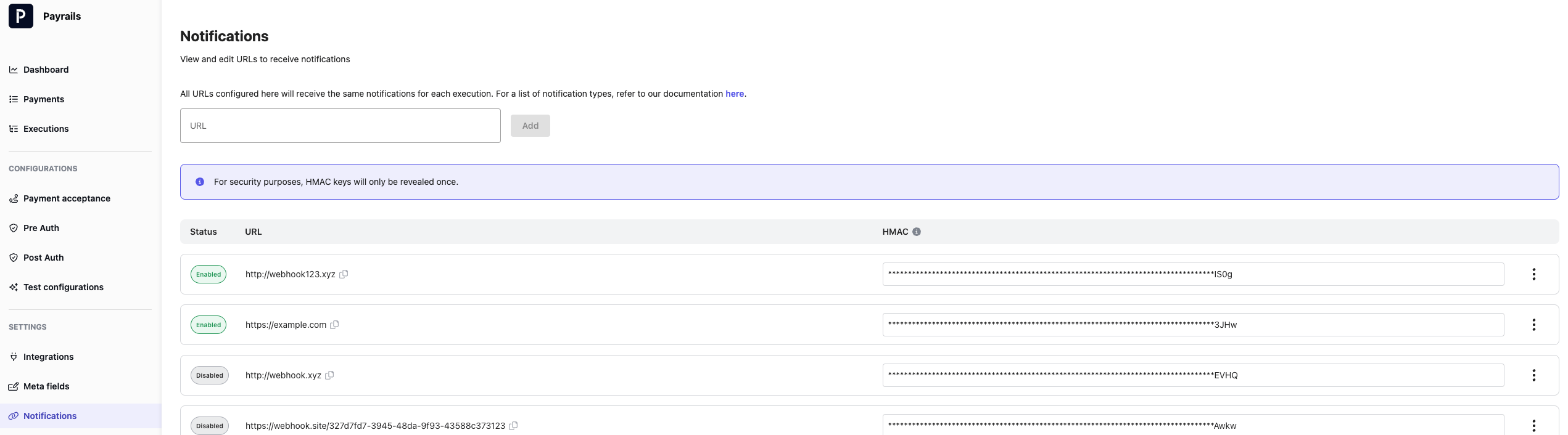
3. Accept Notifications
Notifications will be sent using the HTTP POST method in the format shown below. Acknowledge that you received the notification by replying with a HTTP 200 response. Calculate and Verify the HMAC Signature Each notification request contains anX-Signature header, which is a signature of the request body, to allow you to verify that Payrails is the sender of the notification. The signature is calculated using the HMAC-SHA256 algorithm and a secret key.
To verify the X-Signature header’s value, calculate the HMAC signature as described above, and compare it to the header value. If they match, the notification is valid.
Example:
Secret Key: 44782DEF547AAA06C910C43932B1EB0C71FC68D9D0C057550C48EC2ACF6BA056
Request Header: X-Signature: /9RS0Gfxl2C6j1akmI5/l0y+FTygmNmEPU/2nNYMYTQ=
Here are some simple example codes in different languages for your reference. Please make sure you handle exceptions correctly and adapt them to your use case.