

Client Side Encryption assumes that the Card Holder Data is exposed to the client side HTML DOM before being encrypted and therefore accessible to javascript code, marketing tags and browser plugins. To isolate the Card Holder Data from the rest of the page, you can either build your own isolated iframe for the collection form or adopt our Secure Fields.
How it works
- You collect the payment details from your customer
- You encrypt the payment details with a public key given by Payrails
- You send the encrypted data to the tokenization endpoint of Payrails
- Payrails returns a tokenized Payment Instrument
To make sure your frontend can communicate securely with Payrails, you must first fetch configurations from your server side application. Call the client init endpoint with type
tokenization.- With Payrails CSE SDK: include the
payrails/web-cseto your page and benefit from our utilities to tokenize and eventually save the card. - With your own client-side implementation: Use the public key provided by the Payrails configurations to encrypt the data.
With Payrails CSE SDK
Here’s a tokenization flow with the surface covered by the SDK colored in purple: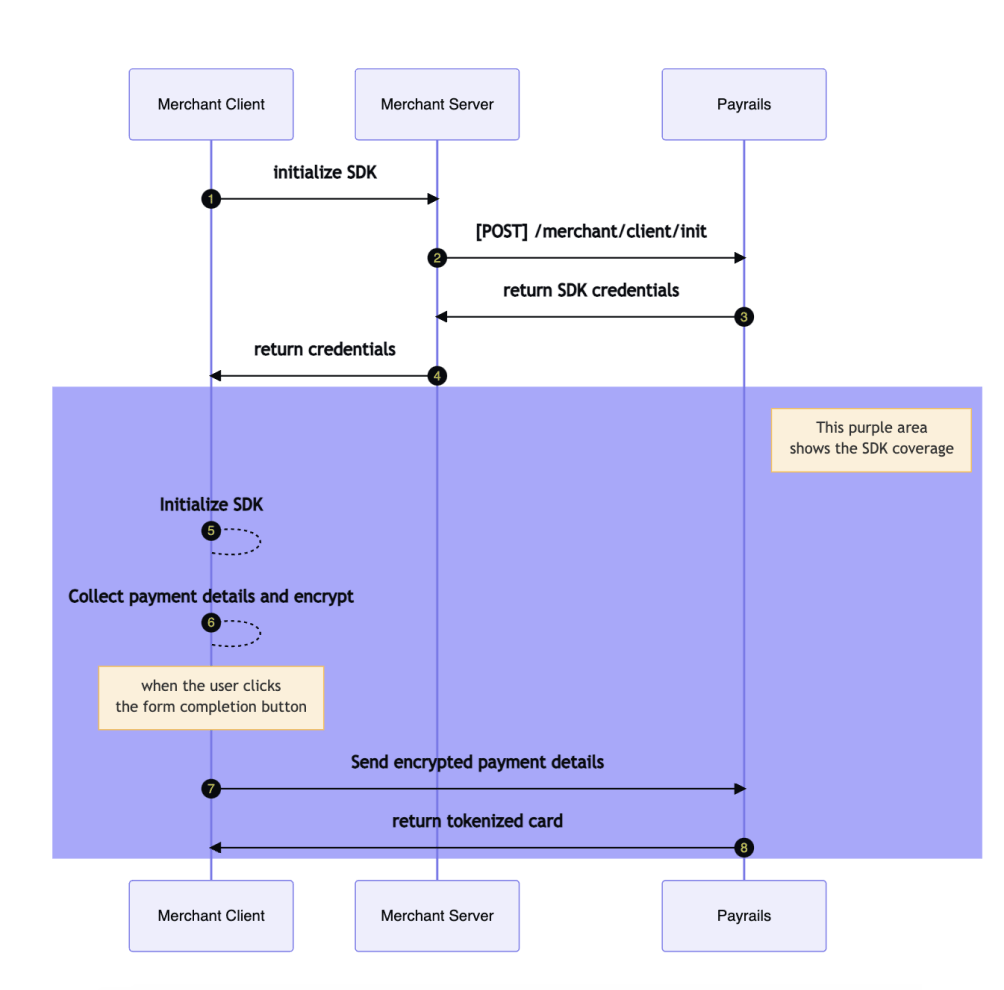
Web CSE SDK
The Client Side Encryption is available for the Web. The SDK is available as anpm package. After the SDK is initialized, you can leverage the SDK features to customize the user experience. The interfaces related to client-side encryption are InitResponse, Card and PayrailsCSE.How to use the SDK:
- Install the npm package
- Use the SDK to encrypt the card details and tokenize the card
- Optionally, you can encrypt the card for using it in another use case, like the Vault Proxy feature.
For the use case of encrypting only the security code of the card, you can also use the
encryptCardData function like this:Android CSE SDK
The Client Side Encryption is available for Android. The SDK is available as an Android library on Maven Central. How to use the SDK:- Make sure you use Maven Central as a repository and add the library as a dependency (replace
X.Y.Zwith the latest version from Maven Central):
- Use the SDK to encrypt the card details or tokenize the card
- This feature is available as of version
v1.4.0
The SDK does an API call and should therefore be called from within the IO thread with
Dispatchers.IOFor the use case of encrypting only the security code of the card, you can also use the
encryptCardData function like this:iOS CSE SDK
The Client Side Encryption is available for Android. The SDK is available on Github How to use the SDK:- You can install the SDK by adding the following line to your
Podfile
Ruby
- Use the SDK to encrypt the card details or tokenize the card
- Optionally, you can encrypt the card to use it in another use case, like the Proxy payment instruments feature. This feature is available as of version
v0.2.0.
For the use case of encrypting only the security code of the card, you can also use the
encryptCardData function like this:With your own client-side implementation
You can implement encryption in 4 steps: Step 1. Fetch Payrails configuration from your server-side From your server-side application, with a valid authentication token, fetch the tokenization configuration from Payrails via the client init endpoint with the typetokenization and get the response:
e.g.
data field can be decoded from base64 into a JSON object like this:
token: the authentication token to use from the client when calling the tokenization endpoint- The authentication token is only valid for the given tokenization ID and holder reference. Make sure you send the same values when calling the Tokenize an instrument endpoint.
tokenization.id: the tokenization ID to use from the client when calling the tokenization endpointtokenization.publicKey: the public key to encrypt the payment details on the client-sidetokenization.links.tokenize.href: the URL of the tokenization endpoint from the client to tokenize the payment details
- The public key is a PKCS8 RSA public key in the
PEMformat without header and line breaks - The encrypted data should be encoded as a base64 string
- See for example
SubtleCrypto.encrypt()