
Billing
Use Payrails to collect and charge payment methods while your billing engine owns subscriptions, invoices, and dunning.
This guide shows how to pair a billing engine with Payrails for sign-up, renewals, retries, and instrument management.
Supported billing engines
Payrails works with any billing engine that:
- Creates invoices for subscription charges
- Sends invoice lifecycle webhooks (for example, “invoice ready to pay”)
- Exposes an API to record external payments against invoices
Examples include an in-house billing engine or third-party systems such as Stripe, Chargebee, Metronome, Recurly, Lago, and others.
flowchart LR

classDef surface fill:#f6f8fa,stroke:#9aa0a6,color:#202124
classDef platform fill:#e8f0fe,stroke:#1a73e8,color:#174ea6
classDef biz fill:#fff7e6,stroke:#f29900,color:#8a4b00
classDef fin fill:#eaf7f1,stroke:#137333,color:#0d4727

subgraph Customer_Frontend["Your frontend"]
FE[Web and mobile experiences]
end

class FE surface
subgraph Customer_Backend["Your backend"]
BE[Billing service]
end

class BE surface
subgraph Payrails["Payrails"]
PR[Payments OS]
end

class PR platform
subgraph Billing_Engine["Billing engine"]
BL[Subscriptions, invoicing, and dunning]
end

class BL biz
subgraph Payment_Providers["Payment providers"]
PSP[Acquirers and PSPs]
end

class PSP fin

%% Core interactions
FE <--> BE
FE <-- Secure payment interactions --> PR
BE <--> PR
BE <--> BL
PR <--> PSP
User journeys
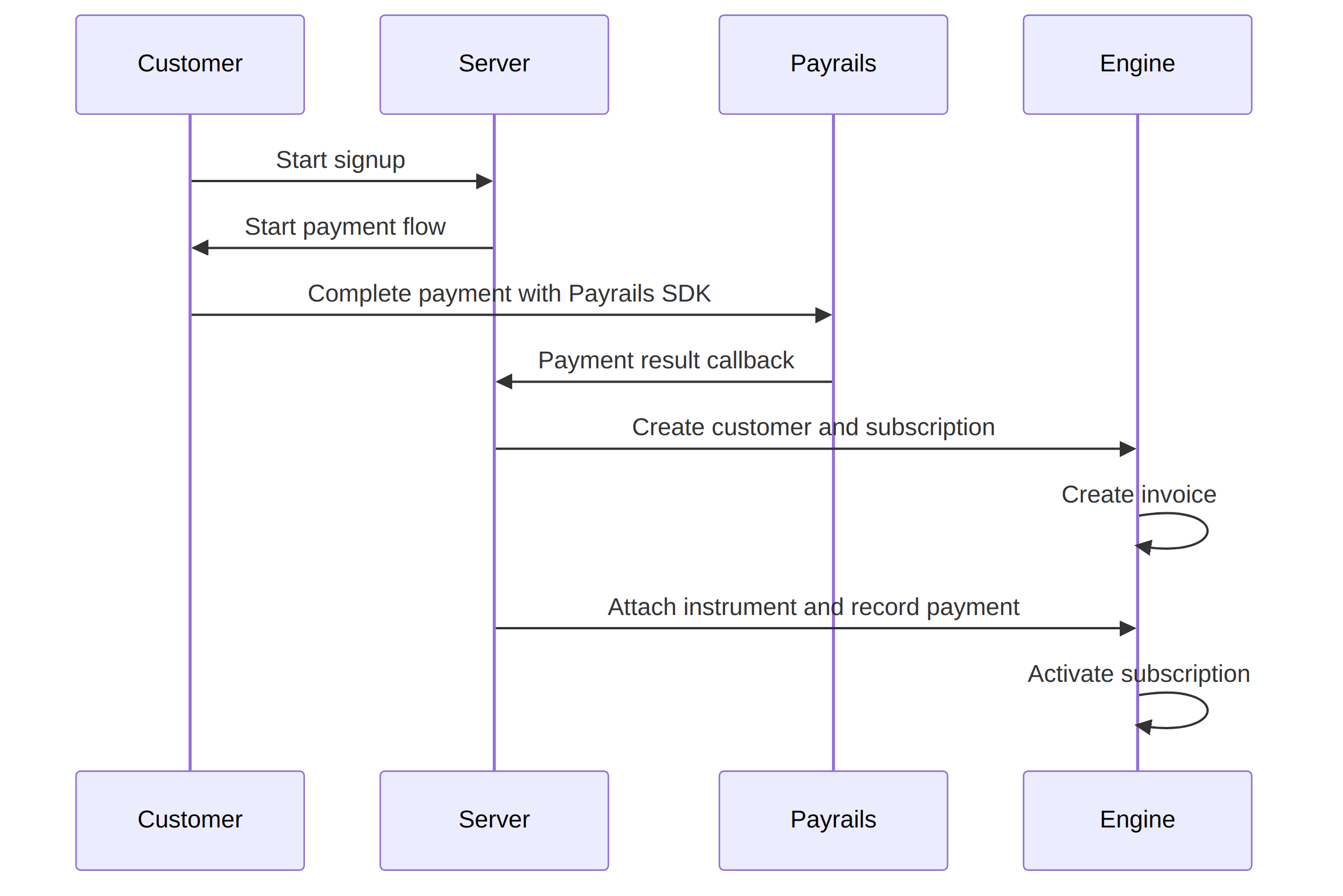
End-user experience:
- Pay with a preferred payment method, whether card or local payment method
Recommended approach:
- Your billing engine creates a customer and subscription and generates an invoice.
- Payrails Drop-in or Elements collects and stores a payment instrument.
- Your backend records the successful payment in your billing engine and links the stored instrument for future renewals.
End-user experience:
- Update payment methods, manage subscriptions, and view previous invoices in a branded portal
Recommended approach:
- Own the customer portal UX.
- Payrails Drop-in or Elements collects and updates payment instruments.
- Retrieve payment history via
PayrailsAPIs and invoice history from billing engine APIs.
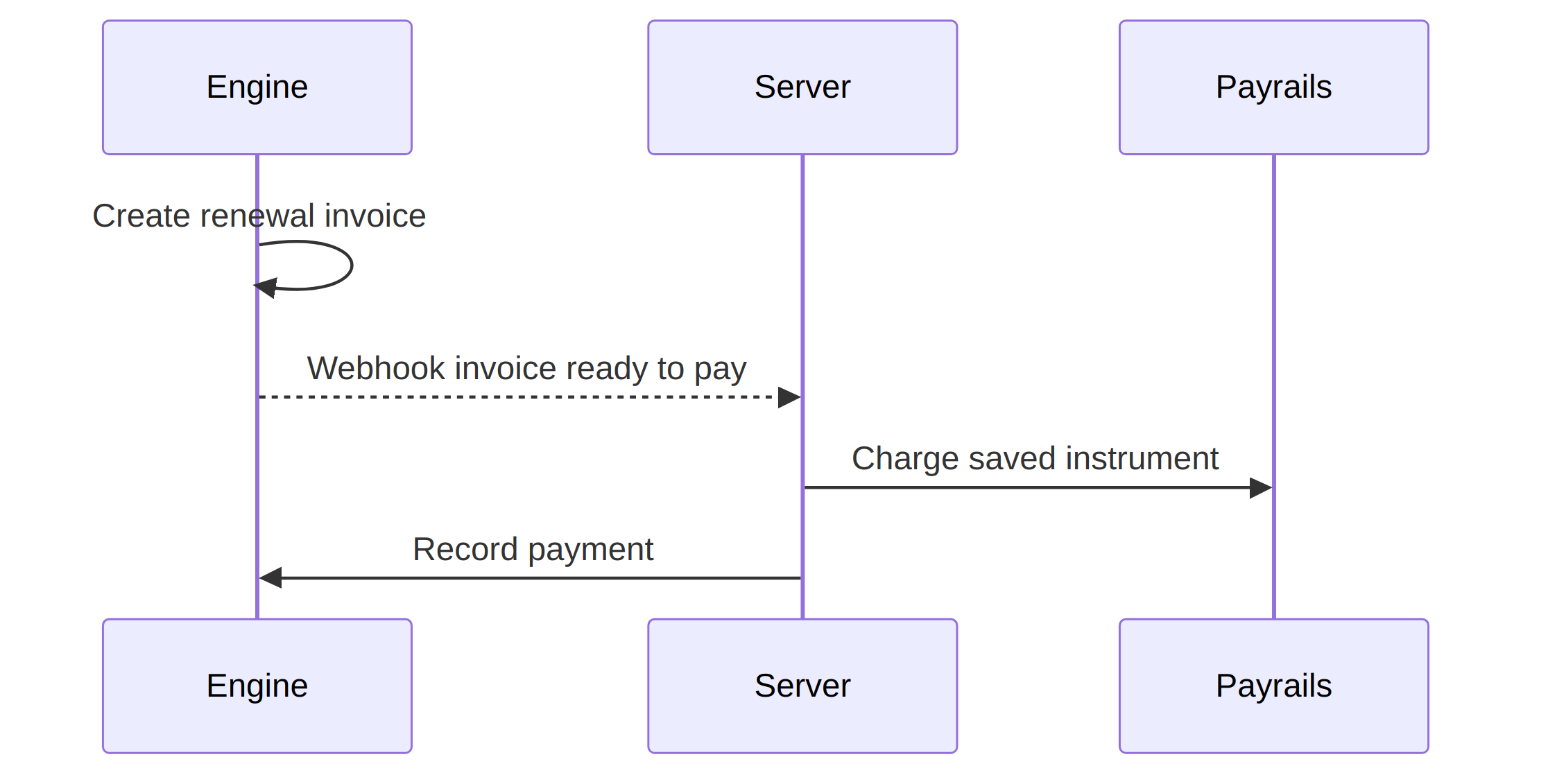
End-user experience:
- Renewals run on saved credentials with correct flags for COF/MIT and SCA as needed
Recommended approach:
- Your billing engine generates a renewal invoice and notifies your backend.
- Your backend instructs Payrails to charge a stored instrument.
- Payrails runs orchestration for the attempt.
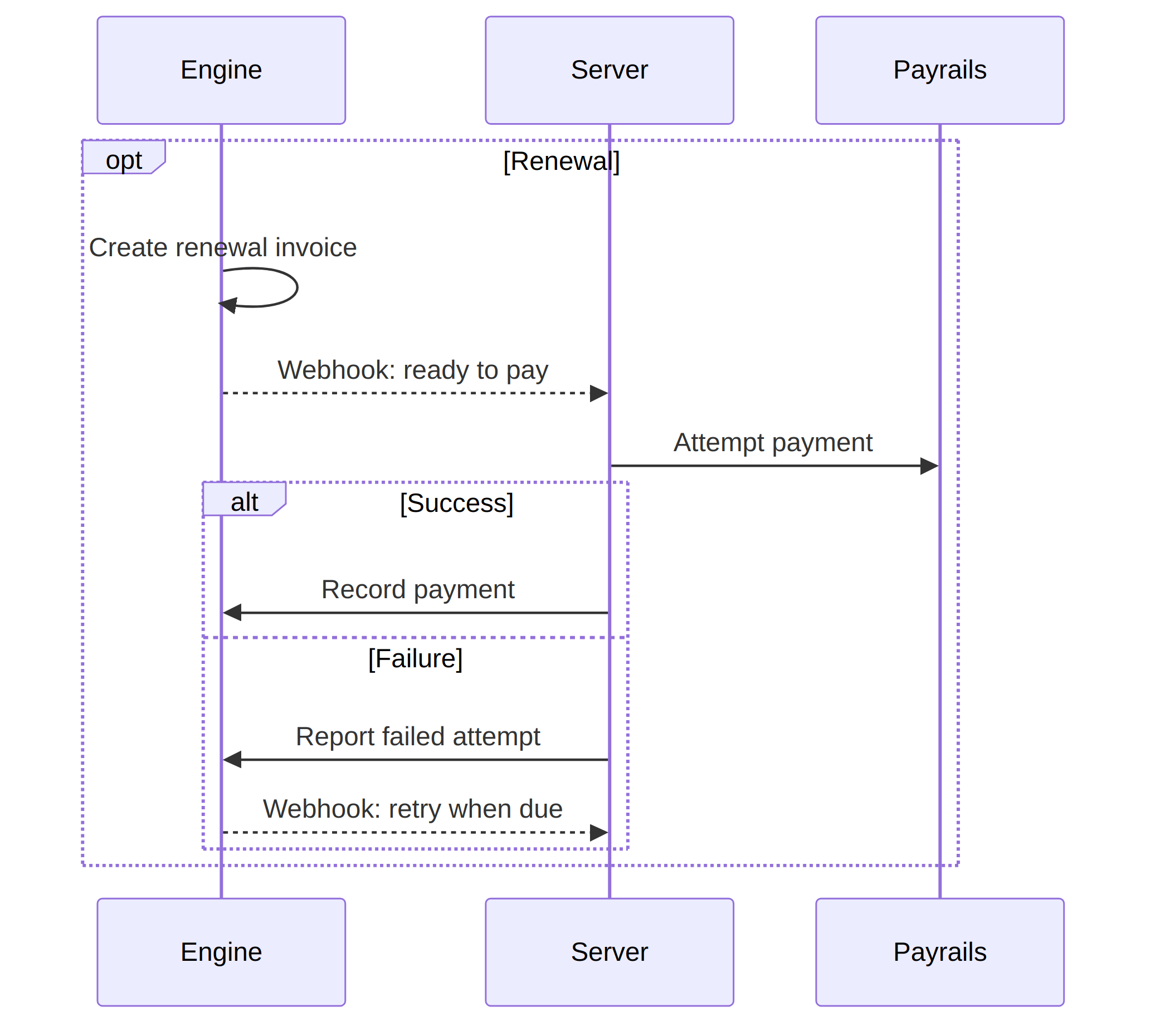
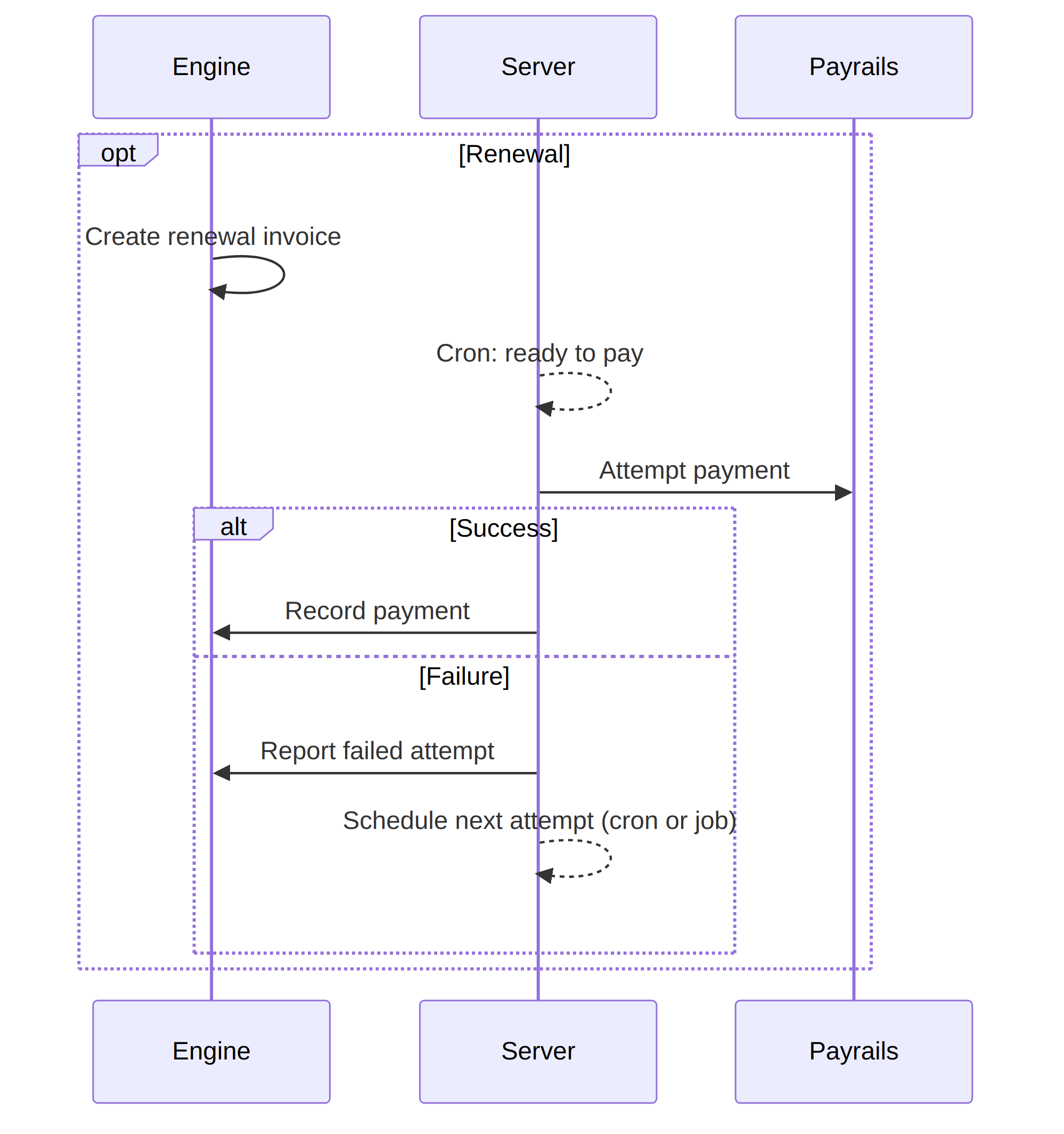
End-user experience:
- Receive clear communication of upcoming renewals
- In the event of failure, receive a link to update payment methods
Recommended approach:
- If your engine supports webhook-driven retries, listen to the events and instruct Payrails to charge a stored instrument and report attempt outcomes.
- If not, schedule retries in your backend to instruct Payrails to charge a stored instrument.
Ownership note:
- Payrails performs payment orchestration upon receiving a request to retry a payment.
- Either the engine or your system owns dunning emails and cadence of retries.
- The
PayrailsPSP retry cascading happens per payment attempt: one billing engine attempt triggers one Payrails execution with multiple attempts across providers.
Engine supports webhook retries
Engine does not support webhook retries
Integration details
This guide uses a fictional subscription business called Needle & Groove. The examples are in TypeScript, but the API calls apply in any language.
Understand the identifiers
Align these identifiers across your frontend, backend, Payrails, and billing engine:
holderReference: Your customer identifier. Make sure your billing engine contains a reference from the customer object to this identifier.invoiceId: The invoice you need to pay (created by your billing engine).paymentInstrumentId: The stored Payrails instrument to charge for renewals.paymentId: ThePayrailspayment transaction identifier for an attempt. Store it against the invoice to reconcile billing-engine invoice attempts with Payrails outcomes.merchantReference: A unique identifier for the payment attempt. A common choice isinvoiceIdplus the attempt number.
In Payrails, represent amounts in major units strings (for example, 25.00 for €25.00) and use ISO 4217 currencies.
Set up server-side Payrails access
Payrails accessMake Payrails API calls from your server and keep credentials off the client.
Use these Payrails docs to set up authentication and mutual TLS:
The server endpoints in this guide follow this recommended pattern:
POST /api/payrails/initcallsPayrailsPOST /merchant/client/initusing mTLS + OAuth.POST /api/payrails/executioncallsPayrailsPOST /merchant/workflows/{workflowCode}/executions.GET /api/payrails/instruments?holderReference=...lists instruments for a customer.
Accept the first subscription payment
This guide creates the invoice in your billing engine first. Then initializes Payrails with the invoice amount and collect a payment method. Authorize the payment first and only create the invoice once you are sure a payment has been successful to not have unused subscriptions.
- Create a subscription and invoice in your billing engine
Return at least these fields to your frontend:
invoiceIdamountcurrency
Example request to your billing engine adapter:
type CreateSubscriptionRequest = {
  email: string
  amountMinor: number
  currency: string
  holderReference: string
  interval: 'month' | 'year' | '...'
}

type CreateSubscriptionResponse = {
  invoiceId?: string
  amount: string
  currency: string
  holderReference: string
  customer?: { id: string }
  subscription?: { id: string }
}

export async function createSubscriptionAndInvoice(baseUrl: string) {
  const body: CreateSubscriptionRequest = {
    email: '[email protected]',
    amount: 25.00,
    currency: 'EUR',
    holderId: 'b8fe6271-5d71-4d28-b8e8-89e64acc0c49',
    interval: 'month',
  }

  const res = await fetch(`/api/subscriptions`, {
    method: 'POST',
    headers: { 'Content-Type': 'application/json' },
    body: JSON.stringify(body),
  })

  if (!res.ok) throw new Error(await res.text())
  return (await res.json()) as CreateSubscriptionResponse
}
from typing import TypedDict, Optional
import requests
class CreateSubscriptionResponse(TypedDict, total=False):
invoiceId: str
amount: str
currency: str
holderReference: str
customer: dict
subscription: dict
def create_subscription_and_invoice(base_url: str) -> CreateSubscriptionResponse:
body = {
"email": "[email protected]",
"amount": 25.00,
"currency": "EUR",
"holderId": "b8fe6271-5d71-4d28-b8e8-89e64acc0c49",
"interval": "month",
}
res = requests.post(f"/api/subscriptions", json=body)
res.raise_for_status()
return res.json()import java.net.URI;
import java.net.http.HttpClient;
import java.net.http.HttpRequest;
import java.net.http.HttpResponse;
public class BillingEngineExample {
public static String createSubscriptionAndInvoice(String baseUrl) throws Exception {
String json = "{" +
"\"email\":\"[email protected]\"," +
"\"amount\":25.00," +
"\"currency\":\"EUR\"," +
"\"holderId\":\"b8fe6271-5d71-4d28-b8e8-89e64acc0c49\"," +
"\"interval\":\"month\"" +
"}";
HttpClient client = HttpClient.newHttpClient();
HttpRequest req = HttpRequest.newBuilder()
.uri(URI.create("/api/subscriptions"))
.header("Content-Type", "application/json")
.POST(HttpRequest.BodyPublishers.ofString(json))
.build();
HttpResponse<String> res = client.send(req, HttpResponse.BodyHandlers.ofString());
if (res.statusCode() < 200 || res.statusCode() >= 300) {
throw new RuntimeException(res.body());
}
return res.body();
}
}- Initialize the Payrails Web SDK (server-side)
Call your backend to create a Payrails client session.
type PayrailsAmount = {
  value: string;
  currency: string;
}

type PayrailsInitRequest = {
  amount: PayrailsAmount;
  type: string;
  workflowCode: string;
  merchantReference: string;
  holderReference: string;
  meta?: Record<string, unknown>;
}

export async function initPayrailsSession(baseUrl: string) {
  const body: PayrailsInitRequest = {
    amount: { value: String(amount), currency: 'EUR' },
    type: 'dropIn',
    workflowCode: 'payment-acceptance',
    merchantReference: 'invoiceId',
    holderReference: 'tp_2bc33192-7de7-41ba-b01d-f84bc8cc4f8a'
    meta: { order: { reference: invoiceId } }
  }

  const res = await fetch(`/api/payrails/init`, {
    method: 'POST',
    headers: {
        Authorization: `Bearer ${accessToken}`,
        'Content-Type': 'application/json',
        'Accept': 'application/json',
        'x-idempotency-key': crypto.randomUUID(),
    },
    body: JSON.stringify(body),
  })

  if (!res.ok) throw new Error(await res.text())
  return await res.json()
}
import uuid
import requests
def init_payrails_session(base_url: str, access_token: str, invoice_id: str, amount: int) -> dict:
body = {
"amount": {"value": str(amount), "currency": "EUR"},
"type": "dropIn",
"workflowCode": "payment-acceptance",
"merchantReference": invoice_id,
"holderReference": "tp_2bc33192-7de7-41ba-b01d-f84bc8cc4f8a",
"meta": {"order": {"reference": invoice_id}},
}
headers = {
"Authorization": f"Bearer {access_token}",
"Content-Type": "application/json",
"Accept": "application/json",
"x-idempotency-key": str(uuid.uuid4()),
}
res = requests.post(f"/api/payrails/init", json=body, headers=headers)
res.raise_for_status()
return res.json()import java.net.URI;
import java.net.http.HttpClient;
import java.net.http.HttpRequest;
import java.net.http.HttpResponse;
import java.util.UUID;
public class PayrailsInitExample {
public static String initPayrailsSession(String baseUrl, String accessToken, String invoiceId, int amountMinor) throws Exception {
String json = "{" +
"\"amount\":{\"value\":\"" + amountMinor + "\",\"currency\":\"EUR\"}," +
"\"type\":\"dropIn\"," +
"\"workflowCode\":\"payment-acceptance\"," +
"\"merchantReference\":\"" + invoiceId + "\"," +
"\"holderReference\":\"tp_2bc33192-7de7-41ba-b01d-f84bc8cc4f8a\"," +
"\"meta\":{\"order\":{\"reference\":\"" + invoiceId + "\"}}" +
"}";
HttpRequest req = HttpRequest.newBuilder()
.uri(URI.create("/api/payrails/init"))
.header("Authorization", "Bearer " + accessToken)
.header("Content-Type", "application/json")
.header("Accept", "application/json")
.header("x-idempotency-key", UUID.randomUUID().toString())
.POST(HttpRequest.BodyPublishers.ofString(json))
.build();
HttpClient client = HttpClient.newHttpClient();
HttpResponse<String> res = client.send(req, HttpResponse.BodyHandlers.ofString());
if (res.statusCode() < 200 || res.statusCode() >= 300) throw new RuntimeException(res.body());
return res.body();
}
}- Mount Drop-in or Elements (client-side)
Use the Payrails init response to mount payment UI:
- Read the Payrails Web SDK overview
- Use Drop-in for a pre-built payment UI:
- Use Elements for individual UI building blocks
Your onSuccess handler triggers the backend to do two things:
- Resolve the stored
paymentInstrumentIdand attach it to the billing providercustomer - Record the successful payment against the invoice in your billing engine
ℹ️ Note:
Achieve the same result by utilising Webhooks withPayrailsand waiting for a successful payment. Ensure that all necessary information required by the handler is included asmetafor that execution.
Record the payment in your billing engine
After Payrails authorization succeeds, record the external payment against your invoice. Some billing engines support this logic for failed payments as well.
At minimum, your billing engine update typically:
- Marks the invoice as paid (or records a successful attempt)
- Associates a “default payment method” reference with the customer for renewals
- Stores the Payrails
paymentInstrumentIdandholderReferenceto charge it off-session
Example: Record a successful payment (adapter shape)
Use a backend endpoint that takes your invoice fields plus the Payrails instrument reference.
This page shows adapter-shaped examples. In your integration, implement these endpoints in your own backend:
POST /api/stripe/record-payment(creates a payment method with metadata and records a payment)POST /api/chargebee/record-payment(offline collection example shape)
Example request body:
type RecordPaymentRequest = {
  invoiceId: string
  customerId: string
  subscriptionId?: string
  instrumentId: string
  amount: number
  currency: string
  successAt: string
}

export async function recordPaidInvoice(baseUrl: string) {
  const body: RecordPaymentRequest = {
    invoiceId: 'inv_123',
    customerId: 'cus_123',
    subscriptionId: 'sub_123',
    instrumentId: '55028ccb-ab15-42f4-9174-a98913b942ac',
    amount: 25.00,
    currency: 'EUR',
    successAt: new Date().toISOString(),
  }

  // In your integration, replace this with your billing engine adapter endpoint.
  const res = await fetch(`/api/billing_engine/record-payment`, {
    method: 'POST',
    headers: { 'Content-Type': 'application/json' },
    body: JSON.stringify(body),
  })

  if (!res.ok) throw new Error(await res.text())
  return await res.json()
}
import requests
from datetime import datetime, timezone
def record_paid_invoice(base_url: str) -> dict:
body = {
"invoiceId": "inv_123",
"customerId": "cus_123",
"subscriptionId": "sub_123",
"instrumentId": "55028ccb-ab15-42f4-9174-a98913b942ac",
"amount": 2500,
"currency": "EUR",
"successAt": datetime.now(timezone.utc).isoformat(),
}
res = requests.post(f"/api/billing_engine/record-payment", json=body)
res.raise_for_status()
return res.json()import java.net.URI;
import java.net.http.HttpClient;
import java.net.http.HttpRequest;
import java.net.http.HttpResponse;
import java.time.Instant;
public class RecordPaymentExample {
public static String recordPaidInvoice(String baseUrl) throws Exception {
String json = "{" +
"\"invoiceId\":\"inv_123\"," +
"\"customerId\":\"cus_123\"," +
"\"subscriptionId\":\"sub_123\"," +
"\"instrumentId\":\"55028ccb-ab15-42f4-9174-a98913b942ac\"," +
"\"amount\":2500," +
"\"currency\":\"EUR\"," +
"\"successAt\":\"" + Instant.now().toString() + "\"" +
"}";
HttpRequest req = HttpRequest.newBuilder()
.uri(URI.create("/api/billing_engine/record-payment"))
.header("Content-Type", "application/json")
.POST(HttpRequest.BodyPublishers.ofString(json))
.build();
HttpClient client = HttpClient.newHttpClient();
HttpResponse<String> res = client.send(req, HttpResponse.BodyHandlers.ofString());
if (res.statusCode() < 200 || res.statusCode() >= 300) throw new RuntimeException(res.body());
return res.body();
}
}If you use a different billing engine, keep the same intent:
- Store
instrumentIdon the customer (or payment method) - Record the invoice payment using your billing engine’s external payments API
Run renewals and off-session attempts
For renewals, your billing engine typically emits a webhook when an invoice is ready to be paid.
Your backend then:
- Loads invoice details (amount, currency,
holderReference,paymentInstrumentId) - Calls Payrails to execute an off-session payment attempt
- Records the attempt result back into the billing engine
Example: Billing engine webhook handler
Your billing-engine webhook handler typically:
- Verifies webhook signatures
- Retrieves the invoice and associated details
- Calls
POST /api/payrails/execution - Reports the outcome back into the billing engine
Adapt the same pattern to your billing engine’s webhook format and security model.
Create a workflow execution (server-side)
Expose a server endpoint that creates a Payrails workflow execution (a thin wrapper around Payrails POST /merchant/workflows/{workflowCode}/executions).
To learn more about creating executions, read the Payrails Create a workflow execution overview.
type PayrailsExecutionRequest = {
  amount: number
  currency: string
  invoiceId?: string
  holderReference?: string
  paymentInstrumentId?: string
  merchantReference?: string
}

export async function createPayrailsExecution(baseUrl: string) {
  const body: PayrailsExecutionRequest = {
    amount: 25.00,
    currency: 'EUR',
    invoiceId: 'inv_123',
    holderReference: 'tp_123e4567-e89b-12d3-a456-426614174000',
    paymentInstrumentId: '55028ccb-ab15-42f4-9174-a98913b942ac',
    merchantReference: 'inv_123',
  }

  const res = await fetch(`/api/payrails/execution`, {
    method: 'POST',
    headers: { 'Content-Type': 'application/json' },
    body: JSON.stringify(body),
  })

  if (!res.ok) throw new Error(await res.text())
  return await res.json()
}
import requests
def create_payrails_execution(base_url: str) -> dict:
body = {
"amount": 25.00,
"currency": "EUR",
"invoiceId": "inv_123",
"holderReference": "tp_123e4567-e89b-12d3-a456-426614174000",
"paymentInstrumentId": "55028ccb-ab15-42f4-9174-a98913b942ac",
"merchantReference": "inv_123",
}
res = requests.post(f"/api/payrails/execution", json=body)
res.raise_for_status()
return res.json()import java.net.URI;
import java.net.http.HttpClient;
import java.net.http.HttpRequest;
import java.net.http.HttpResponse;
public class PayrailsExecutionExample {
public static String createPayrailsExecution(String baseUrl) throws Exception {
String json = "{" +
"\"amount\":25.00," +
"\"currency\":\"EUR\"," +
"\"invoiceId\":\"inv_123\"," +
"\"holderReference\":\"tp_123e4567-e89b-12d3-a456-426614174000\"," +
"\"paymentInstrumentId\":\"55028ccb-ab15-42f4-9174-a98913b942ac\"," +
"\"merchantReference\":\"inv_123\"" +
"}";
HttpRequest req = HttpRequest.newBuilder()
.uri(URI.create("/api/payrails/execution"))
.header("Content-Type", "application/json")
.POST(HttpRequest.BodyPublishers.ofString(json))
.build();
HttpClient client = HttpClient.newHttpClient();
HttpResponse<String> res = client.send(req, HttpResponse.BodyHandlers.ofString());
if (res.statusCode() < 200 || res.statusCode() >= 300) throw new RuntimeException(res.body());
return res.body();
}
}Implement retries and dunning
Define who owns the retry schedule:
- If your billing engine schedules retries, record each attempt result and wait for the next webhook.
- If your billing engine does not schedule retries, schedule attempts in your backend (job queue or cron).
Keep the mapping simple:
- One billing-engine attempt triggers one Payrails workflow execution
- One Payrails execution can include multiple cascaded provider attempts (managed by Payrails)
Manage instruments
Use Payrails as your source of truth for instruments.
- List instruments for a customer:
async function listInstruments() {
  const url = new URL('/api/payrails/instruments')
  url.searchParams.set('holderReference', 'tp_123e4567-e89b-12d3-a456-426614174000')

  const res = await fetch(url.toString(), { method: 'GET' })
  if (!res.ok) throw new Error(await res.text())

  const data = (await res.json()) as { instruments: Array<{ id: string }> }
  return data.instruments
}
import requests
def list_instruments(base_url: str) -> list[dict]:
res = requests.get(
f"/api/payrails/instruments",
params={"holderReference": "tp_123e4567-e89b-12d3-a456-426614174000"},
)
res.raise_for_status()
return res.json()["instruments"]import java.net.URI;
import java.net.URLEncoder;
import java.net.http.HttpClient;
import java.net.http.HttpRequest;
import java.net.http.HttpResponse;
import java.nio.charset.StandardCharsets;
public class ListInstrumentsExample {
public static String listInstruments(String baseUrl) throws Exception {
String holder = "tp_123e4567-e89b-12d3-a456-426614174000";
String url = "/api/payrails/instruments?holderReference=" + URLEncoder.encode(holder, StandardCharsets.UTF_8);
HttpRequest req = HttpRequest.newBuilder()
.uri(URI.create(url))
.GET()
.build();
HttpClient client = HttpClient.newHttpClient();
HttpResponse<String> res = client.send(req, HttpResponse.BodyHandlers.ofString());
if (res.statusCode() < 200 || res.statusCode() >= 300) throw new RuntimeException(res.body());
return res.body();
}
}- Delete an instrument:
export async function deletePayrailsInstrument(baseUrl: string, instrumentId: string) {
  const res = await fetch(
    `/api/payrails/instruments/${encodeURIComponent(instrumentId)}`,
    { method: 'DELETE' }
  )
  if (!res.ok) throw new Error(await res.text())
  return await res.json()
}
import requests
def delete_payrails_instrument(base_url: str, instrument_id: str) -> dict:
res = requests.delete(f"/api/payrails/instruments/{instrument_id}")
res.raise_for_status()
return res.json()import java.net.URI;
import java.net.http.HttpClient;
import java.net.http.HttpRequest;
import java.net.http.HttpResponse;
public class DeleteInstrumentExample {
public static String deletePayrailsInstrument(String baseUrl, String instrumentId) throws Exception {
HttpRequest req = HttpRequest.newBuilder()
.uri(URI.create("/api/payrails/instruments/" + instrumentId))
.DELETE()
.build();
HttpClient client = HttpClient.newHttpClient();
HttpResponse<String> res = client.send(req, HttpResponse.BodyHandlers.ofString());
if (res.statusCode() < 200 || res.statusCode() >= 300) throw new RuntimeException(res.body());
return res.body();
}
}If your customer portal allows changing the default payment method, update your billing engine’s default reference and keep the Payrails instrument link on the billing-engine side.
Implementation checklist
- Decide billing integration model: 3rd party billing engine or in‑house. Confirm event model and available webhooks
- Pilot scope and KPIs: Select one or two markets, define first‑payment vs renewal KPIs, baseline metrics, and success thresholds
- Provisioning and security: Create Payrails workspace, set up mTLS credentials, create default test workflow, connect first PSP in sandbox
- Webhooks and events: Configure invoice and payment events from the engine (e.g., invoice.created, invoice.finalized, payment_intent.succeeded/failed) and Payrails outcome webhooks
- Signup and first payment flow: Integrate Payrails Elements/Drop‑in for tokenization, associate instrument to customer in billing engine, call charge API, handle callbacks
- Renewals (MIT) setup: Store instrument IDs, set correct COF/MIT flags, implement renewal charge path from engine invoice notifications
- Customer portal flow: Update instrument IDs, see payment history, generate payment links
- Dunning ownership: Define email cadence and retry schedule. Wire Payrails attempt outcomes to engine or backend retry logic
- Routing configuration: Start with market‑based routing, enable failover and smart retries. Add BIN, brand, and method rules as needed
- Payment methods and geography: Enable required APMs and local acquiring per pilot markets; verify SCA and exemptions policy
- Reporting and reconciliation: Build unified payments view. Map Payrails events to ERP/finance systems for settlement and invoice matching
- Go‑live checklist: Production credentials, webhook signatures verified, idempotency keys, error handling and retries tested, monitoring and alerts configured
Updated 3 months ago