
Dynamic Styling Based on BIN
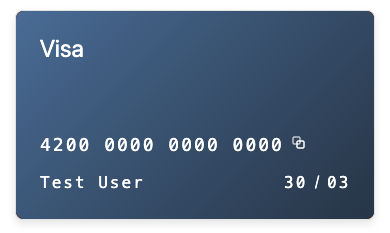
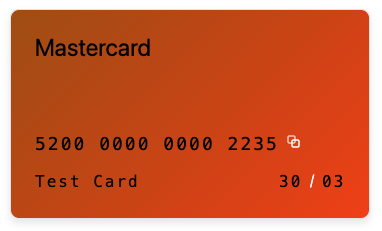
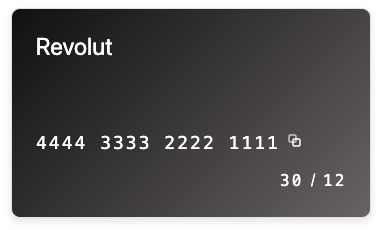
Use case where the styling of the elements and how card information is shown are based on the BIN (ie. Visa, Mastercard, etc)
Get the card BIN type
Checking the card number
type CardType = "Visa" | "Mastercard" | "Unknown";

function getBinType(cardNumber: string): CardType {
  const cleanedUpCardNumber = cardNumber.replace(/\s|-/g, "");

  // Visa: starts with 4
  if (/^4\d{12,18}$/.test(cleanedUpCardNumber)) {
    return "Visa";
  }

  // Mastercard: starts with 51–55 or 2221–2720
  if (
    /^(5[1-5]\d{14}|2221\d{12}|222[2-9]\d{12}|22[3-9]\d{13}|2[3-6]\d{14}|27[01]\d{13}|2720\d{12})$/.test(cleanedUpCardNumber)
  ) {
    return "Mastercard";
  }

  return "Unknown";
}

// Examples
getBinType("4111 1111 1111 1111"); // "Visa"
getBinType("5555 5555 5555 4444"); // "Mastercard"
Use Payrails' API
You can also use https://docs.payrails.com/reference/getbinlookup to fetch a more complete bin details for cards that are used.
const binNumber = cardNumber.slice(0, 6);
const response = await fetch('https://api.staging.payrails.io/payment/binLookup/' + binNumber);
const binData = await response.json();

console.log('Bin Lookup Example:', binData);

// Bin Lookup Example:
// {
//   "bin": "416598",
//   "network": "visa",
//   "localNetwork": "bancontact",
//   "issuer": "Revolut",
//   "issuerCountry": {
//     "code": "LT",
//     "name": "Lithuania",
//     "iso3": "LTU"
//   },
//   "segment": "infinite",
//   "type": "debit",
//   "typeDetail": "personal"
// }You can also get the bin number from the instrument details API https://docs.payrails.com/reference/getinstrument
const instrument = await fetch('https://api.staging.payrails.io/payment/instruments/{instrumentId}');
const instrumentObj = await instrument.json();

console.log(instrumentObj.data.bin);

// Example output: "411111"
Styling Elements
Once we've gathered the card BIN type from the steps above, you can initialize the Display SDK based on the value:
For more information on how to initialize Display SDK: https://docs.payrails.com/docs/display-sdk#usage
Note: you can also design how you show card details based on the other BIN information (ie. bank issuer)
// fetch client init response from backend
const clientInitResponse = {/* ... */};

const options: DisplaySDKOptions = {
  styles: {},
  translations: {},
}

let cardContainerClassName = "card";

// Visa design
if (binData.network === "Visa") {
  cardContainerClassName += " visa-style";
  options.styles.base = {
    color: "white",
  }

// Mastercard design
} else if (binData.network === "Mastercard") {
  cardContainerClassName += " mastercard-style";
  options.styles.base = {
    color: "black",
  }

// Revolut design
} else if (binData.issuer === "Revolut") {
  cardContainerClassName += " revolut-style";
  options.styles.base = {
    color: "white",
  }
}


const displaySDK = DisplaySDK.init(clientInitResponse, options);

displaySDK.createElement(DisplayElementType.CardNumber).mount('#card-number-container');
// all the other elements you wish to initialize here

return (
  <div className={cardContainerClassName}>
    <div id="card-number-container"></div>
    <!-- all the other elements' container here -->
  </div>
);
Updated 8 months ago
Did this page help you?