
Self-served migration of card data from PSPs
Migrate your card from PSPs to Payrails at any point in time using autonomous self-serve approach.
Several PSPs have possibility of "forwarding request" with payment data. In this guide we will cover Stripe, Adyen and Checkout use case, but similar approach can be used with any other PSP if they support "forwarding requests". This guide explains how to migrate certain card from your PSP to Payrails in automated way.
Before start
Across this guide we will often use words Instrument, vault token, alias, record. We recommend to get familiar with these concepts by reading Payment Instruments and Tokens and Records, Aliases and Instrument pages.
In short, details of single card is stored in our vault as Record. Record consists of several fields like card number, cardholder name, expiry month - each of these fields has alias that can be used in configurable proxy requests. Vault records can be "attached" to instruments as Token.
High level overview
Process of migrating card data consists of following steps which should be executed for each card that you want to migrate to Payrails.
- Merchant send request to PSP's special "forwarding" API endpoint.
- Merchant's PSP forwards that request to Payrails with raw card details inside of the body.
- Payrails tokenize card in our Token Vault and returns alias/token information.
- This response is returned to merchant.
- Merchant updates or creates instrument in Payrails using data returned on previous step.
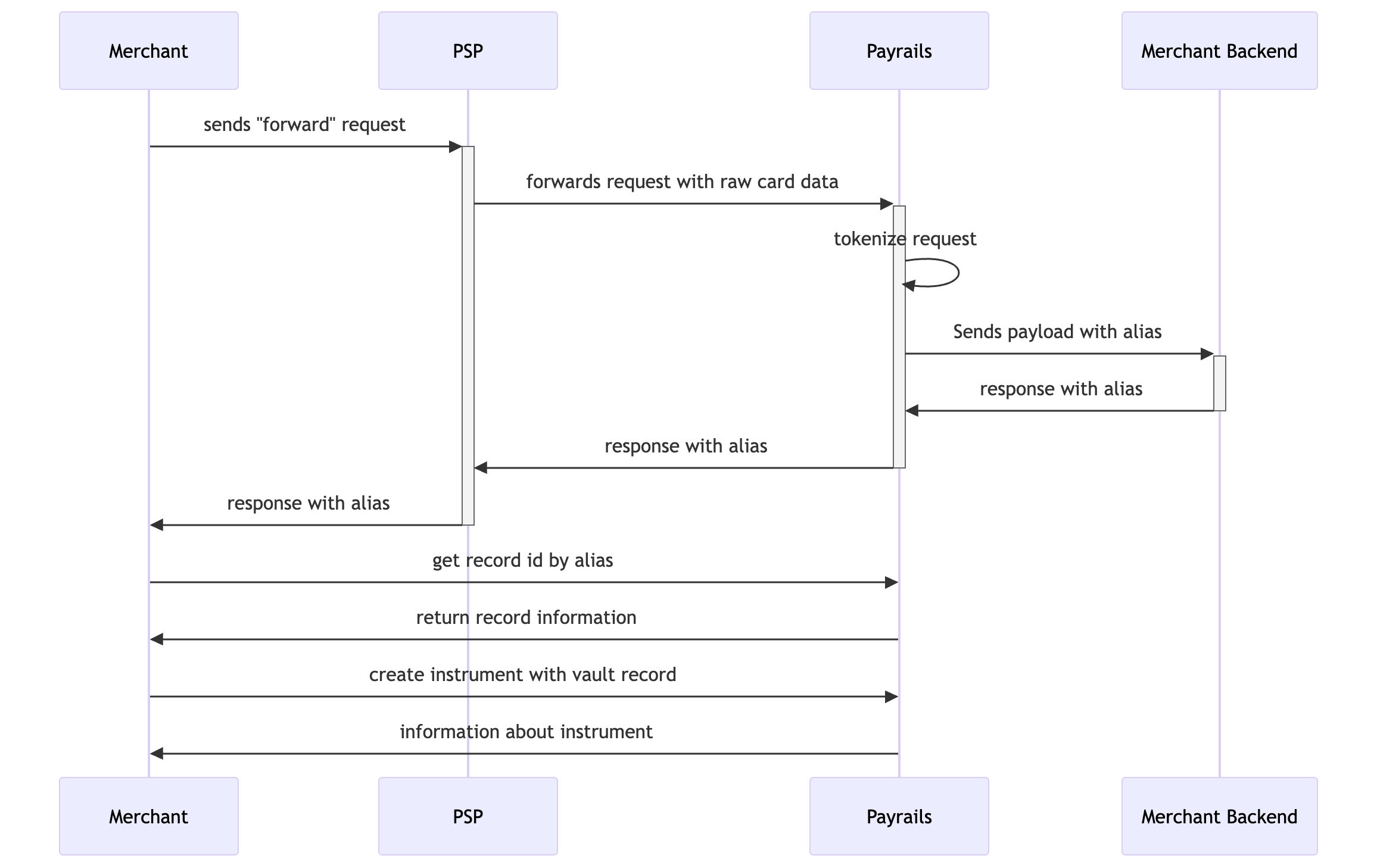
What is "forwarding request"?
This is a request you execute to Stripe/Adyen API and which securely forwards (hence the name of it) detokenized card data to Payrails. By calling this "forwarding" endpoints you can send card data to Payrails without need to execute
For each PSP implementation details and how exactly these calls are executed is different, but concept is the same.
Using same approach for "account updater" use case
Approach described in this guide can be used as well for other cases when you want to transfer new or updated card details to Payrails, for example when certain card is part of Account Updater in your PSP. In this case when you receive notification or webhook that certain card details were updated you can "forward" updated card details to Payrails.
One-time setup steps
Step 1 - Enable capability on PSP side. Endpoints "Forward stored credentials" in Checkout, or "Forward payment details" in Adyen, or "Forwarding Requests" in Stripe, or "Forward API" in Braintree are not active by default and in order to use it merchant needs to provide proof that destination (Payrails) is PCI compliant party. Please reach out to our customer support team to get necessary documents that proves it.
Step 2 - Enable and configure inbound connections in Payrails. In order to receive requests from 3rd parties (which in this case are Adyen or Checkout) merchant needs to configure inbound proxy connection.
Step 3 - Get vault provider ID and config ID. Payrails is a modular platform and there is a support of multiple vaults, therefore in order to "attach" new token to an instrument, you will need to provide information about which vault this token belongs to. You can call API endpoint GET /payment/instruments/:instrumentId?includeTokens=true for any instrument you have and get this data from response:
{
    "id": "16046230-7f07-4f86-946c-5eace4e78f63",
    ...
    "tokens": [
        {
            ...
            "type": "vault",
            "providerId": "19bb4e38-8f0b-489d-8b3e-9da550e7191b", // <!-- you will use this during next steps
            "providerConfigId": "0077318a-5dd2-47fb-b709-e475d2172d32", // <!-- you will use this during next steps
            ...
        }
    ]
}
Both providerId and providerConfigId are never changed.
Step 4 - Create "echo" endpoint in your backend. Payrails will tokenize data received from PSPs and forward it to your backend. Typically you can create simple "echo" endpoint which will return back information it received. If in your use case you want to return more information or maybe do some manipulation with data before returning - you can also do it.
Executing migration
Step 1 - send API request to PSP. Now merchant can send request to API endpoint of Stripe or API endpoint of Checkout which will be forwarded to inbound connection you configured before.
On example of Adyen here is request merchant will send to Adyen's API:
{
  "merchantAccount": "YOUR_MERCHANT_ACCOUNT",
  "shopperReference": "YOUR_SHOPPER_REFERENCE",
  "storedPaymentMethodId": "M5N7TQ4TG5PFWR50", // <-- this is id of card or payment method you want to migrate
  "baseUrl": "https://yourcompany.proxy.vault.payrails.io/",
  "request": {
    "httpMethod": "post",
    "urlSuffix": "/tokenize-from-adyen", // <-- path of inbound you configured in Payrails
    "credentials": "YOUR_CREDENTIALS_FOR_THE_THIRD_PARTY",
    "headers": {
      "Authorization": "Basic {{credentials}}"
    },
    "body": "{\"paymentMethod\":{\"creditCard\":{\"holderName\":\"{{holderName}}\",\"number\":\"{{number}}\",\"expiryMonth\":\"{{expiryMonth}}\",\"expiryYear\":\"{{expiryYear}}\"}}}"
  }
}
Then Adyen replaces placeholders like {{number}} with real data and forwards request to URL you provided. It means there will be call executed to URL https://yourcompany.proxy.vault.payrails.io/tokenize-from-adyen with following body:
{
  "paymentMethod": {
    "creditCard": {
      "holderName": "Alice Doe",
      "number": "4242424242424242",
      "expiryMonth": "09",
      "expiryYear": "2029"
    }
  }
}
This payload is tokenized in following way:
{
  "paymentMethod": {
    "creditCard": {
      "holderName": "Alice Doe",
      "number": "5062d8a5-46cc-42fd-954b-5c469c4664d8",
      "expiryMonth": "09",
      "expiryYear": "2029"
    }
  }
}
where 5062d8a5-46cc-42fd-954b-5c469c4664d8 is alias of card number.
This tokenized payload is forwarded to your backend (to "echo" endpoint) and it returned all the way back.
To summarize, you execute request with body as in code block "Request to Adyen" and as result of this call you get response as per code block "Tokenized payload".
Step 2 - get Payrails Vault Record ID. As result of operation on previous step you got alias of card number. Using call to Payrails API endpoint "Get field details by alias" you can get information about record this alias belongs to. Let's say c2e1632d-ac6b-4f83-a89e-253d33a356b6is record ID you got as result.
Step 3 - using Vault Record ID update or create instrument. Next you can call "Create Instrument" endpoint with payload like:
{
  "paymentMethod": "card",
  "holderReference": "some holder reference",
  "token": {
    "providerId": "id of vault provider",
    "providerConfigId": "id of vault provider config",
    "reference": "c2e1632d-ac6b-4f83-a89e-253d33a356b6" // <-- record ID you got from previous step
  }
}
As result of it you get data about new instrument:
{
  "id": "b8fe6271-5d71-4d28-b8e8-89e64acc0c49",
  "holderId": "788c7c09-a490-4603-915a-e2a957a6cca1",
  "createdAt": "2022-04-22T17:53:36.814Z",
  "updatedAt": "2022-04-22T17:53:36.814Z",
  "paymentMethod": "card",
  "displayName": "Visa **** 4242",
  "fingerprint": "739abff0-406a-4d32-8cfb-701e12be5848",
  "status": "created",
  "futureUsage": "CardOnFile",
  "data": {
    "network": "visa",
    "bin": "424242",
    "suffix": "4242",
    "expiryMonth": "09",
    "expiryYear": "2029",
    "holderName": "Alice Doe"
  }
}
You can use this instrument with any other PSP of your choice - card data is secured in Payrails Vault in PSP-agnostic way. You may also want to delete previous instrument as it contains now outdated card data.
If instead of creation new instrument you would like to update it, you can use endpoint "Create Instrument Token" with following payload:
{
  "type": "vault",
  "providerId": "id of vault provider",
  "providerConfigId": "id of vault provider config",
  "reference": "c2e1632d-ac6b-4f83-a89e-253d33a356b6" // <-- record ID you got from previous step
}
Result of that call would be deletion of existing token and creation of a new one:
{
  "id": "5671c2cc-32c4-437d-a830-c449db87c542",
  "createdAt": "2026-02-25T17:53:36.814Z",
  "updatedAt": "2026-02-25T17:53:36.814Z",
  "instrumentId": "b8fe6271-5d71-4d28-b8e8-89e64acc0c49",
  "status": "created",
  "type": "vault",
  "providerId": "id of vault provider",
  "providerConfigId": "id of vault provider config",
  "reference": "93d1ec67-e786-4930-87c9-1190f4548f79",
}
Difference between replacing token in instrument and creating new instrument
When you update instrument and add new vault token to it, meta data stored in instrument is not updated with new values. For example, if new card has updated expiration date these values will not be updated to new values.
Below you can see example of response for "get instrument" call where certain fields are marked that won't be receive new values when new vault token is added to instrument.
{
    "id": "16046230-7f07-4f86-946c-5eace4e78f63",
    "createdAt": "2026-02-26T07:42:46.399026Z",
    "updatedAt": "2026-02-26T07:42:47.778324Z",
    "holderId": "57c2fb02-4377-4c43-9d66-c74c20e6a903",
    "holderReference": "bc85522c-b845-44bc-9805-b2f6397d2e45",
    "paymentMethod": "card",
    "status": "created",
    "displayName": "Visa **** 0000", // <-- not udpated
    "data": {
        "bin": "49176100", // <-- not updated
        "binLookup": { // <-- not updated
            "bin": "49176100",
            "network": "visa",
            "issuer": "BANK POLSKA KASA OPIEKI S.A. (BANK PEKAO SA)",
            "issuerCountry": {
                "code": "PL",
                "name": "Poland",
                "iso3": "POL"
            },
            "segment": "business",
            "type": "CREDIT",
            "typeDetails": "commercial"
        },
        "network": "visa",
        "networkDisplayName": "Visa",
        "suffix": "0000", // <-- not updated
        "expiryMonth": "03", // <-- not updated
        "expiryYear": "2030" // <-- not updated
    },
    "tokens": [...],
    "fingerprint": "84d4e4be-e4e7-4574-851a-d7f8f91f521e", // <-- not updated
    ...
}
Reason for that is some PSPs require information about original card, as well you might want to display or use information about original card in some way.
If you need to have "fresh" data everywhere, instead of updating token in existing instrument, you can create a new one. Minimal call presented below:
{
    "holderReference": "Test Customer 9132",
    "storeInstrument": true,
    "paymentMethod": "card",
    "description": "personal card",
    "merchantReference": "ref_C47C47",
    "futureUsage": "CardOnFile",
    "data": {},
    "token": {
        "providerId": "id of vault provider",
        "providerConfigId": "id of vault provider config",
        "reference": "c2e1632d-ac6b-4f83-a89e-253d33a356b6" // <-- vault record id you got on previous step
    },
    "meta": {}
}
Self-serve migration from other PSPs or vaults to Payrails
More PSPs and vaults are adding "forwarding" functionality and it can be that PSP you want to migrate from already has such capabilities but is not listed in this guide. Our team will be glad to check whether such approach applicable for given PSP.
Several providers providing "forwarding" functionality but it needs to be configured and there are no predefined endpoint you can call. Usually it is quite easy to do and process is generally the same: you need to confirm that destination of migration has proper level of PCI compliance and configure forwarding rule.
Among providers who support such functionality we can name PCI Proxy, VGS, BasisTheory.
Why this process has so many steps
Most of the steps described in this guide are one-time steps that you need to do once to enable this process and migration of single card then will be quite simple procedure. Please note that both PSP or vault you are migrating from and we in Payrails need to perform these steps in order to maintain compliance with PCI DSS and make sure that card data are not exposed to merchants in order to keep PCI scope as low as possible while at the same time ensure that process is secure.
Updated 5 months ago