
Create a payment link
Create a link from your backend, or from the Portal without writing code.
The API surface
Four endpoints, all under /merchant/dropInLinks.
| Action | Method and path | Scope |
|---|---|---|
| Create a link | POST /merchant/dropInLinks | — |
| List links | GET /merchant/dropInLinks | dropinlinks:list |
| Get one link | GET /merchant/dropInLinks/:dropInLinkId | dropinlinks:read |
| Delete a link | DELETE /merchant/dropInLinks/:dropInLinkId | dropinlinks:delete |
There is no update endpoint. Links cannot be edited after creation — to change any field, delete the link and create a new one.
Create a link
POST /merchant/dropInLinks
x-idempotency-key: 8f14e45f-ceea-467a-9a1b-2c3d4e5f6a7b

{
  "workspaceId": "d5454c2f-ae5e-44f3-8edf-f6dad64f005f",
  "amount": {
    "value": "100.00",
    "currency": "EUR"
  },
  "expiresAt": "2026-12-31T23:59:59Z",
  "workflowCode": "payment-acceptance",
  "allowPartialFulfillment": false,
  "description": "Invoice 2026-0001",
  "merchantReference": "INV-2026-0001"
}
Request fields
| Field | Required | Description |
|---|---|---|
workspaceId | Yes | UUID of the Payrails workspace the link belongs to (The workspace ID can be found in the portal under Settings → Workspaces) |
amount | Yes | Object with value as a decimal string of the major currency unit, and currency as an ISO 3-letter code |
expiresAt | Yes | ISO 8601 timestamp with timezone. After this time the link is no longer valid |
workflowCode | No | Workflow used for executions created from the link. Defaults to payment-acceptance |
allowPartialFulfillment | No | Whether the link can be paid across multiple partial payments. Defaults to false. See Payment modes |
description | No | Human-readable description displayed on the payment page |
merchantReference | No | Your reconciliation reference, commonly an invoice or order number |
meta | No | Execution context metadata. Payrails defines structures for common fields and you can extend them |
descriptionis displayed on the payment page, so anyone with the link can read it. Never put personal data, account numbers, or internal identifiers there. UsemerchantReferencefor internal identifiers.
Response codes
| Code | Meaning |
|---|---|
201 | Created |
400 | Bad request |
401 | Unauthorized |
403 | Insufficient scope |
404 | Not found |
422 | Unprocessable entity |
The link object
Every endpoint returns the same shape.
| Field | Always present | Description |
|---|---|---|
id | Yes | UUID of the link |
workspaceId | Yes | UUID of the workspace |
dropInLinkUrl | Yes | The public URL to share with your payer |
status | Yes | enabled, closed, expired, or deleted |
amount | Yes | Total configured for the link |
paidAmount | Yes | Total paid so far |
allowPartialFulfillment | Yes | Whether partial payments are allowed |
workflowCode | Yes | Workflow used for executions from this link |
expiresAt | Yes | Expiry timestamp |
createdAt | Yes | Creation timestamp |
executionId | No | Workflow execution ID, present once one has been created |
description | No | The description shown on the page |
merchantReference | No | Your reconciliation reference |
meta | No | Execution context metadata |
The API returns
amountandpaidAmount, but no remaining balance. See Payment modes for how to calculate it.
Store dropInLinkUrl and merchantReference on your side. You will need both to reconcile.
Verify end to end in test
Run the full loop once before going live.
- Create the link using the request above against your test credentials (See how to set up your Payrails account and environment here).
- Open the returned
dropInLinkUrlin a browser and confirm the amount, the description, and your branding all render correctly - Submit a test payment. This creates the execution on first use. The payment is linked to that execution, and after a successful single payment, the link
statuschanges toclosed. - Confirm the webhook arrived. Check that the event reached your endpoint, that
merchantReferencematches, and that your system updated only after processing it.
If the webhook does not arrive, stop and fix the issue before going live. A link can look fine to your customer even when your records are not being updated.
List links
GET /merchant/dropInLinksReturns a paginated list. Useful for reconciliation sweeps and for building your own internal views.
Filters
| Parameter | Notes |
|---|---|
filter[status] | enabled, closed, expired, or deleted |
filter[merchantReference] | Exact match on your reference |
filter[executionId] | UUID of a workflow execution |
filter[createdAt] | Supports range syntax, for example [2026-01-01T00:00:00Z,2026-02-01T00:00:00Z) |
filter[updatedAt] | Same range syntax as createdAt |
Pagination
Cursor-based, using page[after], page[before], and page[size]. The response includes a links object with self, prev, next, first, and last, and a results array of link objects.
Follow links.next rather than incrementing offsets.
Get one link
GET /merchant/dropInLinks/:dropInLinkIdReturns the current state of a single link. Read-only.
Use it to check status and paid amount, or to recover after a missed webhook. Do not poll it as your primary state mechanism.
Delete a link
DELETE /merchant/dropInLinks/:dropInLinkIdMarks the link as deleted and returns the updated link object with status set to deleted.
This is a soft delete. The record remains readable, payments already completed are unaffected, and no new payment can be started. It cannot be undone.
Create in the Portal
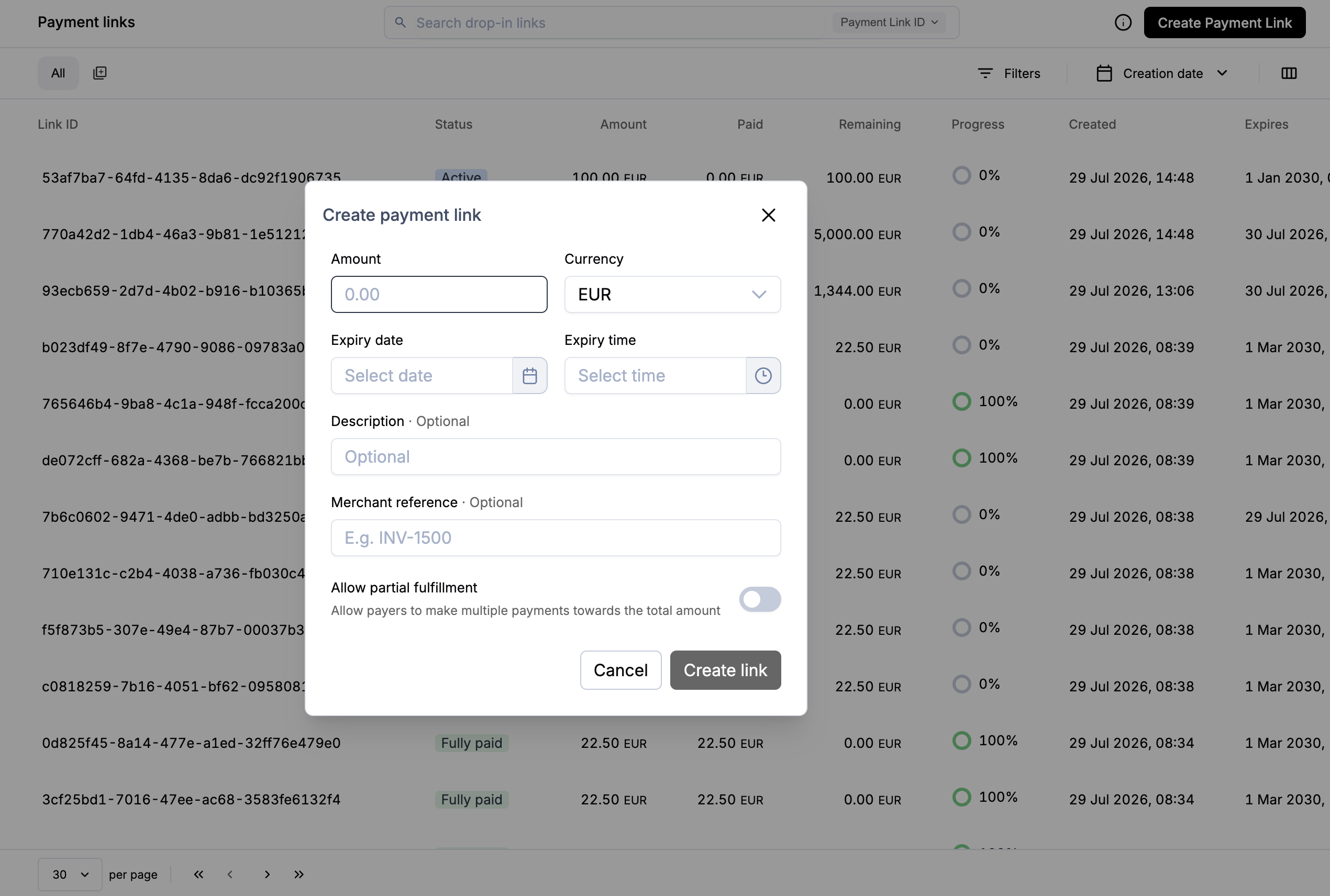
- In the Portal, go to Operations → Payment Links
- Select Create test payment link
- Copy or open the generated URL
The Portal action uses predefined values. For control over metadata and payment mode, use the API.
Next steps
- Payment modes — single versus partial payments
- Share the link
- Full request and response schemas: API reference
Updated about 1 month ago