
Share the link
How to distribute a link, and what your customer sees when they open it.
Sharing the link
The link is a standard HTTPS URL, returned as dropInLinkUrl. Share it through whichever channel fits the interaction:
- SMS or WhatsApp
- Live chat or a support tool
- Attached to or embedded in an invoice
- Sent by an agent during a call
Your customer needs no account, no app, and no login. The link opens in any modern browser on desktop or mobile.
Customer communications are yours to send
Payrails does not email or message your customers about Payment Links. You are responsible for:
- Sending the link itself
- Payment confirmations and receipts
- Reminders and follow-ups on unpaid or partially paid links
- Telling the customer about refunds or reversals
Drive all of these from webhook events. See Track and reconcile.
What the payer sees
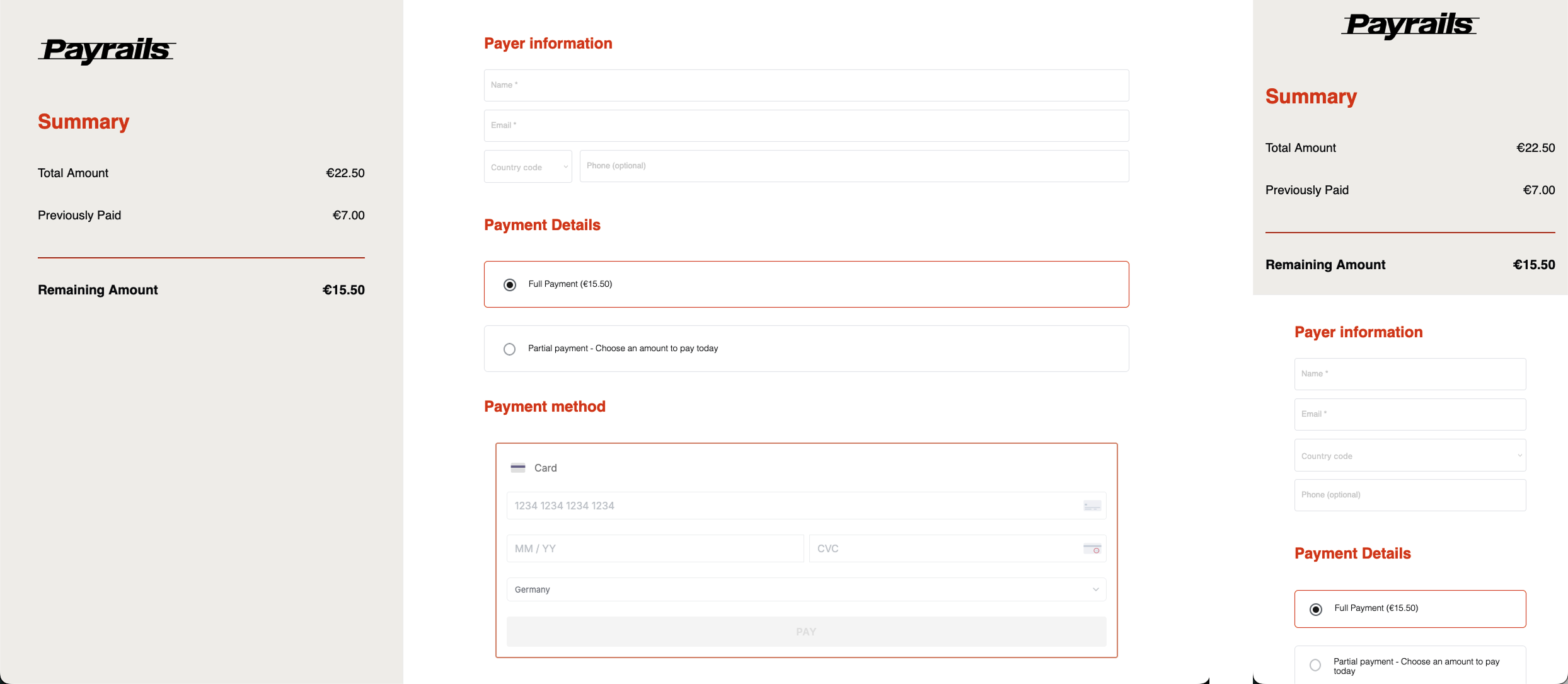
Note: The example above uses the Payrails branding (the logo and colors are configurable for your brand).
- Payrails validates that the link is
enabledand not expired - The page loads your branding, the
descriptionyou set, and the amount due - The payer enters their details, if payer information collection is enabled
- The payer submits payment, and 3-D Secure runs if required
- A confirmation or failure screen is shown
The payer interacts only with the Payrails-hosted page. There is no direct connection between your customer and your backend, which is what keeps card data out of your systems.
The confirmation screen is for the payer, not for your systems. Confirm the outcome from the webhook instead.
Information collected from the payer
Whether the page asks for payer details at all depends on your configuration.
- If payer information collection is enabled, the page collects name, email address, and phone number before payment.
- If it is disabled, none of those are collected and the payer goes straight to paying.
| Field | Collected | Notes |
|---|---|---|
| Name | Only if payer information collection is enabled | Format validated |
| Email address | Only if payer information collection is enabled | Format validated |
| Phone number | Only if payer information collection is enabled | Format validated |
| Payment amount | Partial payments mode only | Must not exceed the outstanding balance |
| Payment details | Always | Depends on the payment methods enabled in your workflow |
Where payer information is collected, it is included in webhook payloads so you can reconcile and follow up. If collection is disabled, do not build reconciliation or customer contact logic that depends on those fields being present.
Payer information collection is set as part of your configuration. See Overview for what to agree at onboarding.
Branding
The hosted page applies your logo, colors, and font, configured by Payrails during onboarding. See Overview for what to supply.
Merchant-configurable branding and theming are not yet released. Until it ships, all brand changes go through your Payrails contact.
Payment methods
The payer sees the payment methods enabled in the workflow behind the link, set by workflowCode. 3-D Secure and capture behaviour follow that same workflow configuration.
Apple Pay and Google Pay are available on the hosted payment page.
Closed, expired, and deleted links
| Link status | What the payer sees |
|---|---|
expired | An expiry message. Payment cannot start |
closed | A paid message. Payment cannot start |
deleted | An unavailable message. Payment cannot start |
If payment is still required, create a new link and share it.
Language
The hosted page is available in English. Localization and right-to-left support are not currently available.
Next steps
- Track and reconcile — webhooks, monitoring, limits, and errors
Updated about 1 month ago